概述
参数研究是一种调整模拟的有效且可靠的方法。其目标可能多种多样:找到重量最小、能同时保证安全并节约资源的最佳结构,调整网格密度以获得可靠的模拟结果,或改变材料属性以检验模拟的敏感性,并能够就结构安全性做出可靠的判断。对于这些情况以及许多其他应用,参数化建模非常适用。为了无需手动计算所有变体,可以使用 Dlubal 应用程序编程接口。通过它可以在无人值守的情况下自动完成参数研究的计算。
参数化建模
RFEM 6、RSTAB 9 和 RSECTION 中的许多功能已经可以参数化。更多信息可在相关手册中找到:
- Online-Handbücher RFEM 6 | 产品功能 | 参数化输入
- Online 帮助 RSTAB 9 | 产品功能 | 参数化输入
- Online-Handbücher RSECTION 1 | 产品功能 | 参数化输入
通过应用程序编程接口访问模型
为了能够通过应用程序编程接口访问模型,必须安装相关的软件包。您也可以直接在主程序中使用控制台或脚本管理器,而不是外部编辑器。更多信息可通过以下链接获取。
示例 1:壁厚优化
该模型由一个简单的箱体和一个装配的锥形圆柱体组成。两个部分均由钢板制成,但壁厚不同。这些壁厚已被参数化,以进行参数研究。目标是在重量最小的前提下,找到一种配置,使其冯·米塞斯等效应力不超过屈服强度。荷载包括自重以及在一个活荷载工况中,作用于圆锥顶部刚性面上的分量式集中荷载。支撑为位于箱体底部两条线上的铰接支撑。模型和带有参数化的用户界面视图如下所示。
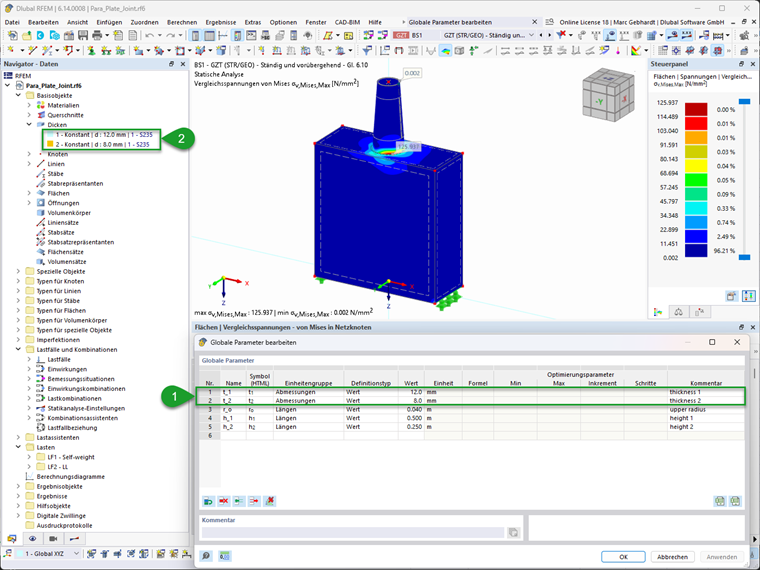
下面的脚本分为几个部分。第一部分导入所使用的库,然后是变量的定义。这里指定了用于可视化目的的屈服强度以及要改变的参数的跨度,这些参数与板厚相关联。接着定义了功能,这些功能将在后续流程中用于构建设计变体矩阵以及更改 RFEM 6 中的全局参数。 主程序部分从构建全局参数的设计变体矩阵开始。为此,通过笛卡尔积从定义的参数变化中生成所有可能的变体。随后,这些变体将根据条件进一步限制,即下部区域的壁厚必须大于或等于上部结构的壁厚。 然后通过 Dlubal 应用程序编程接口建立与 RFEM 6 的连接。在本例中,是使用配置文件中存储的应用程序编程接口密钥连接到活动模型。这两项设置也可以在函数调用中指定。 现在进入一个循环,在其中依次根据当前的变体调整 RFEM 6 中的全局参数,执行计算并读取结果。为了强制调整模型并删除结果,在计算前会删除网格并重新生成。所有面的最大冯·米塞斯等效应力从第一个设计状况的结果中确定。结构的总自重从自重荷载工况中的 Z 方向合力得出。通过除以重力加速度,从该合力计算出重量。 在最后两个部分,结果被保存为 Excel 表格,并绘制成应力与结构重量的关系图。
"""ParaS-VMStress_Thick-min.py

Related RFEM 6 model: "Para_Plate_Joint.rf6"
Model: https://www.dlubal.com/en/downloads-and-information/examples-and-tutorials/models-to-download/006159

Run a parameter study via the Dlubal RFEM API, collect result metrics, export and plot results.
and chart.

Sections:
- Imports
- Configuration
- Functions
- Main execution
- Plotting
"""
# --------------------- Imports ---------------------
import itertools
import numpy as np
import pandas as pd
import matplotlib.pyplot as plt
from dlubal.api import rfem


# --------------------- Configuration ---------------------
parameter_ranges = {
    't_1': {'min': 8, 'max': 12, 'step': 2},
    't_2': {'min': 4, 'max': 8, 'step': 2},
} # thicknesses in mm
f_y = 235  # yield strength in MPa

# --------------------- Functions ---------------------
def build_parameter_grid(param_ranges):
    """Build a complete mutation dataset from min/max/step values in mm."""
    columns = []
    value_lists = []
    for name, bounds in param_ranges.items():
        min_val = bounds['min']
        max_val = bounds['max']
        step = bounds['step']
        if step <= 0:
            raise ValueError(f"Step width for '{name}' must be positive.")
        if max_val < min_val:
            raise ValueError(f"Max value for '{name}' must be >= min value.")
        values = np.arange(min_val, max_val + step * 0.5, step)
        columns.append(name)
        value_lists.append(values)
    combinations = list(itertools.product(*value_lists))
    return pd.DataFrame(combinations, columns=columns)

def set_glpa(dl_app, p_name, p_value,):
    """Sets the global parameter p_name to the specified value p_value"""
    params = dl_app.get_object_list([rfem.global_parameters.GlobalParameter()])
    for p in params:
        if p.name == p_name:
            p.value = p_value
            dl_app.update_object(p)
            check=True
            return True
    if not check:
        raise ValueError(f"  Error: Parameter '{p_name}' not found!")

# --------------------- Main execution ---------------------
# Build parameter set
para_dfo = build_parameter_grid(parameter_ranges)
para_dfo = para_dfo[para_dfo['t_1'] >= para_dfo['t_2']]
para_df = para_dfo / 1000  # mm -> m
print(f"Parameter set:\n {para_dfo}")

# Connect to RFEM with current model and run parameter study
with rfem.Application() as rf_app:
    # Check connection and print model info
    app_info = rf_app.get_application_info()
    print("Application Info:", app_info)
    res_paras=pd.DataFrame(columns=['sigvm','sfz'])
    for i in para_df.index:
            # set global parameters
            print(f"Set mutation {i} with parameters {[x for x in para_df.loc[i]]}")
            for p in para_df.columns:
                # print(f"Set mutation {i} with parameter {p} to {para_df.loc[i, p]}")
                if not set_glpa(rf_app, p, para_df.loc[i, p]):
                    break
            # Remesh
            rf_app.delete_mesh()
            rf_app.generate_mesh(skip_warnings=True)
            # Run calculation
            calculation = rf_app.calculate_all(skip_warnings=True)
            # Results
            if calculation.succeeded:
                # Von Mises stresses
                res_sigvm = rf_app.get_results(
                    results_type=rfem.results.STATIC_ANALYSIS_SURFACES_EQUIVALENT_STRESSES_MISES_MESH_NODES,
                    filters=[
                        rfem.results.ResultsFilter(column_id='loading', filter_expression='DS1'),
                        ]
                    ).data
                sigvm = res_sigvm['sigma_eqv_mises'].max()/10**6 # N/m^2 -> MPa
                # self-weight
                sfz = rf_app.get_result_table(
                    table=rfem.results.ResultTable.STATIC_ANALYSIS_SUMMARY_TABLE,
                    loading=rfem.ObjectId(no=1,object_type=rfem.OBJECT_TYPE_LOAD_CASE)
                ).data
                sfz = float(sfz.loc[6].value)  / 10 # N -> kg (g=10 m/s^2 for gravity acceleration)

                res_paras.loc[i] = pd.Series({'sigvm':sigvm,'sfz':sfz})
            else:
                print(f"Calculation failed for mutation {i} with parameters {[x for x in para_df.loc[i]]}")
                res_paras.loc[i] = pd.Series({'sigvm':np.nan,'sfz':np.nan})

# Merge parameters and results for export and plotting
para_out = pd.concat([para_dfo,res_paras], axis=1)

# ---------------------- Export Results ---------------------
para_out.to_excel('./ParaS-VMStress_Thick-min_results.xlsx')

# --------------------- Plotting ---------------------
fig, ax = plt.subplots(figsize=(12, 9))
ax.scatter(para_out['sfz'], para_out['sigvm'], color='tab:blue', s=50, label='Mutations')
y_offset = (para_out['sigvm'].max() - para_out['sigvm'].min()) * 0.03
for x, y, mut, t1, t2 in zip(para_out['sfz'], para_out['sigvm'], para_out.index, para_out['t_1'], para_out['t_2']):
    ax.text(x , y+y_offset, f"M{int(mut)}, {t1:.0f}, {t2:.0f} mm", fontsize=8, va='top', ha='center')
ax.axhline(y=f_y, color='red', linestyle='--', linewidth=1, label=f'Yield Strength ({f_y} MPa)')
ax.set_title('Stress vs. Mass for Parameter Mutations')
ax.set_xlabel('Mass [kg]')
ax.set_ylabel('Von Mises Stress [MPa]')
ax.legend()
fig.tight_layout()
fig.savefig('./ParaS-VMStress_Thick-min_results.png', dpi=200)
plt.show()
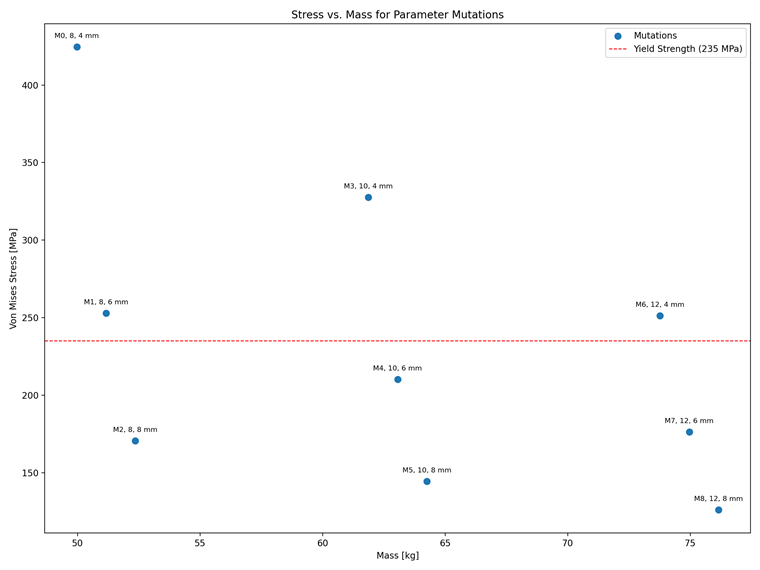
这个简单参数研究的结果表明,与壁厚为 12 毫米和 8 毫米的初始配置相比,采用 8 毫米的壁厚,可以在不超过允许屈服强度的情况下节省约 30% 的材料。结果可以在下图中查看。
示例 2:网格收敛研究
此示例已在关于网格收敛研究的专业文章中采用。这是一个进行线性屈曲分析的圆柱壳。包含更详细描述的专业文章链接和相关模型如下所示:
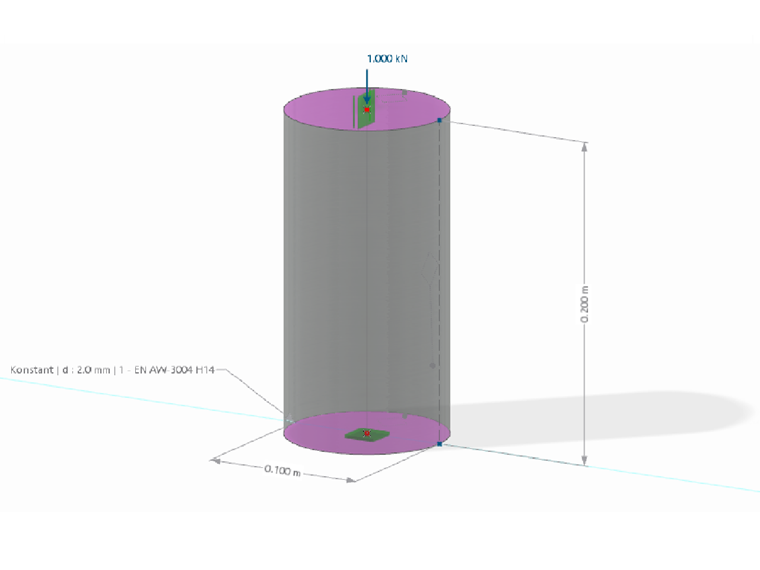
网格收敛研究的目标是调整网格密度,在结果不再发生显著变化的同时,避免单元数量过多,从而保证工作经济可行。为此,在现有模型中引入了一个全局参数 (lfe)。然后,它将作为网格尺寸传递给面网格细化。
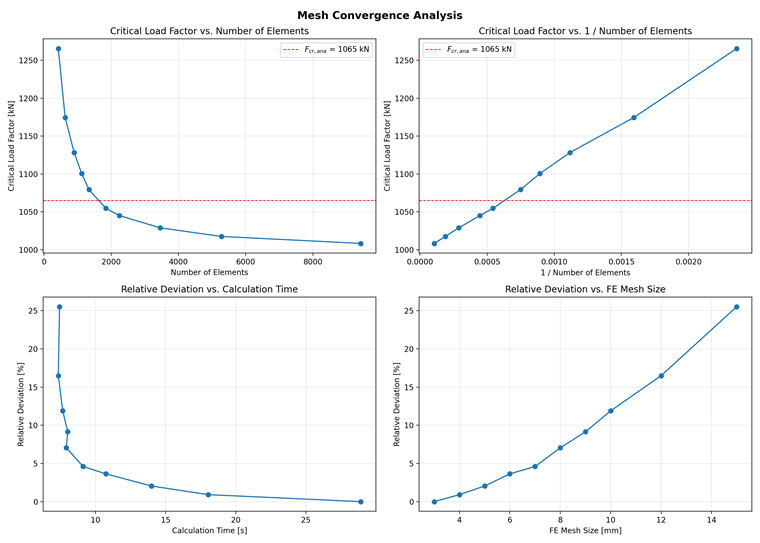
在下面的脚本中,通过逐步改变目标有限元网格尺寸来进行网格收敛研究。其基本结构与第一个示例相同,因此这里仅说明不同之处。 为了分析网格密度对计算时间的影响,计算时间从计算调用过程中的进程时间确定。临界荷载系数从第一个荷载工况的稳定性分析中确定。接着,确定临界荷载系数相对于上一步的变化,以便在变化幅度较大时强制中止计算。在结果输出之前进行了收敛分析,评估结果的相对变化。
"""ParaS-LBA_MeshConvergence-min.py

Related RFEM 6 model: "MeshSensitivity-LBA_AlC.rf6"
Model: https://www.dlubal.com/en/downloads-and-information/examples-and-tutorials/models-to-download/006080

Run a mesh convergence study in RFEM by sweeping the global parameter
`l_fe`, collect critical load factor, compare variants, save and plot results.

Sections:
- Imports
- Configuration
- Main execution
- Plotting
"""

# --------------------- Imports ---------------------
# Standard library
import time

# Third-party
import numpy as np
import pandas as pd
import matplotlib.pyplot as plt
from dlubal.api import rfem

# ------------------- Configuration -------------------
FE_SIZES_MM = [15, 12, 10, 9, 8, 7, 6, 5, 4, 3] # List of finite element sizes to sweep in millimetres
PARAM_NAME = "l_fe"                             # Name of the global parameter in the model
CONVERGENCE_THRESHOLD_PCT = 1.0                 # Convergence threshold in percentage
FCR_ANA = 1065                                  # Analytical critical load factor (for reference in the plot)

# ------------------- Functions -------------------
def set_glpa(dl_app, p_name, p_value,):
    """Sets the global parameter p_name to the specified value p_value"""
    params = dl_app.get_object_list([rfem.global_parameters.GlobalParameter()])
    for p in params:
        if p.name == p_name:
            p.value = p_value
            dl_app.update_object(p)
            check=True
            return True
    if not check:
        raise ValueError(f"  Error: Parameter '{p_name}' not found!")

# ------------------- Main execution -------------------
with rfem.Application() as rf_app:
    # Check connection and print model info
    app_info = rf_app.get_application_info()
    print("Application Info:", app_info)

    results = pd.DataFrame(columns=['l_fe_mm', 'n_elements', 'c_time_s', 'f_cr', 'delta_pct'])
    f_prev = None
    i = 0
    for l_fe in FE_SIZES_MM:
        i += 1
        l_fe_m = l_fe / 1000.0  # Convert mm to m for use in RFEM
        if not set_glpa(dl_app=rf_app, p_name=PARAM_NAME, p_value=l_fe_m):
            break
        # Remesh
        rf_app.delete_mesh()
        rf_app.generate_mesh(skip_warnings=True)
        n_elem = rf_app.get_mesh_statistics().surface_2D_finite_elements
        # Run calculation
        t0 = time.perf_counter()
        calculation = rf_app.calculate_all(skip_warnings=True)
        t1 = time.perf_counter()
        c_time = t1 - t0
        # Results
        if calculation.succeeded:
            f_cr = rf_app.get_results(
            results_type=rfem.results.STABILITY_ANALYSIS_CRITICAL_LOAD_FACTORS,
            filters=[
            rfem.results.ResultsFilter(column_id='loading', filter_expression='LC1'),
            ]
            ).data.loc[0].f

            if f_prev is not None and f_prev != 0 and f_cr is not None:
                delta_pct = abs(f_cr - f_prev) / abs(f_prev) * 100.0
                delta_str = f"{delta_pct:>4.2f}"
            else:
                delta_pct = None
                delta_str = f"{'---':>4}"

            if f_cr is not None:
                print(f"Mutation {i}: l_fe = {l_fe:.1f} mm | n_elements = {n_elem} | f_cr = {f_cr:.2f} | delta = {delta_str} %")
            results.loc[i] = pd.Series({
                'l_fe_mm': l_fe, 'n_elements': n_elem, 'c_time_s': c_time,
                'f_cr': f_cr, 'delta_pct': delta_pct
                })
            f_prev = f_cr
        else:
            print(f"Calculation failed for mutation {i} with mesh size {l_fe:.1f} mm")
            results.loc[i] = pd.Series({
                'l_fe_mm': l_fe, 'n_elements': n_elem, 'c_time_s': np.nan,
                'f_cr': np.nan, 'delta_pct': np.nan
                })

# Calculate 1 / n_elements for the second plot
results['inv_n_elements'] = 1.0 / results['n_elements']
# Calculate relative deviation from minimum critical load factor
results['rel_dev_f_cr_min'] = (results['f_cr'] - results['f_cr'].min()) / results['f_cr'].min() * 100

# Convergence analysis
print(f"\n  Convergence analysis (threshold: < {CONVERGENCE_THRESHOLD_PCT} % change):")
convergence_point = None
for (l_mm, n, a, d) in results.loc[:, ['l_fe_mm', 'n_elements', 'f_cr', 'delta_pct']].itertuples(index=False):
    if d is not None and d < CONVERGENCE_THRESHOLD_PCT:
        convergence_point = (l_mm, n, a)
        break
if convergence_point:
    print(f"  Convergence reached at l_fe = {convergence_point[0]:.1f} mm")
    print(f"  f_cr = {convergence_point[2]:.2f}  |  n_elements = {convergence_point[1]}")
else:
    print("  Convergence not reached yet – finer mesh required.")

# ---------------------- Export Results ---------------------
results.to_excel('./ParaS-LBA_MeshConvergence-min_results.xlsx')

# ------------------- Plotting -------------------
fig, axes = plt.subplots(2, 2, figsize=(14, 10))

# Plot 1: f_cr vs. n_elements
ax1 = axes[0, 0]
ax1.plot(results['n_elements'], results['f_cr'], 'o-', color='tab:blue', markersize=6)
ax1.axhline(y=FCR_ANA, color='red', linestyle='--', linewidth=1, label=f'$F_{{cr,ana}}$ = {FCR_ANA} kN')
ax1.set_xlabel('Number of Elements')
ax1.set_ylabel('Critical Load Factor [kN]')
ax1.set_title('Critical Load Factor vs. Number of Elements')
ax1.grid(True, alpha=0.3)
ax1.legend()

# Plot 2: f_cr vs. 1/n_elements
ax2 = axes[0, 1]
ax2.plot(results['inv_n_elements'], results['f_cr'], 'o-', color='tab:blue', markersize=6)
ax2.axhline(y=FCR_ANA, color='red', linestyle='--', linewidth=1, label=f'$F_{{cr,ana}}$ = {FCR_ANA} kN')
ax2.set_xlabel('1 / Number of Elements')
ax2.set_ylabel('Critical Load Factor [kN]')
ax2.set_title('Critical Load Factor vs. 1 / Number of Elements')
ax2.grid(True, alpha=0.3)
ax2.legend()

# Plot 3: Relative Deviation vs. Calculation Time
ax3 = axes[1, 0]
ax3.plot(results['c_time_s'], results['rel_dev_f_cr_min'], 'o-', color='tab:blue', markersize=6)
ax3.set_xlabel('Calculation Time [s]')
ax3.set_ylabel('Relative Deviation [%]')
ax3.set_title('Relative Deviation vs. Calculation Time')
ax3.grid(True, alpha=0.3)

# Plot 4: Relative Deviation vs. l_fe_mm
ax4 = axes[1, 1]
ax4.plot(results['l_fe_mm'], results['rel_dev_f_cr_min'], 'o-', color='tab:blue', markersize=6)
ax4.set_xlabel('FE Mesh Size [mm]')
ax4.set_ylabel('Relative Deviation [%]')
ax4.set_title('Relative Deviation vs. FE Mesh Size')
ax4.grid(True, alpha=0.3)

fig.suptitle('Mesh Convergence Analysis', fontsize=14, fontweight='bold')
fig.tight_layout()
fig.savefig('./ParaS-LBA_MeshConvergence-min_results.png', dpi=200)
plt.show()
下图显示了由程序脚本生成的图形,这些图形也在开头提到的专业文章中展示并进行了更详细的评估。