1742x
004214
2020-02-04

Editing Guidelines

I can no longer select, copy, move, or delete my guidelines. Can you help me, please?


Answer:

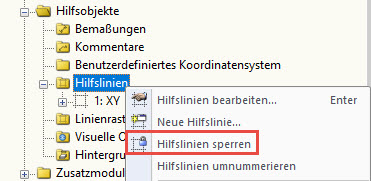
Please check to see whether the "Lock Guidelines" feature has been activated. You can find this function in Project Navigator – Data under Guide Objects → Guidelines. Right-click the guideline and deactivate this function.

Author

Sandy provides support in Customer Support for technical issues related to the software. She reliably familiarizes herself with new topics and helps develop clearly structured solutions.

References


;