


Question:
Is it possible to reduce the memory requirements of a printout report in RFEM 6 and RSTAB 9?
Answer:
Yes, it is possible, although the default settings of the printout report are already optimized.
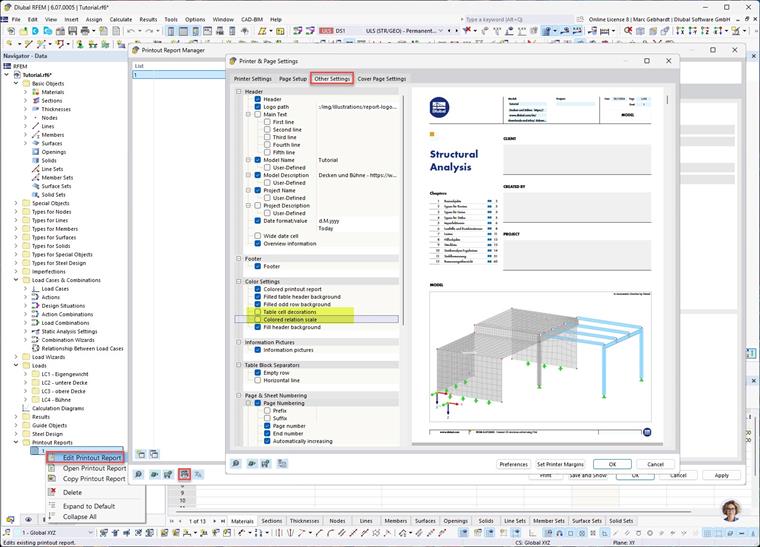
You can find various setting options in the Printer & Page Settings dialog box in the Other Settings tab. You can open this dialog box in the Printout Report Manager.
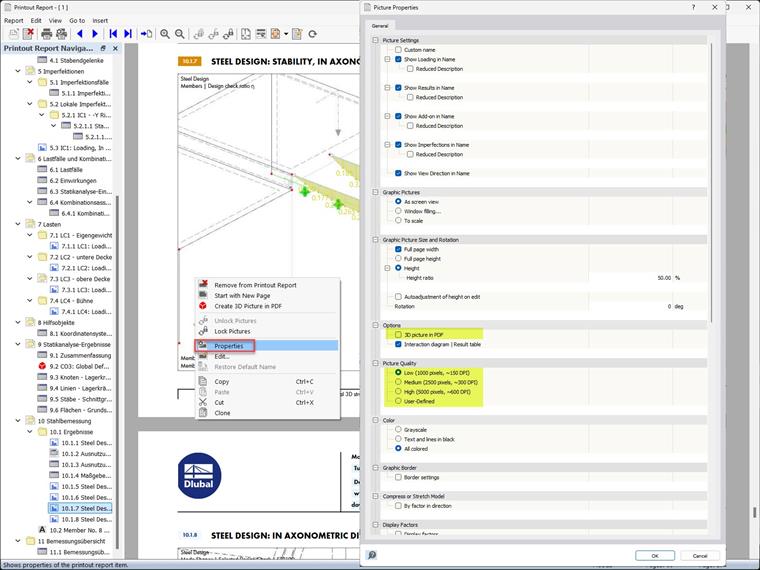
It is also possible to reduce the quality of the images and dispense with 3D PDFs.
This results in the following change in the memory requirements of the exported PDF file, for example.
| Variant | Description | Memory Capacity |
|---|---|---|
| 0 | Default |
|
| 1 | 0 and deactivated Table Icons | 11.5 MB |
| 2 | 1 and deactivated Colored Relation Scale | 11.4 MB |
| 3 | 2 and low-quality images | 9.7 MB |