Community
Sign in to your account

Sign up for the Dlubal Extranet to get most of the software and have exclusive access to your personal data.

Create Account
By signing-in you agree to Dlubal Conditions of Use & Sale. Please see our Privacy Notice, our Cookies Notice.
0
Webshop
Contact Sales Team
Language
  • Deutsch
  • English
  • Français
  • Español
  • Português
  • Italiano
  • Česky
  • Polski
  • Pусский
  • 中文(简体)
  • Industries
    • Reinforced Concrete Structures
    • Prestressed Concrete Structures
    • Steel Structures
    • Wood & Mass Timber Structures
    • Masonry Structures
    • Aluminum and Lightweight Structures
    • Buildings
    • Industrial Structures and Plants
    • Pipelines
    • Bridge Structures
    • Cranes and Craneways
    • Towers and Masts
    • Glass Structures
    • Tensile Membrane Structures
    • Cable and Tensile Structures
    • Laminate and Sandwich Structures
    • Temporary Structures
    • Scaffolding and Rack Structures
    • Offshore Structures
    • Silos and Storage Tanks
    • Renewable Energy Plants
    • Solar Structures & Mounting Systems
    • Shipbuilding and Floating Bodies
    • Conveyor Structures
    • Drilling Structures
    • Swimming Pools and Water Parks
    • Container Structures
    • Drilled Pile Foundations
    • Staircase Structures
    • Power Plants
    • Hydraulic Steel Engineering
    • Mechanical Engineering
    • Pneumatic Structures
    Application Areas
    • Structural Engineering
    • Finite Element Analysis (FEA)
    • Wind Simulation and Wind Load Generation
    • Stress Analysis
    • Nonlinear Analysis
    • Stability Analysis
    • Nonlinear Buckling Analysis
    • Warping Torsion Analysis
    • Dynamic and Seismic Analysis
    • Nonlinear Dynamic Analysis
    • Pushover Analysis
    • Form-Finding and Cutting Patterns
    • Steel Joints
    • BIM Planning
    • Cold-Formed Sections
    • Soil-Structure Interaction
    • Facade Analysis
    • Foundations and Foundation Engineering
    • Construction Stages
    • Fire Resistance
    Standards
    • Eurocodes (EC)
    • German Standards (DIN)
    • British Standards (BS EN, BS)
    • Italian Standards (NTC)
    • US Standards
    • Canadian Standards (CSA)
    • Australian Standards (AS)
    • Swiss Standards (SIA)
    • Chinese Standards (GB, HK)
    • Indian Standards (IS)
    • Mexican Standards (RCDF, CFE Sismo 15)
    • Russian Standards (SP)
    • South African Standards (SANS)
    • Brazilian Standards (NBR)
    Online Services
    • Geo-Zone Tool Top Menu Icon Snow Load, Wind Speed, and Seismic Load Maps
    • Cloud Calculation Icon Cloud Calculations
    • Structural Analysis Wiki Icon Structural Analysis Wiki
    • Cross-Section Properties of Steel and Timber Sections Icon Cross-Section Properties of Steel Cross-Sections
    Structural Design for Solar Systems

    Dlubal Software helps you create and verify any solar mounting system. Work efficiently with steel, aluminum, and concrete structures in a single environment.

    Explore Tools
    Solar Structures Solar Structures | Mobile Version
    Dlubal API

    The new Dlubal API service (gRPC) provides you with a flexible interface to the structural analysis software based on Python and C#, with direct access to the entire Dlubal product range.

    Start With API
    Background for the main menu banner API Background for the main menu banner API
  • Icon representing RFEM 6, a finite element analysis software application. RFEM 6 Only Structural Analysis and Design Software You Need for Your Projects

    RFEM 6 serves as the basis of the modular program family and is used to define structures, materials, and actions for plate, wall, shell, and beam structures, as well as for solids and contact elements.

    More Information
    Add-on Switch Icon Add-ons
    • Additional Analyses
    • Dynamic Analysis
    • Special Solutions
    • Design
    • Connections
    RSTAB 9 Icon without borders RSTAB 9 Iconic Frame and Truss Analysis Software

    RSTAB 9 is a powerful analysis and design software for 3D beam, frame, or truss structure calculations, reflecting the current state of the art and helping structural engineers meet requirements in modern civil engineering.

    More Information
    Add-on Switch Icon Add-ons
    • Additional Analysis
    • Dynamic Analysis
    • Special Solutions
    • Design
    RSECTION 1 Icon without borders RSECTION 1 User-Defined Cross-Section Properties

    RSECTION supports structural engineers by determining cross-section properties for a wide variety of cross-sections and allowing for subsequent stress analysis.

    More Information
    RWIND 3 Icon without borders RWIND 3 CFD Software for Digital Wind Tunnels

    RWIND 3 is a digital wind tunnel for simulating wind flows around any building geometry and for the calculation of the wind loads on their surfaces.

    More Information
    API Icon Dlubal API Your Gateway to Parametric Modeling and Automation

    The new Dlubal API service (gRPC) provides you with a flexible interface to the structural analysis software based on Python and C#, with direct access to the entire Dlubal product range. Benefit from seamless and powerful integration into your Dlubal software—ideal for parametric modeling and complex optimization tasks.

    Discover API
    API Documentation API Documentation
    • Index
    • Getting Started
    • Applications
    • Model Objects
    • Pricing
    • Examples
    FEA for Steel Connections

    Design and analyze steel connections using CBFEM, compliant with EN 1993‑1‑8 and AISC 360, fully integrated in RFEM 6 for faster, more accurate structural workflows.

    Learn More
    Steel Connections Steel Connections
    Geo-Zone Tool

    The Dlubal online service provides zone maps for quick determination of snow loads, wind speeds, and seismic data.

    CHECK LOAD ZONES
    Geo-zone tool visual displaying snow, wind, and seismic maps with illustrations for environmental load assessments. Illustration of snow, wind, and seismic geo-zone maps on a mobile version showing various regions and data.
    Outdated Products
  • Support
    • Frequently Asked Questions (FAQ)
    • Knowledge Base
    • Product Features
    • Licensing
    • Ask Individual Question
    • Our Support Team
    • Submit Program Feature or Idea
    • FAQ for Licensing & Authorization 
    • Report Problem or Program Issue
    • Program Updates
    • Program Issues
    • Formulas | Math is fun!
    Training
    • First Steps with RFEM
    • First Steps with RSTAB
    • Online Training
    • Training in Dlubal
    • Individual Training
    • Videos
    • E-Learning Videos
    • Webinars – Learn Online
    • Online Courses
    Service
    • Free Support / Service
    • Geo-Zone Tool for Load Determination
    • Extranet | My Account
    • Project Support
    • Service Contract
    • Updates & Upgrades
    • Previous Program Versions
    Sales
    • Webshop
    • Our Sales Team
    • Contact Our Sales Team
    • Schedule an online product demo
    • Why Dlubal Software
    AI Support Assistant
    • Mia – Your 24/7 AI Assistant
    • Discover Your Personal AI Assistant
    Free Support & Service

    Need help? Access free support options including 24/7 AI assistance, email support, and webinars.

    Learn More
    Free Support & Service Free Support & Service
    Find Answers Fast

    Find quick answers to common questions about Dlubal Software. Search or filter hundreds of FAQ to solve issues in no time.

    View FAQ
    Frequently Asked Questions (FAQ) FAQ | Mobile Version
  • News
    • Current News
    • New Product Features
    • Subscribe to Newsletter
    • New Programs
    • Dlubal Blog
    Training
    • Online Training
    • Individual Training
    Events
    • Event Overview
    • Trade Fairs and Conferences
    • Webinars
    Master Engineering with Webinars

    Join industry leaders and explore solutions in structural engineering and software. Enhance your skills with our live sessions!

    See Next Webinars
    3D FEA Software RFEM 6 | First Steps Menu Banner Image | News Webinars | Mobile Version
    Unlock the Power of Innovation

    Discover cutting-edge tools and enhancements designed to boost your engineering workflow.

    Explore New Features
    Explore New Features Menu Banner Image | News_ProductFeatures | Mobile Version
  • Download Full Version

    Would you like to try out the capabilities of the Dlubal Software programs? You have the opportunity to do so! With the free 90-day full version you can thoroughly test all our programs.

    Start Trial Version Now
    Dlubal Free Zone

    In the Dlubal free zone, you can access webinars, articles, and software trial versions—all free of charge and conveniently located in one place.

    More Information
    Examples
    • Structural Analysis Models to Download
    • Submit Structural Analysis Model
    • Introductory Examples and Tutorials
    • Verification Examples
    • Image Overview
    Documents
    • Online Manuals
    • Manuals
    • Leaflets, Brochures, and Certificates
    References
    • Customer Projects
    • Why Submit Your Customer Project?
    • How to Submit Customer Project?
    • Submit Customer Project
    Free Models to Download

    Explore thousands of ready-to-use structural models. Download, adapt, and use them as templates to accelerate your design process.

    Discover Models
    Structural Analysis Models to Download Free Models to Download | Mobile Version
    Dlubal Free Zone

    Get expert help whenever you need it. Enjoy free AI assistance, email support, live webinars, and premium services for Service Contract Pro users.

    Get Support
    Free Support & Service Free Support & Service | Mobile Version
  • E-Learning
    • RFEM 6 for Beginners
    • RFEM 6 for Students
    • Programming with RFEM 6 and Python
    • RFEM 6 with Rhino & Grasshopper
    • RFEM 5 for Beginners
    • Modeling with RFEM 5
    • Structural Analysis Learning Videos for Students
    • Quick Tutorials for Dlubal Programs
    • Best Tips and Tricks in RFEM
    • Dlubal Online Training Recordings
    • Recorded Dlubal Webinars
    Students and Schools
    • Free Structural Analysis Software for Students
    • Request or Renew Free Student License
    • Request for Free Instructor License
    • Submit Thesis
    • Why Submit Your Thesis?
    • Graduation Theses with Dlubal Structural Analysis Software
    • Free Structural Analysis Software for Educational Institutions
    • Request School Package
    • Free Introductory Training at Your University
    • Request Training Date
    Knowledge Platform
    • First Steps with RFEM
    • Videos
    • Online Manuals
    • Structural Analysis Wiki
    • Knowledge Base
    • Frequently Asked Questions (FAQ)
    Infotainment
    • Podcast
    • Dlubal Blog
    • Introduction to Structural Analysis and Design
    First Steps with RFEM 6

    Take your first steps with RFEM 6 and discover how quickly you can model and calculate. Customize with add-ons for even more possibilities.

    Get Started
    3D FEA Software RFEM 6 | First Steps Menu Banner Image | News Webinars | Mobile Version
    Free Structural Analysis Software for Students

    Thousands of students worldwide already benefit from Dlubal Software. Enjoy free access, training, and expert support throughout your studies.

    Get Free License
    Free Structural Analysis Software for Students Free Structural Analysis Software for Students
  • About Us
    • History and Facts
    • Company Philosophy
    • Why Dlubal Software?
    • Product Comparison
    • Quality Policy
    • Our Team
    Contact
    • Dlubal Locations Worldwide
    • Authorized Dlubal Resellers
    References
    • Customer Reviews
    • Customer Projects
    • Case Studies
    • Why submit your customer project?
    • Verification Examples
    • Your Review
    • Participation in Research Projects
    Our Customers

    We present our customers who realize their projects with Dlubal Software. Learn how our customers worldwide implement innovative solutions in construction and engineering using advanced tools for structural analysis and dynamic analysis.

    View Our Customers
    Building Success Together

    Discover how leading engineers around the world trust our solutions to elevate their projects with us.

    See Our Customers
    See Our Customers Menu Banner Image | Company_OurCustomers_Mobile
    Meet the Experts

    Our dedicated engineers are here to assist you with modeling, design, and technical challenges—anytime, anywhere.

    Connect with Support
    Our Team Menu Banner Image | Company_OurTeam | Mobile Version
  • Career
    • Jobs
    • Teams
    • Colleague Blog
    • Insights
    Jobs
    • All Open Positions
    • Product Development
    • Customer Support
    • Sales
    • Marketing
    • Software Development
    • Administration
    • Interns
    • Others
    Teams
    • Product Development
    • Customer Service
    • Sales
    • Marketing
    • Software Development
    • Administration
    Why Dlubal?
    • Company Culture
    • Employee Benefits
    Build Your Future with Us

    Reveal how our team shapes the future of engineering. Experience innovation, growth, and exciting challenges.

    Your Career Opportunities
    Career at Dlubal Menu Banner Image | Career at Dlubal Mobile
    Find Your Dream Job

    Join a global leader in engineering software and take your career to new heights.

    Explore Open Positions
    All Open Positions Menu Banner Image | Open Positions Mobile
  • Webshop
Main Products
Icon representing RFEM 6, a finite element analysis software application.
RFEM 6
RSTAB 9 Icon without borders
RSTAB 9
RWIND 3 Icon without borders
RWIND 3
RSECTION 1 Icon without borders
RSECTION
Online Services
Geo-Zone Tool icon
Geo-Zone Tool
Cross-section Properties
Cross-Section Properties
API Icon
API
Cloud Calculation Icon
Cloud Calculation
Downloadable Models
Downloadable Models
Dlubal Community Icon
Dlubal Community
Knowledge Base Articles Icon
Knowledge Base
Online Webinars
Webinars
Sign in to your account

Sign up for the Dlubal Extranet to get most of the software and have exclusive access to your personal data.

Login Create Account
90-Day Free Trial
Sign in to your account

Sign up for the Dlubal Extranet to get most of the software and have exclusive access to your personal data.

Login Create Account
  • Products
  • Dlubal API
  • Dlubal API

Dlubal API (gRPC)

The new Dlubal API Service (gRPC) is a Python/C#-based solution that provides seamless, high-level interaction with the entire Dlubal product suite—RFEM, RSTAB, and RSECTION. Open to your innovations, it is perfectly suited for integrating your company-specific tools.

Whether you're working on parametric modeling or optimization tasks, our mission is to deliver an easily extensible library that gives you fast, effortless access to all data and functionality across Dlubal's main programs and their add-ons via Python or C#.

Get Started with the API
Abstract background image featuring subtle geometric patterns and smooth gradients for enhanced interface presentation. Background image featuring a mobile API interface design with abstract digital elements.
  • Overview
  • API Documentation
  • Use Cases
  • Articles
  • Examples
  • FAQ
Subscriptions & Prices

Discover Dlubal API

Engineers often face the bottleneck of repetitive manual modeling and isolated optimization processes that slow down complex project delivery. The Dlubal API solves this by providing a high-level gRPC interface that allows you to automate workflows and integrate structural data directly using Python or C#. This seamless connection transforms static software into a dynamic tool for parametric modeling and automated design workflows.

The API enables quick and effortless access to an extensive range of data and functionalities across Dlubal’s main programs and their add-ons via Python or C#. You can apply these capabilities to real-world project scenarios like the optimization of complex solar mounting systems, the generation of parametric steel halls, or the analysis of specialized membrane structures. Every step is backed by the complete traceability of calculation methods and formulas to ensure that your automated solutions remain transparent and ready to submit.

The API provides comprehensive support for the standards and add-ons included in the main programs RFEM, RSTAB, and RSECTION. The availability of ready-to-use function libraries means you do not need to be a software developer to harness the power of the API.
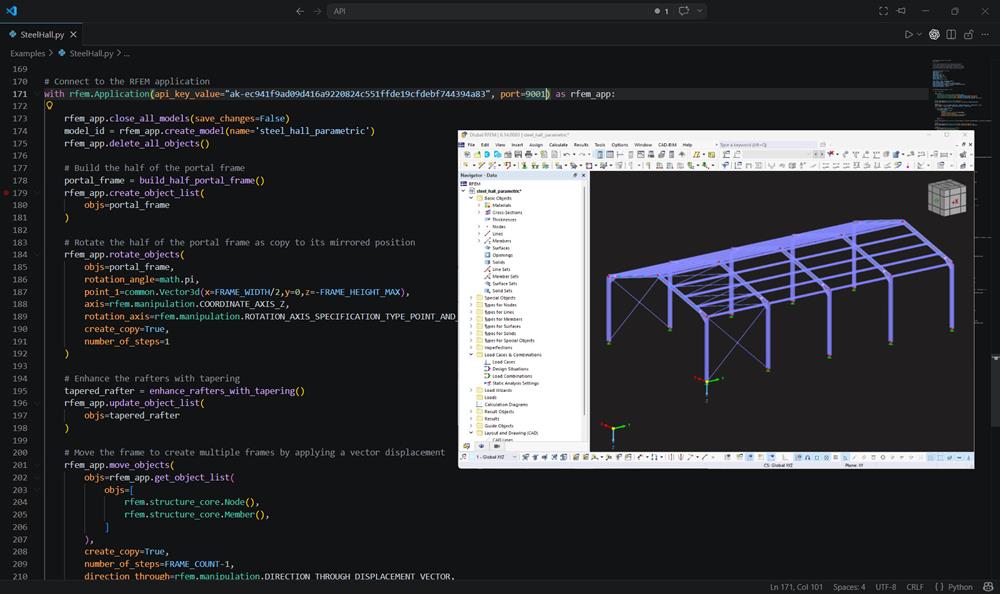
RFEM 6 interface displaying a model of a steel hall structure with Python script integration for enhanced automation and customization.
Visualization of a solar tracker structure in RFEM 6 with API and Python script integration.
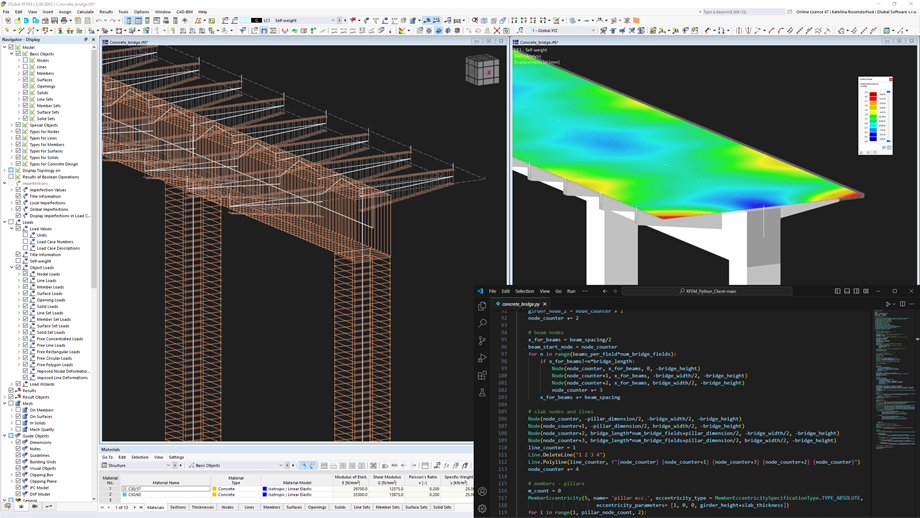
RFEM 6 user interface showing a steel bridge model with Python script integration features for advanced structural analysis.
Steel container structure modeled in RFEM 6 with a Python script interface, demonstrating integration of API functionalities with engineering software capabilities.
RFEM 6 interface displaying a model of a steel hall structure with Python script integration for enhanced automation and customization.
Visualization of a solar tracker structure in RFEM 6 with API and Python script integration.
RFEM 6 user interface showing a steel bridge model with Python script integration features for advanced structural analysis.
Steel container structure modeled in RFEM 6 with a Python script interface, demonstrating integration of API functionalities with engineering software capabilities.

Available Dlubal API Clients

Icon representing RFEM 6, a finite element analysis software application.

RFEM 6 API

RSTAB 9 Icon without borders

RSTAB 9 API

RSECTION 1 Icon without borders

RSECTION 1 API

Your Advantages

Automated creation of complex parametric models and optimization cycles using Python or C#

Effortless bidirectional data exchange across all Dlubal programs utilizing ready-to-use function libraries

Complete traceability of calculation methods and formulas for transparent, submission-ready results

Seamless Docker deployment for isolating scripts and scaling calculation instances in the cloud

Use Cases

The Dlubal API is essential when your projects involve repetitive modeling tasks or require optimization logic. Its applications range from simple scripts that automate design checks to complex generative algorithms that autonomously evolve entire structures. The following use cases show how these workflows solve real engineering challenges.
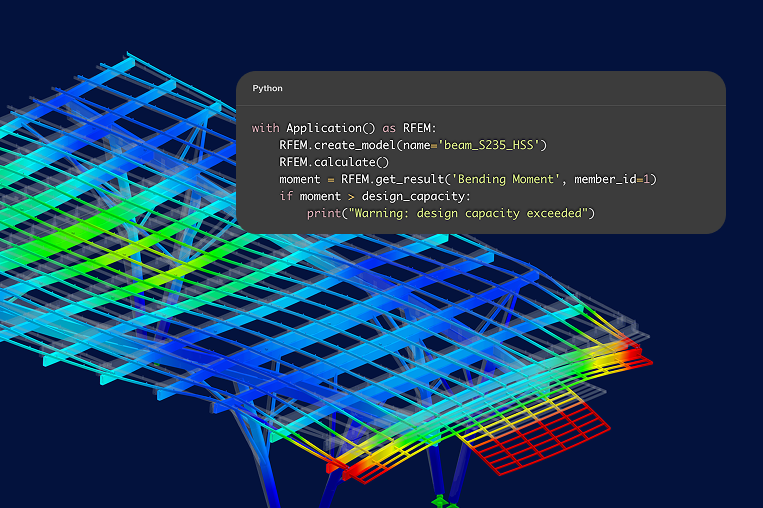
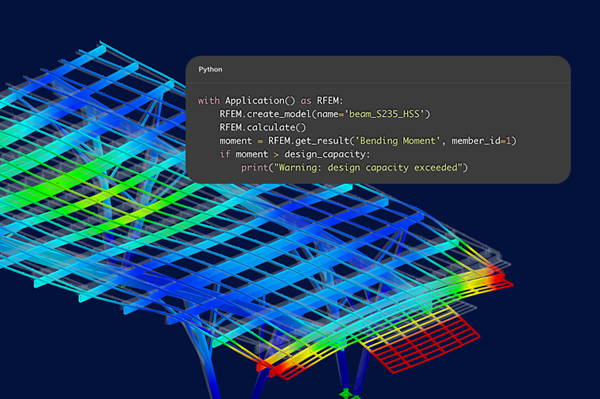
Graphic illustration depicting use cases related to the Dlubal API, showcasing various engineering scenarios and applications. Graphic illustration depicting use cases related to the Dlubal API, showcasing various engineering scenarios and applications.
Parametric Design of Complex Solar Mounting Systems

The API automates the generation of thousands of frame variants from coordinate inputs, ensuring material efficiency and complete traceability across large-scale energy projects.

Automated Optimization of Large-Scale Warehouse Structures

By linking the API to optimization algorithms, you can automatically iterate through cross-section libraries to find the lightest steel section that meets all code requirements.

Custom Design Checks for Specialized Aluminum Profiles

The API lets you extract internal forces and apply custom design logic directly within the calculation pipeline, removing the need to manually transfer data to external spreadsheets.

Generative Modeling of Free-Form Timber Roofs

Defining the structure mathematically enables instant model updates whenever architectural constraints change, without the need to switch between software environments.

Key Features

Steel container structure modeled in RFEM 6 with a Python script interface, demonstrating integration of API functionalities with engineering software capabilities.

High-Performance gRPC Technology

You communicate with the software using the binary-based gRPC protocol rather than traditional text-based interfaces. The program processes these requests with minimal latency, allowing for rapid, high-volume data exchange between your custom code and the calculation core. This significantly increases execution speed for automated tasks and large-scale parametric studies.
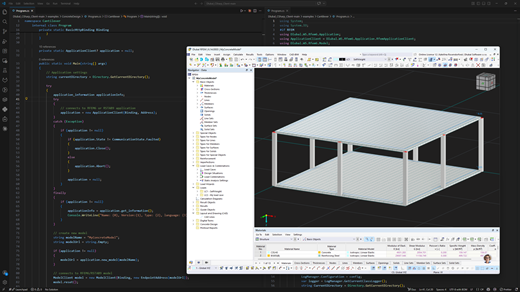
Illustration of Python and C# integration showing code samples for API product page.

Native Python and C# Integration

Dlubal provides high-level client libraries specifically for Python and C#, which act as "wrappers" to simplify the coding process. This means you can use intuitive, engineer-friendly functions to command the software without needing to manage the underlying network protocols or complex data structures yourself.
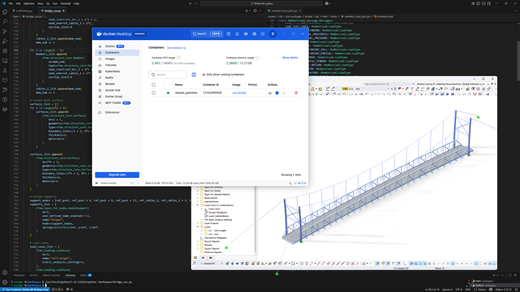
Illustration showing seamless Docker deployment process using Dlubal's API, focusing on simplified workflows and integration.

Containerization and Docker Support

The API service is designed to be container-ready, allowing for seamless deployment in Docker environments. This feature enables you to isolate your automation scripts, scale calculation instances across server clusters, and ensure a consistent execution environment whether working locally or in the cloud.

Show All Features

Parametric Solar Mounting Design with the RFEM 6 API

Manually modeling hundreds of mounting frame configurations for varying site dimensions is inefficient and error-prone. This prototype app demonstrates a better way. By driving solar tracker geometry, cross-sections, and panel tilt directly from a custom UI, the API instantly generates the complete 3D model in RFEM 6, ready for structural analysis.

  • Generate thousands of model configurations instantly from site coordinates
  • Rapidly evaluate multiple iterations to identify the most cost-effective design
  • Maintain a fully traceable, code-driven process from start to finish
Watch the Demo
Visualization of a solar tracker structure in RFEM 6 with API and Python script integration.

Dlubal API Articles

Webservice and API in RFEM 6

Introduction to the API of RFEM 6

This article introduces the RFEM 6 API, showing how custom programming enables you to automatically generate models, apply loads, run calculations, and extract results.
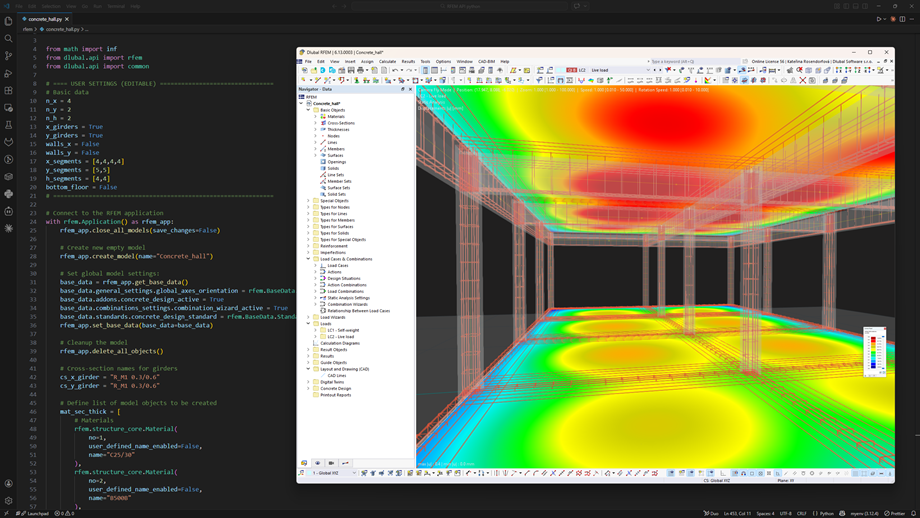
Python script interface alongside a reinforced concrete model in RFEM 6 user interface.

Practical Use Cases and Key Benefits

Explore practical use cases and key benefits of the Dlubal API. Learn how Python integration helps automate workflows and connect RFEM 6 with broader engineering solutions.

View All Articles
API Subscriptions & Prices
  • Monthly
  • Annually -10%
Free
Ideal for getting started and familiarizing yourself with the API – non-binding and free of charge
Free
  • Maximum of 500 API requests per month
  • No additional API requests possible
  • Maximum of 1 active user
  • Access to all input data and results (without add-ons)
  • No time limit
Start for Free
Basic
Optimal for simple automations and small applications
USD 110 /month
  • Maximum 3,000 API requests per month
  • 0.08 USD per additional API request
  • Access to all input data and results
Buy now
Most Popular
Professional
Perfect for more complex scripts and extensive calculations
USD 330 /month
  • Maximum 10,000 API requests per month
  • 0,050 USD per additional API request
  • Access to all input data and results
Buy now
Premium
The best choice for demanding integrations and large projects
USD 670 /month
  • Maximum 25,000 API requests per month
  • 0,035 USD per additional API request
  • Access to all input data and results
Buy now
Enterprise
Customized solutions and unlimited possibilities for the highest demands
Customized
  • Individual number of API requests
  • Individual price per additional API request
  • Unlimited number of active users
  • Access to all input data and results
Contact Sales

Frequently Asked Questions About Dlubal API

Can I automate my existing RFEM models without having to rebuild them from scratch via code?

Yes, the API allows you to open and modify existing files just as easily as creating new ones. You can use scripts to specifically target and swap materials, adjust load magnitudes, or extract results from models you have already modeled manually in the graphical interface.

Do I need to be a professional software developer to create functional automation scripts?

No, you do not need a computer science degree to use the API effectively. Thanks to the high-level Python and C# libraries provided by Dlubal, you can use simple, structural-engineering-focused commands that hide the complex communication logic happening in the background.

Can the API handle the optimization of non-standard geometries like free-form shells or complex membrane structures?

Yes, it is specifically designed for parametric tasks that are too tedious for manual modeling. You can use mathematical functions to define node coordinates and surface geometries, allowing you to run iterative loops that automatically find the most efficient shape based on the resulting utilization ratios.

Is it possible to use the API for high-level research projects involving non-linear material behavior and Eurocode design?

Directly so, as the API supports non-linear material models and provides full access to the design add-ons for international standards. This allows you to programmatically verify that your custom-optimized structures still comply strictly with safety requirements like Eurocode 3 or AISC.

How can the Dlubal MCP Server help me access all RFEM and RSTAB data and features with AI support?

The Dlubal MCP Server is an upcoming AI-driven middleware that uses the Model Context Protocol to link RFEM/RSTAB with external applications. It creates a seamless pipeline where you can control complex structural analysis via conversational AI and custom automated tools.

Can I use the API to automate specific workflow without purchasing additional developer software?

Yes, you can start automating immediately using free, open-source environments like Visual Studio Code. Because the API connects directly to your existing RFEM or RSTAB installation, you don't need to invest in expensive proprietary development tools to build custom scripts that handle your routine design tasks.

How does Dlubal API improve my workflow?

The API increases your efficiency because...

  • You save time – Automate model creation, load allocation, and result evaluation, significantly shortening your design process.
  • You reduce costs – Fewer manual steps mean fewer engineering hours and lower project costs.
  • You have full adaptability – Design calculations, reports, and workflows exactly according to your project or company specifications without being limited by UI restrictions.
  • It is seamlessly integrated – The API links RFEM, RSTAB & Co. bidirectionally with BIM and CAD tools, prevents media breaks, and ensures consistent data.
  • You have comprehensive data access – Access an extensive range of model objects and results, filter them specifically, and process them further to make data-based decisions.
  • It unleashes innovation potential – Develop new apps, prototypes, and AI workflows (for example, with the AI assistant Mia) without reinventing the wheel.
  • It has high performance – Thanks to gRPC technology, data exchange is up to 10 times faster than with classic SOAP/REST services.
How can I access the Dlubal API?

To use the Dlubal API, you need a valid license (full or trial version) of a supported Dlubal main program (currently RFEM 6 and RSTAB 9, in the future also RSECTION, RWIND, and Geo-Zone Tool) and a personal API key. You can easily generate this API key via your Dlubal Extranet account under “API & Cloud → API II → My API Keys”:

  • Dlubal Extranet | My API Keys

An API subscription is not mandatory – you can start directly with the free API subscription “Free” and get to know and use the API without obligation.

Can I use imperial units (feet and inches) in RFEM Python API scripts?

Yes, but it requires a simple workaround. Since the RFEM Python API expects inputs in meters, the best practice is to define your imperial dimensions at the start of your script and apply a conversion factor.

See how to handle unit conversion in Python: FAQ | Imperial Units in the Python API

Dlubal Community Icon
Join the Dlubal Community

Here, you can ask and answer technical questions, engage in meaningful discussions on structural analysis and design, suggest new features, and interact directly with the Dlubal team and fellow users.

Dark blue icon representing free support service, typically used for websites. It symbolizes assistance and customer service availability.
Free Support & Service

Explore our free and professional support options, including 24/7 AI assistance, email support, webinars, and exclusive services for Service Contract Pro customers.

API Documentation
API Documentation

Browse the complete RFEM 6 API reference, code examples, and step-by-step guides to start building your own automated workflows.

Dark blue play icon represented as an SVG graphic. Suitable for multimedia interfaces or interactive design elements.
Videos

Explore hands-on video tutorials focused on the RFEM 6 API. Follow practical examples and learn how to build and run your first automated scripts.

SVG icon representing a webinar in dark blue color with stylized elements and typography.
Webinars

Access our recorded webinars on API-driven structural engineering workflows. Watch sessions whenever you want to deepen your knowledge and get inspired by real-world applications.

Structural Analysis and Design Software
Dlubal Software, Inc.

30 South 15th Street, 15th Floor
PA 19103 Philadelphia
United States

+1 (267) 702-2815 [email protected]
Dlubal Software GmbH

Am Zellweg 2
93464 Tiefenbach
Germany

+49 9673 9203-0 [email protected]
Solutions
  • Reinforced Concrete Structures
  • Steel Structures
  • Wood & Mass Timber Structures
  • Steel Joints
Products
  • RFEM 6
  • RSTAB 9
  • RSECTION 1
  • RWIND 3
Support
  • Frequently Asked Questions (FAQ)
  • Ask Individual Question
  • Snow Load, Wind Speed, and Seismic Load Maps
  • Contact Our Sales Team
News
  • Subscribe to Newsletter
  • Current News
  • Event Overview
  • Online Training
Resources
  • Free Full Trial Version
  • Submit Customer Project
  • Customer Projects
  • Online Manuals
Join Dlubal
Dlubal Community YouTube Facebook LinkedIn Twitter Instagram Pinterest TikTok
© 2001-2026 Dlubal Software GmbH | All Rights Reserved
Legal Notice
About Us
Sitemap
Language
  • Deutsch
  • English
  • Français
  • Español
  • Português
  • Italiano
  • Česky
  • Polski
  • Pусский
  • 中文(简体)