Answer:
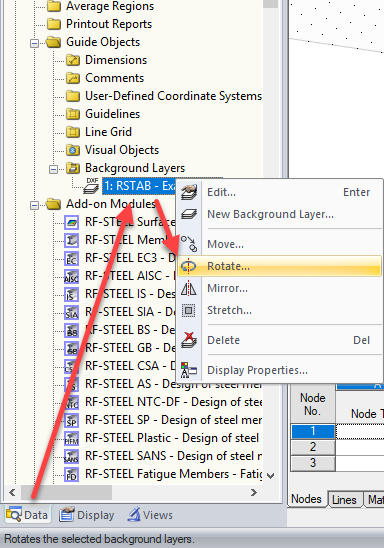
The easiest way to rotate the DXF file as a background layer is to use Project Navigator Data → Guide Objects → Background Layers, and rotate it about any axis using the shortcut menu.
Sign up for the Dlubal Extranet to get most of the software and have exclusive access to your personal data.
Sign up for the Dlubal Extranet to get most of the software and have exclusive access to your personal data.
Sign up for the Dlubal Extranet to get most of the software and have exclusive access to your personal data.
The easiest way to rotate the DXF file as a background layer is to use Project Navigator Data → Guide Objects → Background Layers, and rotate it about any axis using the shortcut menu.
Mr. Baumgärtel provides technical support for Dlubal Software customers.