1402x
003456
2021-07-21

Adjusting Fonts and Page Margins in Printout Report

I have problems with my printout report. The font is very large. In some cases, the columns overlap and the font is no longer legible.


Answer:

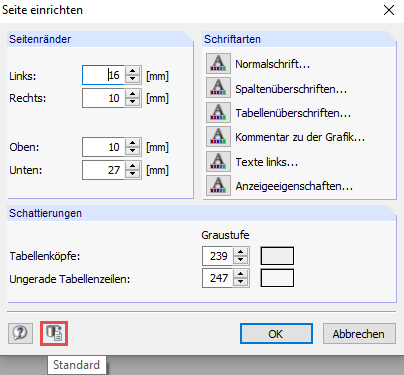
The font sizes and fonts, as well as the page margins displayed in the printout report, can be defined in the "Page Setup" dialog box.

If columns are moved into each other, the text overlaps, or the page margins are extremely large, you should check whether the problem can be solved by changing the settings to default in "Settings" → "Page Setup".

Author

Sandy provides support in Customer Support for technical issues related to the software. She reliably familiarizes herself with new topics and helps develop clearly structured solutions.

References


;