4965x
003611
2021-05-21

Blank Page for 3D PDF in Adobe Reader / Acrobat

When I open a 3D PDF with Adobe Reader or Adobe Acrobat, I only get a blank page without any content displayed. What can be the cause?


Answer:

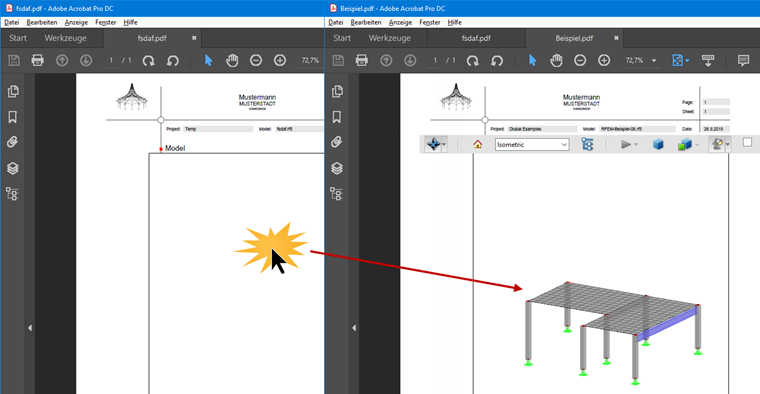
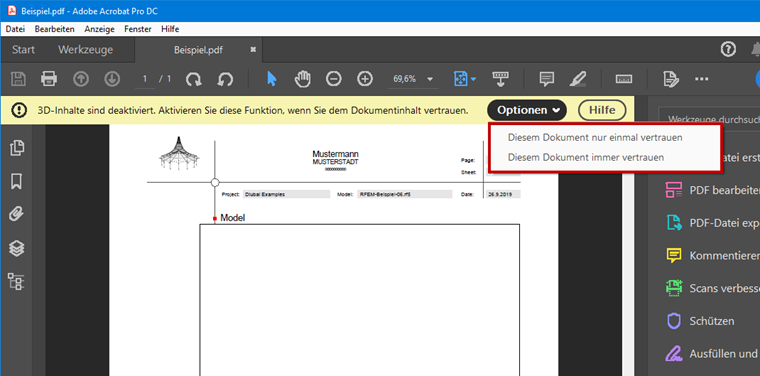
After opening a PDF file, the security setting for 3D content from Adobe applies. The content has to be activated (see Image 01). After getting familiar with the document, simply click into the model area (see Image 02).

Author

Gerhard works in product engineering in the field of timber structures and also assists with customer support. He draws on his development experience to create practical and actionable solutions.

Links
Downloads


;