Answer:
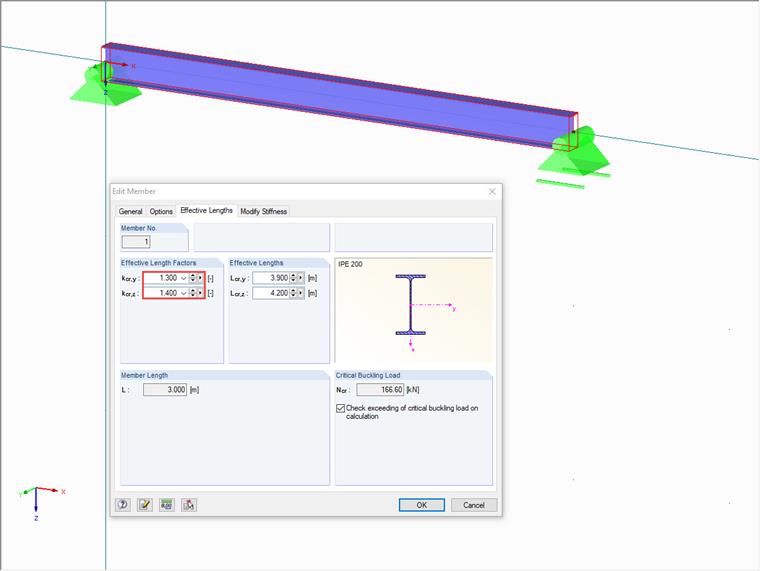
The factors for the effective lengths are transferred using the interface for the member (IMember), which is called SetEffectiveLengths(). Use GetEffectiveLengths() to read out the data:
// get interface to running RFEM application.
iApp = Marshal.GetActiveObject("RFEM5.Application") as IApplication;
iApp.LockLicense();

// get interface to active RFEM model.
iModel = iApp.GetActiveModel();

// get interface to model data.
IModelData2 iModData = iModel.GetModelData() as IModelData2;

// get interface to member 1
IMember iMem = iModData.GetMember(1, ItemAt.AtNo);

MemberEffectiveLengths memEffLen = iMem.GetEffectiveLengths();

memEffLen.No = 1;
memEffLen.CheckBucklingLoad = true;
memEffLen.Enabled = true;
memEffLen.FactorU = 1.1;
memEffLen.FactorV = 1.2;
memEffLen.FactorY = 1.3;
memEffLen.FactorZ = 1.4;

// set new effective lengths data
iModData.PrepareModification();
iMem.SetEffectiveLengths(memEffLen);
iModData.FinishModification();
Please note that it is only possible to read out the properties for the effective lengths (for example, EffectiveLengthY) of the MemberEffectiveLengths structure and the CriticalBucklingLoad property.