


With the short printout report, you can summarize the most important results for each design object—ideally on a single page—with just a few clicks and without manually inserting graphics. This article explains what the short printout report is, what advantages it provides, and how it is structured.
What is the short printout report?
The short printout report is an alternative to the detailed printout report and is used to document the structural analysis.
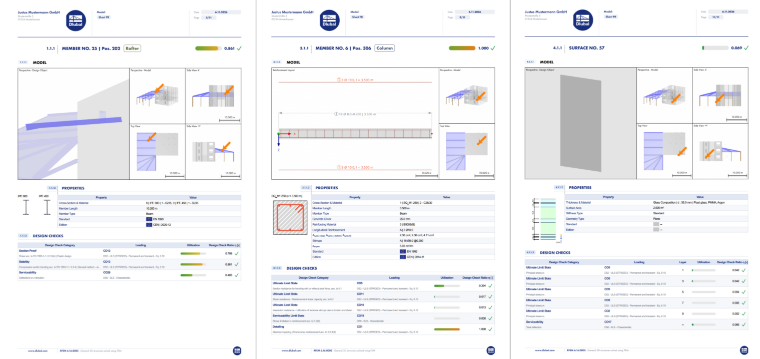
The short report is based on design objects. For each design object—such as a concrete column, a steel beam, or a glass pane—the most important information is summarized on a single page. Image 1 shows three sample pages from a short report.
As of the November 2026 release, the short printout report supports the following design objects and materials:
- Design objects: Members, member sets, surfaces, surface sets
- Materials: Steel, aluminum, concrete, timber, glass
The summary report does not provide the scope of a verifiable structural analysis. It offers a quick overview of the most important parameters and design ratios for a design object or item. For verifiable documentation, continue to use the detailed printout report.#/ #
What are the advantages of the short printout report?
- Easy to create: The short printout report has only a few settings and can therefore be generated quickly.
- Automatic graphic generation: Overview graphics and views are automatically generated for each design object. There is no need to add graphics manually.
- Space-saving documentation: Especially for small models or positional analyses, the short printout report saves many pages: Each design object typically requires only a single page.
Creating Short Printout Report
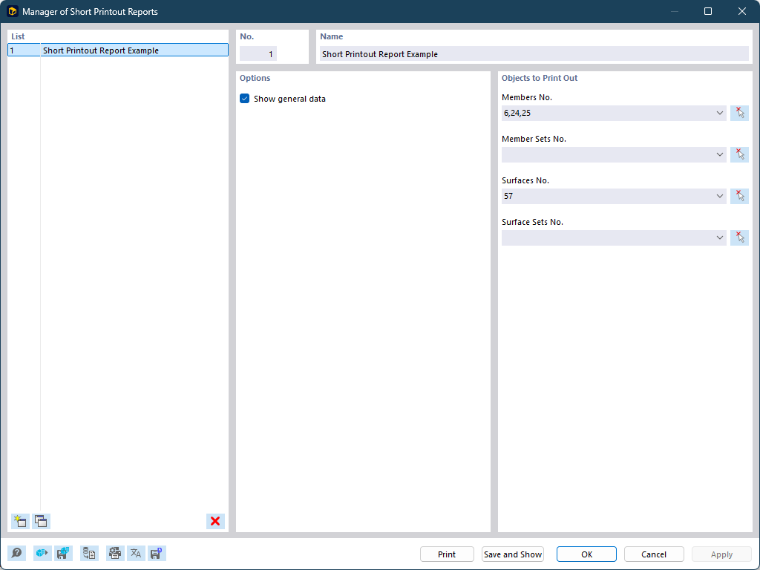
The summary report is created in the Short Report Manager (Image 2). There, you select the design objects to be documented—separated into members, member sets, surfaces, and surface sets. The program then generates a separate report page for each selected design object.
Furthermore, you can activate or deactivate the Base Data in the manager. The base data forms a general page at the beginning of the report.
Structure of Short Printout Report
Each page of the short printout report is divided into four sections: Heading, Model, Properties, and Design Checks. The sample pages in Image 1 show this structure for different design objects.
Header
The header contains the name of the design object as well as any comments and tags. The governing design ratio of the entire design object is clearly displayed in the upper right corner—allowing you to grasp the result at a glance.
Model
This section shows overview graphics of the design object. Red arrows point to the design object, allowing you to quickly locate it within the global model. For concrete design objects, the reinforcement layout is also displayed.
Properties
The key input data for the design object are summarized here:
- Material
- Cross-section or thickness
- Geometry
- Embedded reinforcement (for concrete)
- Design standard
Additionally, a cross-section graphic is displayed for members, and a graphic of the layer structure is shown for multilayer surfaces.
Design Checks
A summary table lists the governing design checks—specifically, the most governing check for each check category. The categories displayed depend on the material discipline and the design standard. Possible categories include, for example:
- Cross-section design checks
- Stability analyses
- Fire resistance
- Serviceability
- Seismic analysis
- Fatigue
Conclusion
The short printout report is ideal when you need a quick, compact overview of your design objects—for example, for positional analyses, internal coordination, or communication with building owners and architects. With just a few settings, automatically generated graphics, and one page per design object, you save time and paper.
- banner.tip@For a verifiable structural analysis, the detailed printout report remains the right choice.