3184x
002325
2025-06-03

Visualization of Table Window or Project Navigator in RFEM 5 and RSTAB 8

The table window (or the Project navigator) is not displayed in RFEM 5 and RSTAB 8 anymore, although the corresponding button is activated. How can I fix this?


Answer:

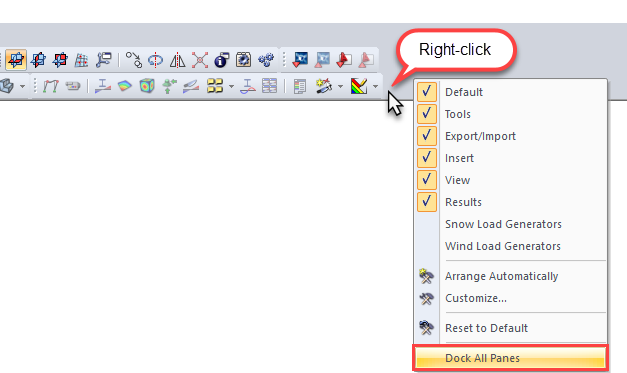
In this case, you can show the table or Project navigator again by selecting the "Dock All Panes" function. For this, right-click the toolbar (see the image) and select the "Dock All Panes" option. Then the table window or the navigator should be visible again.

Author

Frank is responsible for quality assurance in the RFEM program and also assists with customer support. He oversees technical design processes and contributes to the stability and reliability of the software.

Downloads


;