1891x
002369
2018-06-08

Modifying Parameters of Rolled Section in Cross-Section Library

How can I change the parameters of a rolled cross-section from the cross-section library?


Answer:

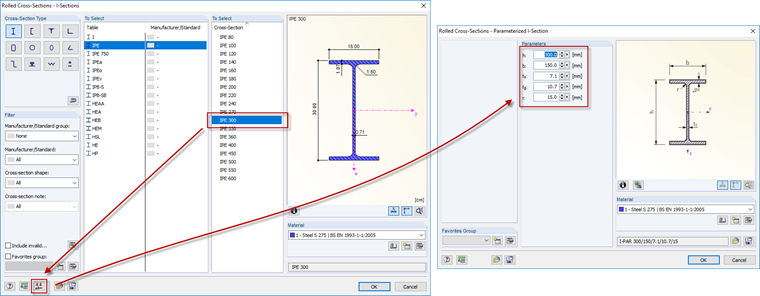
If a rolled cross-section with the desired dimensions is not available in the cross-section library, it can be created manually.

To do so, select the cross-section you wish to change and click the "Parametric Input" button. A dialog box opens where you can enter the desired data (see the image).

Author

Sonja works in Product Engineering and also assists with Customer Support. Her focus is on RSECTION as well as steel and aluminum structures, where she applies her expertise.


;