


No, the add-in is not installed automatically.
This means you need to have Tekla Structures and RFEM 6 or RSTAB 9 installed on your computer.
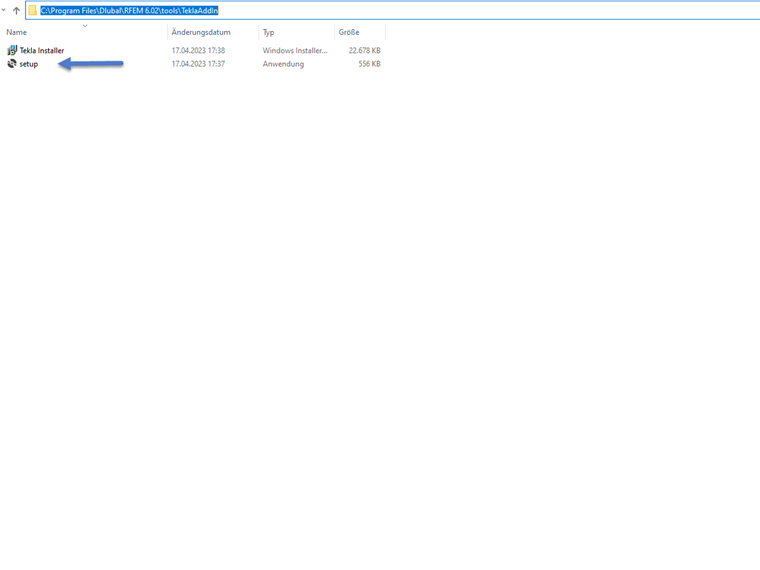
Afterwards, you have to navigate to the respective folders:
- C:\Program Files\Dlubal\RFEM 6.xx\tools\TeklaAddIn
- C:\Program Files\Dlubal\RSTAB 9.xx\tools\TeklaAddIn
This contains the "setup.exe" file. You can run it simply by double-clicking it. Tekla Add-in Installer appears.
After completing the setup, the add-in is installed and the corresponding function is available in the Tekla menu.

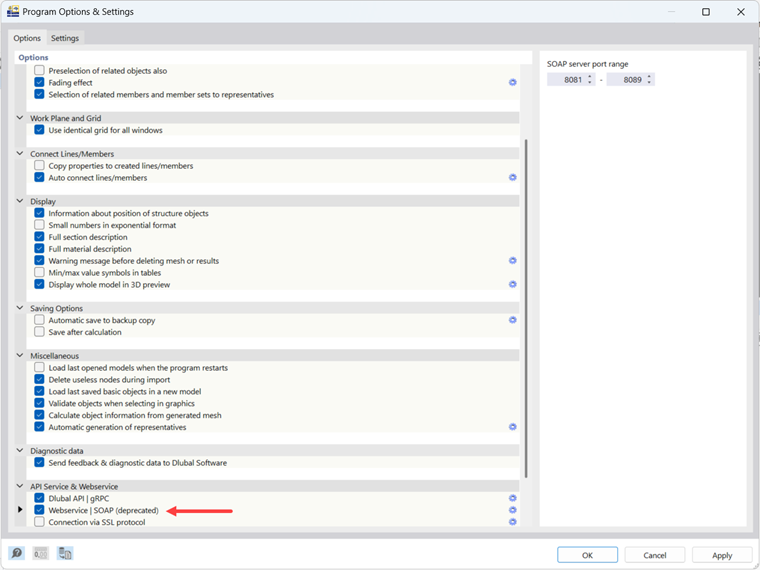
It is also necessary to ensure that the option for the "Webservice | SOAP" server has been activated in RFEM. You can also find this setting in the RFEM menu "Options" under "Program Options".
Tekla Structures 2021-2026 are currently supported.
Tekla Structures 2023 can be used as of the version 6.02.0064.
Tekla Structures 2024 can be used as of the version 6.06.0002.
Tekla Structures 2025 can be used as of the version 6.09.0012.
Tekla Structures 2026 can be used as of the version 6.15.0001.