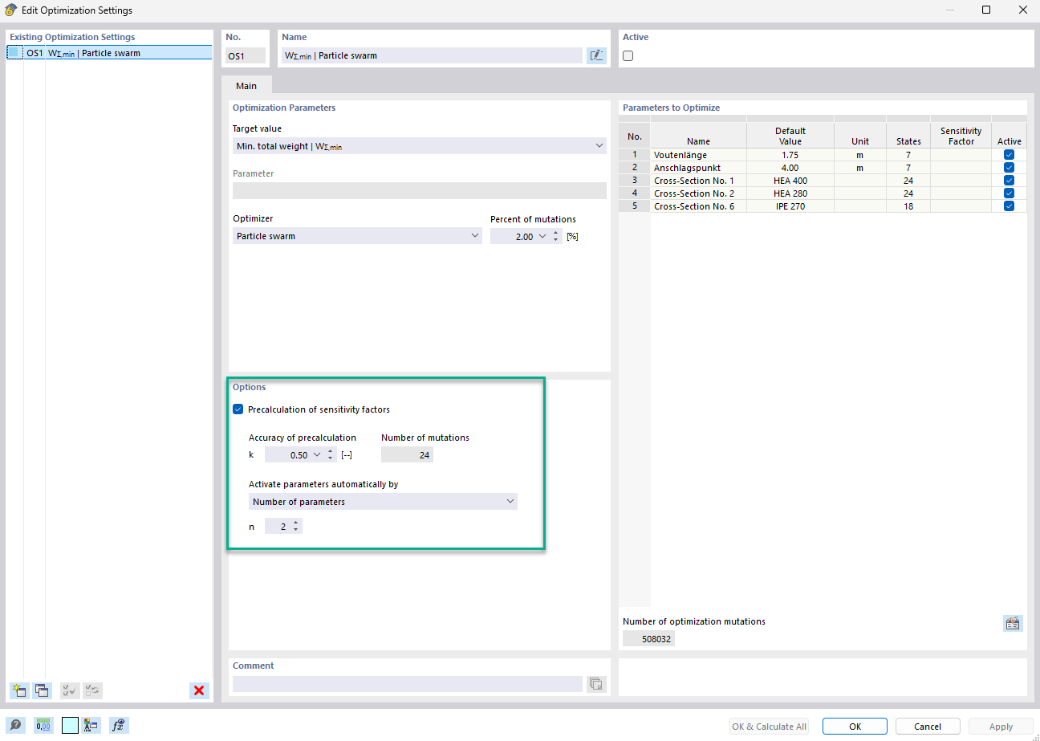
The sensitivity factors provide you with a multi-stage calculation method in the Optimization & Costs/CO₂ Emission Estimation add-on, which generates fewer model mutations to be calculated by the automatic selection of parameters to be combined.
Sensitivity factors are determined for the parameters to be optimized. The more a variable parameter affects the desired optimization goal, the higher is the corresponding sensitivity factor in the range from 0 to 1.
If you select the "Precalculation of sensitivity factors" option, the program determines initial values for the sensitivity factors in the first step. Based on the set precision k, the add-on first calculates random model mutations with all active parameters and analyzes their influence on the optimization goal. In the second step, the actual optimization run or several optimization runs are started, depending on the setting selected in the "Activate parameters automatically by" section:
- Number of parameters n: In each subsequent optimization run, only the set number of parameters is combined with each other to generate model mutations. For example, there are 3 parameters with n = 2, resulting in two optimization runs. First, the two parameters with the largest sensitivity factors, then the two parameters with the next highest sensitivity factors. This continues until all optimization runs for combinations with n parameters have been calculated.
- Sensitivity factor is greater than fs: Only parameters with a sensitivity factor greater than the set limit value are combined with each other in the subsequent optimization run to generate model mutations.
For each of these optimization runs in the second step, the adjusted optimizer and percentage of mutations are used.