In RFEM/RSTAB, the data import from Tekla Structures is started using the [Direct Import] button.
![Button [Direct Import]](/en/webimage/059699/4908509/Schaltfläche_[Direkter_Import]_EN.png)
There are two options for importing data.
1. Physical Model
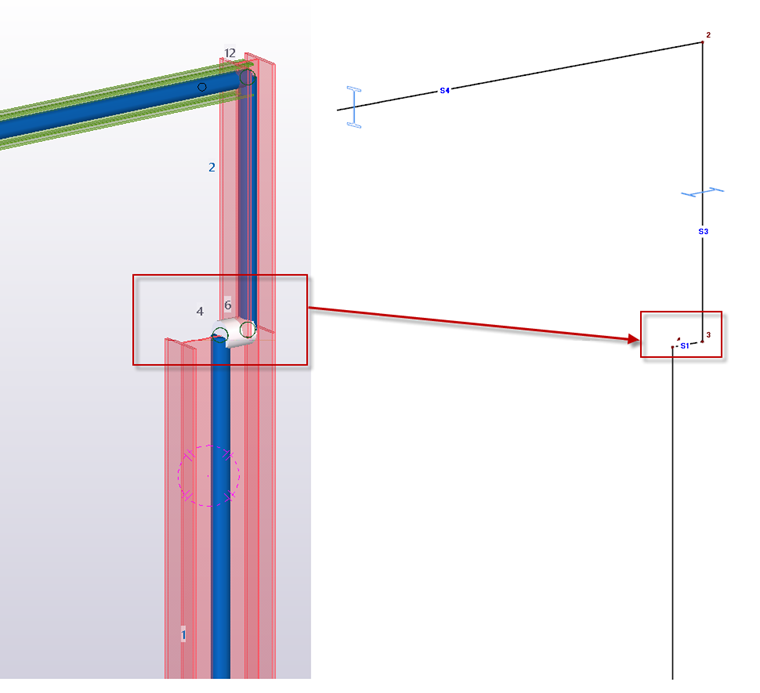
The model is imported as it is represented in Tekla. Information such as supports, hinges, and loads is not transferred. This physical model is usually not a valid mechanical model in which all elements are connected at points. Thus, elements whose center lines do not meet at a point or line are not connected.
2. Analytical Model
In Tekla Structures, it is also possible to create an analytical model. There are many ways to transform the physical model into a mechanically correct analytical model. Eccentricities, closely spaced nodes, or missing connections can be considered by rigid couplings, for example. The adapted “line model” refers to the defined axis positions. In addition, Tekla Structures provides the possibility to enter support conditions and hinges, as well as loads, load cases, and load combinations.
RFEM/RSTAB imports all this additional information. There may be problems with loads, as the loads and combinations of Tekla Structures do not necessarily match the RFEM/RSTAB loads. Therefore, the import is currently limited to standard loads and basic load combinations. A general recommendation is to commit the loads to the structural analysis software. Dlubal does not currently import any design criteria from Tekla Structures.
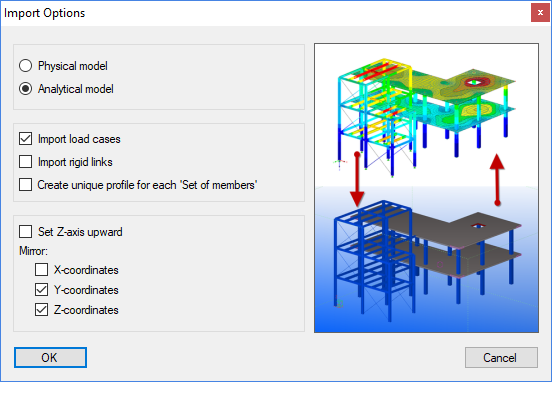
By default, identical cross-sections are grouped under one cross-section number in RFEM/RSTAB. If you want to group the model “by set of members”, you can create a separate cross-section for each set of members.
The orientation of the global Z-axis is always defined “upwards” in Tekla Structures. Optionally, the elements can be mirrored about the individual axes of the global coordinate system.
The analytical model in Tekla Structures uses rigid links to mechanically connect members. RFEM/RSTAB recognizes these special couplings and converts them to the corresponding Coupling member type.