174x
005767
2026-01-06

Display of Resulting Support Forces of Individual Surfaces in RFEM 6

The Result Navigator can be used to display the resultants of all support forces and their components. Is it also possible in RFEM 6 to display the resultant support force of a single embedded surface?


Answer:

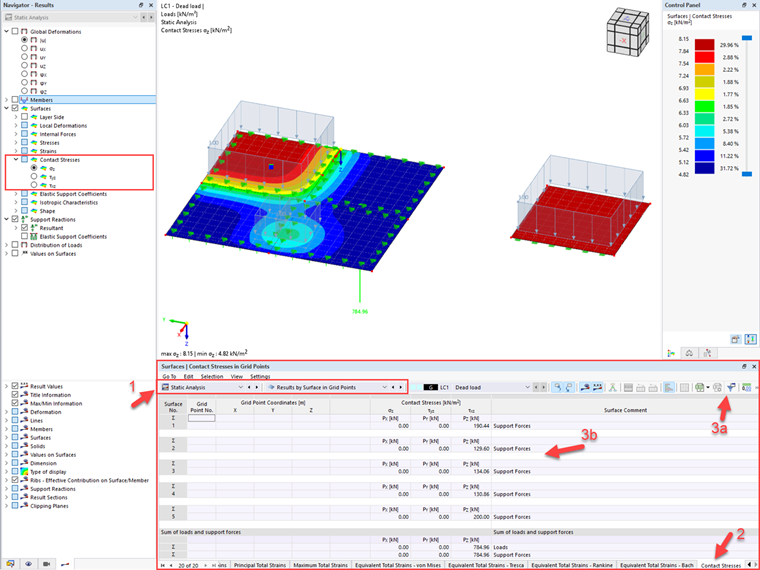
The resulting support forces Px, Py, and Pz can be displayed for the individual surfaces as follows.

1. Under "Static Analysis," select "Results by Surface in Grid Points" or in mesh nodes.

2. Select the "Contact Stresses" tab. This can be done by right-clicking and selecting the dialog box or using the mouse wheel.

3. You can use the filter settings to display the value of the individual grid or mesh points or just the sum of the support forces for each surface.
Tip

The sum displayed refers to the selected force direction (Px, Py, or Pz) in the plane of the surface supports. Support reaction moments and eccentric force applications are not taken into account.


Author

Mr. Hartmann is responsible for development and quality assurance in the field of timber structures and is actively involved in customer support.


;