Community
Sign in to your account

Sign up for the Dlubal Extranet to get most of the software and have exclusive access to your personal data.

Create Account
By signing-in you agree to Dlubal Conditions of Use & Sale. Please see our Privacy Notice, our Cookies Notice.
0
Webshop
Contact Sales Team
Language
  • Deutsch
  • English
  • Français
  • Español
  • Português
  • Italiano
  • Česky
  • Polski
  • Pусский
  • 中文(简体)
  • Industries
    • Reinforced Concrete Structures
    • Prestressed Concrete Structures
    • Steel Structures
    • Timber and Wood Structures
    • Masonry Structures
    • Aluminum and Lightweight Structures
    • Buildings
    • Industrial Structures and Plants
    • Pipelines
    • Bridge Structures
    • Cranes and Craneways
    • Towers and Masts
    • Glass Structures
    • Tensile Membrane Structures
    • Cable and Tensile Structures
    • Laminate and Sandwich Structures
    • Temporary Structures
    • Scaffolding and Rack Structures
    • Offshore Structures
    • Silos and Storage Tanks
    • Renewable Energy Plants
    • Solar Structures & Mounting Systems
    • Shipbuilding and Floating Bodies
    • Conveyor Structures
    • Drilling Structures
    • Swimming Pools and Water Parks
    • Container Structures
    • Drilled Pile Foundations
    • Staircase Structures
    • Power Plants
    • Hydraulic Steel Engineering
    • Mechanical Engineering
    • Pneumatic Structures
    Application Areas
    • Structural Engineering
    • Finite Element Analysis (FEA)
    • Wind Simulation and Wind Load Generation
    • Stress Analysis
    • Nonlinear Analysis
    • Stability Analysis
    • Nonlinear Buckling Analysis
    • Warping Torsion Analysis
    • Dynamic and Seismic Analysis
    • Nonlinear Dynamic Analysis
    • Pushover Analysis
    • Form-Finding and Cutting Patterns
    • Steel Joints
    • BIM Planning
    • Cold-Formed Sections
    • Soil-Structure Interaction
    • Facade Analysis
    • Foundations and Foundation Engineering
    • Construction Stages
    • Fire Resistance
    Standards
    • Eurocodes (EC)
    • German Standards (DIN)
    • British Standards (BS EN, BS)
    • Italian Standards (NTC)
    • US Standards
    • Canadian Standards (CSA)
    • Australian Standards (AS)
    • Swiss Standards (SIA)
    • Chinese Standards (GB, HK)
    • Indian Standards (IS)
    • Mexican Standards (RCDF, CFE Sismo 15)
    • Russian Standards (SP)
    • South African Standards (SANS)
    • Brazilian Standards (NBR)
    Online Services
    • Geo-Zone Tool Top Menu Icon Snow Load, Wind Speed, and Seismic Load Maps
    • Cloud Calculation Icon Cloud Calculations
    • Structural Analysis Wiki Icon Structural Analysis Wiki
    • Cross-Section Properties of Steel and Timber Sections Icon Cross-Section Properties of Steel Cross-Sections
    Structural Design for Solar Systems

    Dlubal Software helps you create and verify any solar mounting system. Work efficiently with steel, aluminum, and concrete structures in a single environment.

    Explore Tools
    Solar Structures Solar Structures | Mobile Version
    Dlubal API

    The new Dlubal API service (gRPC) provides you with a flexible interface to the structural analysis software based on Python and C#, with direct access to the entire Dlubal product range.

    Start With API
    Background for the main menu banner API Background for the main menu banner API
  • Icon representing RFEM 6, a finite element analysis software application. RFEM 6 Only Structural Analysis and Design Software You Need for Your Projects

    RFEM 6 serves as the basis of the modular program family and is used to define structures, materials, and actions for plate, wall, shell, and beam structures, as well as for solids and contact elements.

    More Information
    Add-on Switch Icon Add-ons
    • Additional Analyses
    • Dynamic Analysis
    • Special Solutions
    • Design
    • Connections
    RSTAB 9 Icon without borders RSTAB 9 Iconic Frame and Truss Analysis Software

    RSTAB 9 is a powerful analysis and design software for 3D beam, frame, or truss structure calculations, reflecting the current state of the art and helping structural engineers meet requirements in modern civil engineering.

    More Information
    Add-on Switch Icon Add-ons
    • Additional Analysis
    • Dynamic Analysis
    • Special Solutions
    • Design
    RSECTION 1 Icon without borders RSECTION 1 User-Defined Cross-Section Properties

    RSECTION supports structural engineers by determining cross-section properties for a wide variety of cross-sections and allowing for subsequent stress analysis.

    More Information
    Add-on Switch Icon Add-ons
    • Effective Sections
    RWIND 3 Icon without borders RWIND 3 CFD Software for Digital Wind Tunnels

    RWIND 3 is a digital wind tunnel for simulating wind flows around any building geometry and for the calculation of the wind loads on their surfaces.

    More Information
    API Icon Dlubal API Your Gateway to Parametric Modeling and Automation

    The new Dlubal API service (gRPC) provides you with a flexible interface to the structural analysis software based on Python and C#, with direct access to the entire Dlubal product range. Benefit from seamless and powerful integration into your Dlubal software—ideal for parametric modeling and complex optimization tasks.

    Discover API
    API Documentation API Documentation
    • Index
    • Getting Started
    • Applications
    • Model Objects
    • Subscriptions & Pricing
    • Examples
    FEA for Steel Connections

    Design and analyze steel connections using CBFEM, compliant with EN 1993‑1‑8 and AISC 360, fully integrated in RFEM 6 for faster, more accurate structural workflows.

    Learn More
    Steel Connections Steel Connections
    Dlubal Community

    This platform offers a space for technical inquiries, engaging discussions on structural analysis and design, feature suggestion, and direct interaction with the Dlubal team and fellow users.

    Join Now
    Background for the Dlubal Community main menu banner Background for the Dlubal Community main menu banner
    Outdated Products
  • Support
    • Frequently Asked Questions (FAQ)
    • Knowledge Base
    • Product Features
    • Licensing
    • Ask Individual Question
    • Our Support Team
    • Submit Program Feature or Idea
    • FAQ for Licensing & Authorization 
    • Report Problem or Program Issue
    • Program Updates
    • Program Issues
    • Formulas | Math is fun!
    Training
    • First Steps with RFEM
    • First Steps with RSTAB
    • Online Training
    • Training at Dlubal
    • Individual Training
    • Videos
    • E-Learning Videos
    • Webinars – Learn Online
    • Online Courses
    Service
    • Free Support / Service
    • Extranet | My Account
    • Project Support
    • Service Contract
    • Geo-Zone Tool for Load Determination
    • Updates & Upgrades
    • Previous Program Versions
    Sales
    • Webshop
    • Our Sales Team
    • Contact Our Sales Team
    • Schedule an online product demo
    • Why Dlubal Software
    AI Support Assistant
    • Mia – Your 24/7 AI Assistant
    • Discover Your Personal AI Assistant
    Free Support & Service

    Need help? Access free support options including 24/7 AI assistance, email support, and webinars.

    Learn More
    Free Support & Service Free Support & Service
    Find Answers Fast

    Find quick answers to common questions about Dlubal Software. Search or filter hundreds of FAQ to solve issues in no time.

    View FAQ
    Frequently Asked Questions (FAQ) FAQ | Mobile Version
  • News
    • Current News
    • New Product Features
    • Subscribe to Newsletter
    • New Programs
    • Dlubal Blog
    Training
    • Online Training
    • Individual Training
    Events
    • Event Overview
    • Trade Fairs and Conferences
    • Webinars
    Master Engineering with Webinars

    Join industry leaders and explore solutions in structural engineering and software. Enhance your skills with our live sessions!

    See Next Webinars
    3D FEA Software RFEM 6 | First Steps Menu Banner Image | News Webinars | Mobile Version
    Unlock the Power of Innovation

    Discover cutting-edge tools and enhancements designed to boost your engineering workflow.

    Explore New Features
    Explore New Features Menu Banner Image | News_ProductFeatures | Mobile Version
  • Download Full Version

    Would you like to try out the capabilities of the Dlubal Software programs? You have the opportunity to do so! With the free 90-day full version you can thoroughly test all our programs.

    Start Trial Version Now
    Dlubal Free Zone

    In the Dlubal free zone, you can access webinars, articles, and software trial versions—all free of charge and conveniently located in one place.

    More Information
    Examples
    • Structural Analysis Models to Download
    • Submit Structural Analysis Model
    • Introductory Examples and Tutorials
    • Verification Examples
    • Image Overview
    Documents
    • Online Manuals
    • Manuals
    • Leaflets, Brochures, and Certificates
    • Info Sheets
    References
    • Customer Projects
    • Why Submit Your Customer Project?
    • How to Submit Customer Project?
    • Submit Customer Project
    Free Models to Download

    Explore thousands of ready-to-use structural models. Download, adapt, and use them as templates to accelerate your design process.

    Discover Models
    Structural Analysis Models to Download Free Models to Download | Mobile Version
    Dlubal Free Zone

    Get expert help whenever you need it. Enjoy free AI assistance, email support, live webinars, and premium services for Service Contract Pro users.

    Get Support
    Free Support & Service Free Support & Service | Mobile Version
  • E-Learning
    • RFEM 6 for Beginners
    • RFEM 6 for Students
    • Programming with RFEM 6 and Python
    • RFEM 6 with Rhino & Grasshopper
    • RFEM 5 for Beginners
    • Modeling with RFEM 5
    • Structural Analysis Learning Videos for Students
    • Quick Tutorials for Dlubal Programs
    • Best Tips and Tricks in RFEM
    • Dlubal Online Training Recordings
    • Recorded Dlubal Webinars
    Students and Schools
    • Free Structural Analysis Software for Students
    • Request or Renew Free Student License
    • Request for Free Instructor License
    • Submit Student Thesis
    • Why Submit Your Thesis?
    • Graduation Theses with Dlubal Structural Analysis Software
    • Free Structural Analysis Software for Educational Institutions
    • Request School Package
    • Free Introductory Training at Your University
    • Request Training Date
    Knowledge Platform
    • First Steps with RFEM
    • Videos
    • Online Manuals
    • Structural Analysis Wiki
    • Knowledge Base
    • Frequently Asked Questions (FAQ)
    Infotainment
    • Podcast
    • Dlubal Blog
    • Introduction to Structural Analysis and Design
    First Steps with RFEM 6

    Take your first steps with RFEM 6 and discover how quickly you can model and calculate. Customize with add-ons for even more possibilities.

    Get Started
    3D FEA Software RFEM 6 | First Steps Menu Banner Image | News Webinars | Mobile Version
    Free Structural Analysis Software for Students

    Thousands of students worldwide already benefit from Dlubal Software. Enjoy free access, training, and expert support throughout your studies.

    Get Free License
    Free Structural Analysis Software for Students Free Structural Analysis Software for Students
  • About Us
    • History and Facts
    • Company Philosophy
    • Why Dlubal Software?
    • Product Comparison
    • Quality Policy
    • Our Team
    Contact
    • Dlubal Locations Worldwide
    • Authorized Dlubal Resellers
    References
    • Customer Reviews
    • Customer Projects
    • Why submit your customer project?
    • Verification Examples
    • Your Review
    • Participation in Research Projects
    Our Customers

    We present our customers who realize their projects with Dlubal Software. Learn how our customers worldwide implement innovative solutions in construction and engineering using advanced tools for structural analysis and dynamic analysis.

    View Our Customers
    Building Success Together

    Discover how leading engineers around the world trust our solutions to elevate their projects with us.

    See Our Customers
    See Our Customers Menu Banner Image | Company_OurCustomers_Mobile
    Find Your Dream Job

    Join a global leader in engineering software and take your career to new heights.

    Explore Open Positions
    All Open Positions Menu Banner Image | Open Positions Mobile
  • Achieve More Together
    • Career at Dlubal
    Teams
    • Product Development
    • Customer Service
    • Sales
    • Marketing
    • Software Development
    • Administration
    Jobs
    • All Open Positions
    • Product Development
    • Customer Support
    • Sales
    • Marketing
    • Software Development
    • Administration
    • Interns
    • Others
    Dlubal Team News
    • Team Stories
    Build Your Future with Us

    Reveal how our team shapes the future of engineering. Experience innovation, growth, and exciting challenges.

    Your Career Opportunities
    Career at Dlubal Menu Banner Image | Career at Dlubal Mobile
    Meet the Experts

    Our dedicated engineers are here to assist you with modeling, design, and technical challenges—anytime, anywhere.

    Connect with Support
    Our Team Menu Banner Image | Company_OurTeam | Mobile Version
  • Webshop
Main Products
Icon representing RFEM 6, a finite element analysis software application.
RFEM 6
RSTAB 9 Icon without borders
RSTAB 9
RWIND 3 Icon without borders
RWIND 3
RSECTION 1 Icon without borders
RSECTION
Online Services
Geo-Zone Tool icon
Geo-Zone Tool
Cross-section Properties
Cross-Section Properties
API Icon
API
Cloud Calculation Icon
Cloud Calculation
Downloadable Models
Downloadable Models
Dlubal Community Icon
Dlubal Community
Knowledge Base Articles Icon
Knowledge Base
Online Webinars
Webinars
Sign in to your account

Sign up for the Dlubal Extranet to get most of the software and have exclusive access to your personal data.

Login Create Account
90-Day Free Trial
Sign in to your account

Sign up for the Dlubal Extranet to get most of the software and have exclusive access to your personal data.

Login Create Account
  • Products
  • Outdated Products
  • Add-on Modules for RFEM 5
  • Steel and Aluminum Structures
  • RF-STEEL EC3
RFEM Shortcut Icon Add-on Module for RFEM 5
}
HeiligA | Contact Box Image
How may I help you?

Do you have any questions about Dlubal products or need assistance in selecting the right one for your project?

I'm here to help. You can easily reach me through the contact options provided below.

Looking forward to hearing from you!

Amy Heilig, PE
CEO – USA Subsidiary | Sales Engineer

Working hours are from 9:00 AM to 3:00 PM Philadelphia time (EST)

+1 267 702 2815
[email protected]
Ask Individual Question
  • Mia – Your AI Expert
  • Frequently Asked Questions (FAQ)
  • Why Dlubal Software?
calculator icon
Pricing
Add-on Module for RFEM 5
RF-STEEL EC3

Add-on Module for RFEM 5
RF-STEEL EC3

The add-on module performs all typical structural safety, stability, deformation, and fire resistance design checks for steel members according to Eurocode 3. It integrates the materials, cross-sections, and internal forces from RFEM 5, and allows for steel design of thin-walled cross-sections, including the automatic classification of the sections and the calculation of the elastic critical moments for lateral-torsional buckling. Furthermore, it is also possible to define specific National Annexes with user-defined limit values and parameters.

Banner | RF-/STEEL Add-on Module for RFEM 

Design of Steel Members According to EC 3
Total items: 4
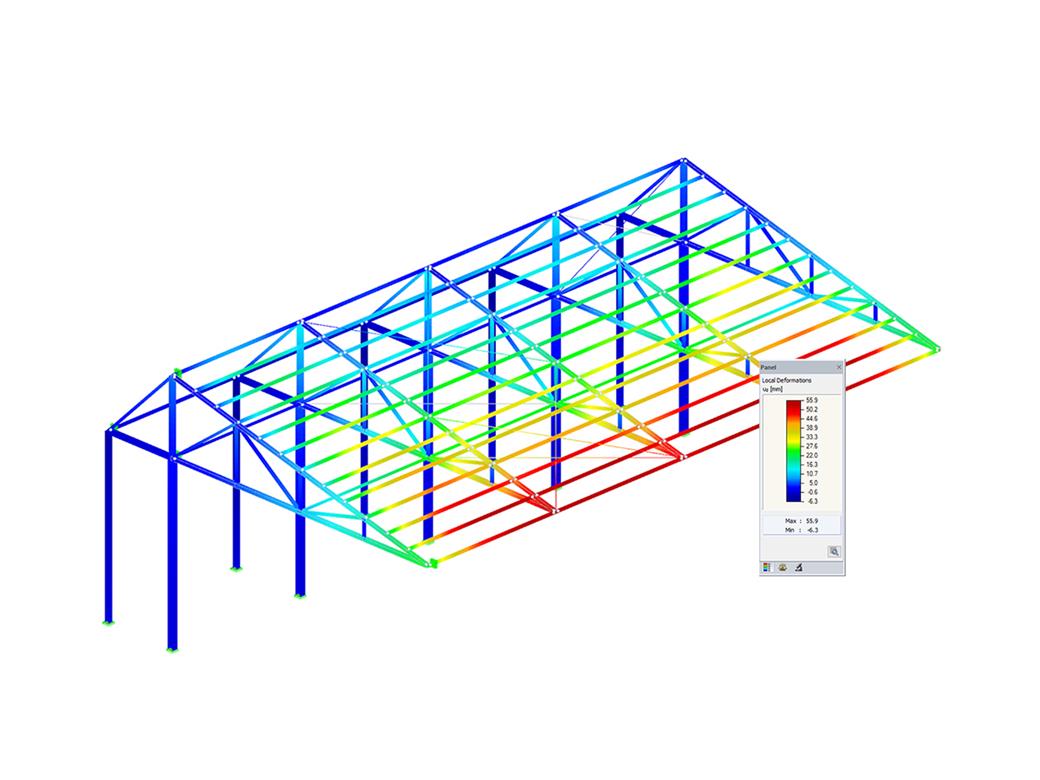
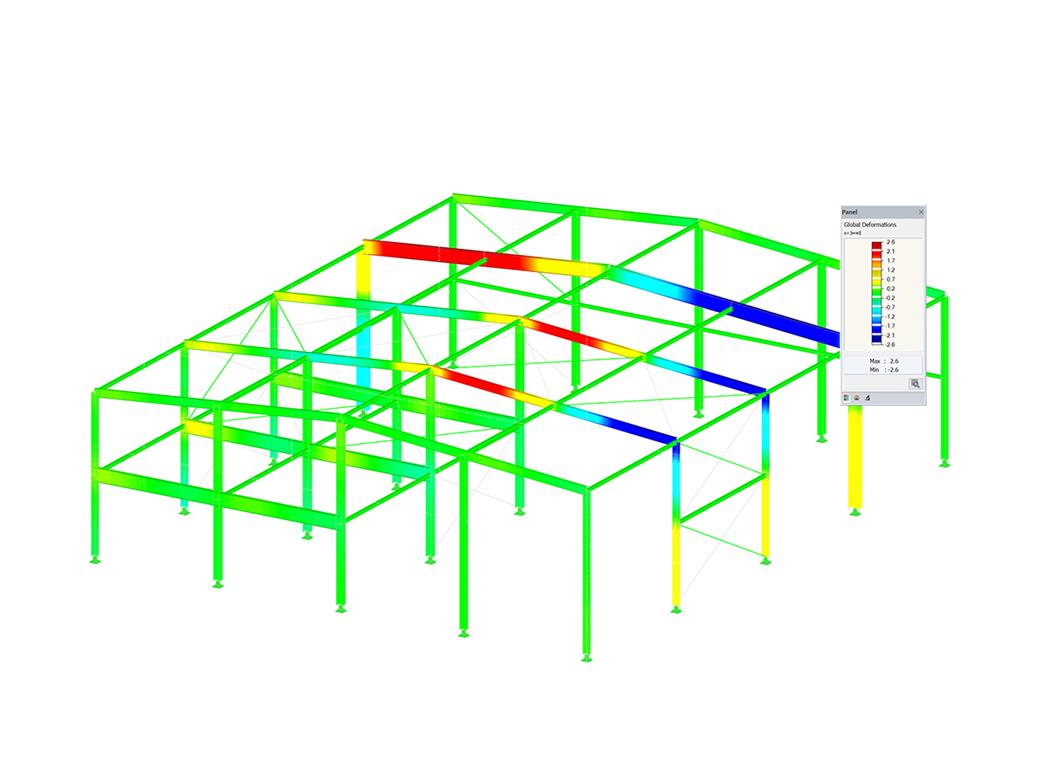
Design of Steel Members According to EC 3
  • 3D Viewer
  • 3D Viewer | Babylon
  • Virtual Reality
Stress Analysis of Framework in RSTAB
  • 3D Viewer
  • 3D Viewer | Babylon
  • Virtual Reality
Your browser does not support the video tag.
  • 3D Viewer
  • 3D Viewer | Babylon
  • Virtual Reality
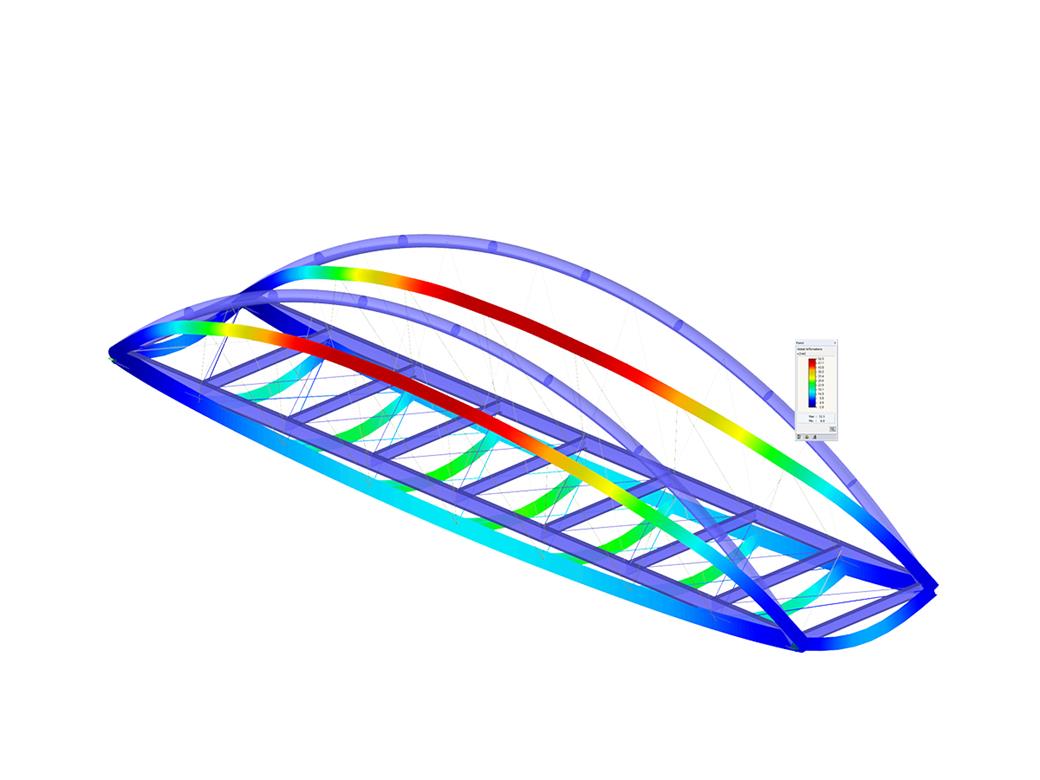
RSTAB Model of Arch Bridge
  • 3D Viewer
  • 3D Viewer | Babylon
  • Virtual Reality
  • General
  • RF-STEEL EC3 5
  • Steel Structures
    • Eurocode 3

RF-/STEEL EC3 | Features

  • Import of materials, cross-sections, and internal forces from RFEM/RSTAB
  • Steel design of thin‑walled cross‑sections according to EN 1993‑1‑1:2005 and EN 1993‑1‑5:2006
  • Automatic classification of cross-sections according to EN 1993-1-1:2005 + AC:2009, Cl. 5.5.2, and EN 1993-1-5:2006, Cl. 4.4 (cross-section class 4), with optional determination of effective widths according to Annex E for stresses under fy
  • Integration of parameters for the following National Annexes:
  • DE | Flag DIN EN 1993-1-1/NA:2015-08 (Germany)
  • Austria | Flag ÖNORM B 1993-1-1:2007-02 (Austria)
  • Belgium Flag NBN EN 1993-1-1/ANB:2010-12 (Belgium)
  • Bulgaria | Flag BDS EN 1993-1-1/NA:2008 (Bulgaria)
  • Denmark Flag DS/EN 1993-1-1 DK NA:2015 (Denmark)
  • Finland Flag SFS EN 1993-1-1/NA:2005 (Finland)
  • France Flag NF EN 1993-1-1/NA:2007-05 (France)
  • Greek Flag ELOT EN 1993-1-1 (Greece)
  • Italy Flag UNI EN 1993-1-1/NA:2008 (Italy)
  • Lithuania Flag LST EN 1993-1-1/NA:2009-04 (Lithuania)
  • Luxemburg Flag UNI EN 1993-1-1/NA:2011-02 (Italy)
  • Malaysia Flag MS EN 1993-1-1/NA:2010 (Malaysia)
  • Flag of the Netherlands NEN EN 1993-1-1/NA:2011-12 (Netherlands)
  • NS EN 1993-1-1/NA:2008-02 (Norway)
  • Poland Flag PN EN 1993-1-1/NA:2006-06 (Poland)
  • Portugal Flag NP EN 1993-1-1/NA:2010-03 (Portugal)
  • Romania Flag SR EN 1993-1-1/NB:2008-04 (Romania)
  • Sweden Flag SS EN 1993-1-1/NA:2011-04 (Sweden)
  • Singapore Flag SS EN 1993-1-1/NA:2010 (Singapore)
  • Slovakia Flag STN EN 1993-1-1/NA:2007-12 (Slovakia)
  • Slovenia Flag SIST EN 1993-1-1/A101:2006-03 (Slovenia)
  • Spain Flag UNE EN 1993-1-1/NA:2013-02 (Spain)
  • CS | Flag CSN EN 1993-1-1/NA:2007-05 (Czech Republic)
  • EN-GB | Flag BS EN 1993-1-1/NA:2008-12 (the United Kingdom)
  • Cyprus Flag CYS EN 1993-1-1/NA:2009-03 (Cyprus)
  • In addition to the National Annexes (NA) listed above, you can also define a specific NA, applying user‑defined limit values and parameters.
  • Automatic calculation of all required factors for the design value of flexural buckling resistance Nb,Rd
  • Automatic determination of the ideal elastic critical moment Mcr for each member or set of members on every x-location according to the Eigenvalue Method or by comparing moment diagrams. You only have to define the lateral intermediate supports.
  • Design of tapered members, unsymmetric sections or sets of members according to the General Method as described in EN 1993-1-1, Cl. 6.3.4
  • In the case of the General Method according to Cl. 6.3.4, optional application of "European lateral-torsional buckling curve" according to Naumes, Strohmann, Ungermann, Sedlacek (Stahlbau 77 [2008], pp. 748‑761)
  • Rotational restraints can be taken into account (trapezoidal sheeting and purlins)
  • Optional consideration of shear panels (for example, trapezoidal sheeting and bracing)
  • RF-/STEEL Warping Torsion module extension (license required) for stability analysis according to the second-order analysis as stress analysis including consideration of the 7th degree of freedom (warping)
  • Module extension RF-/STEEL Plasticity (license required) for plastic analysis of cross‑sections according to Partial Internal Forces Method (PIFM) and Simplex Method for general cross‑sections (in connection with the RF‑/STEEL Warping Torsion module extension, it is possible to perform the plastic design according to the second‑order analysis)
  • Module extension RF-/STEEL Cold-Formed Sections (license required) for ultimate and serviceability limit state designs for cold-formed steel members according to the EN 1993-1-3 and EN 1993-1-5 standards
  • ULS design: Selection of fundamental or accidental design situations for each load case, load combination, or result combination
  • SLS design: Selection of characteristic, frequent, or quasi-permanent design situations for each load case, load combination, or result combination
  • Tension analysis with definable net cross-section areas for member start and end
  • Weld designs of welded cross-sections
  • Optional calculation of warp spring for nodal support on sets of members
  • Graphic of design ratios on cross-section and in RFEM/RSTAB model
  • Determination of governing internal forces
  • Filter options for graphical results in RFEM/RSTAB
  • Representation of design ratios and cross‑section classes in the rendered view
  • Color scales in result windows
  • Automatic cross-section optimization
  • Transfer of optimized cross-sections to RFEM/RSTAB
  • Parts lists and quantity surveying
  • Direct data export to MS Excel
  • Verifiable printout report
  • Possibility to include the temperature curve in the report
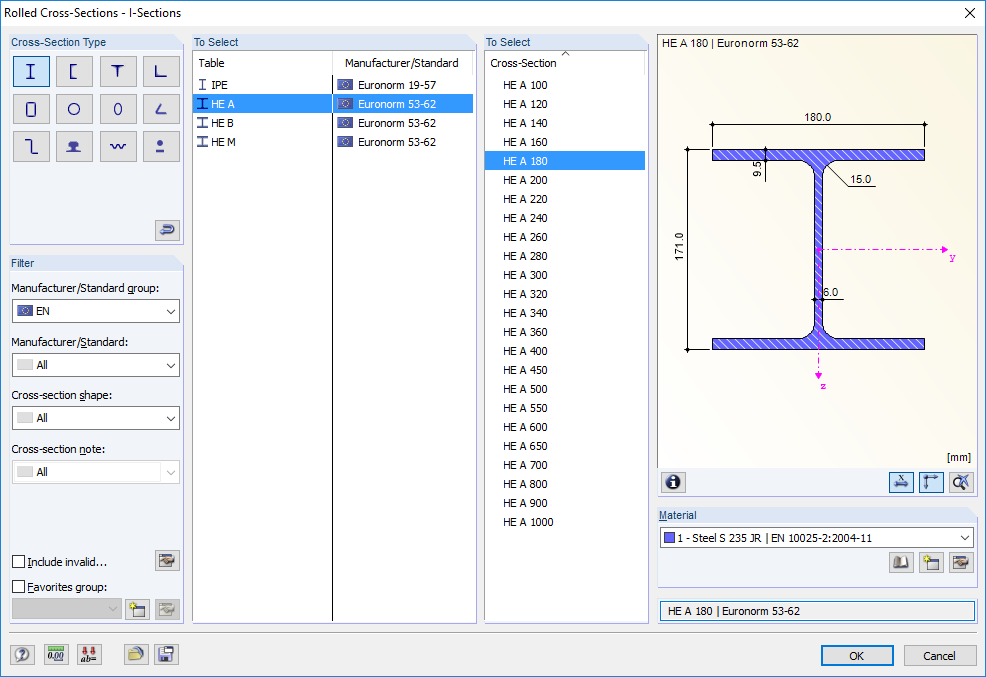
Select Cross-Section for Design
  • General
  • RF-STEEL EC3 5
  • Steel Structures
    • Eurocode 3

RF-STEEL EC3 | Input

RF-/STEEL EC3 automatically imports the cross-sections defined in RFEM/RSTAB. It is possible to design all thin-walled cross-sections. The program automatically selects the most efficient method according to standards.

The ultimate limit state design takes into account several loads and you can select the interaction designs available in the standard.

The classification of designed cross-sections into Classes 1 to 4 is an essential part of the analysis according to Eurocode 3. This way, you can check the limitation of the design and rotational capacity by means of the local buckling of cross-section parts. RF-/STEEL EC3 determines the c/t-ratios of the cross-section parts subjected to compression stress and performs the classification automatically.

For the stability analysis, you can specify for each member or set of members whether flexural buckling occurs in the y- and/or the z-direction. You can also define additional lateral restraints in order to represent the model close to reality. The slenderness ratio and elastic critical load are determined automatically on the basis of the boundary conditions of RF-/STEEL EC3. The elastic critical moment for lateral-torsional buckling required for the lateral-torsional buckling analysis can be determined automatically or specified manually. The load application point of transverse loads, which has an influence on the torsional resistance, can also be taken into account via the setting in the details. In addition, you can take into account rotational restraints (for example trapezoidal sheeting and purlins) and shear panels (for example trapeziodal sheeting and bracing).

In modern construction, where cross-sections are increasingly slender, the serviceability limit state is an important factor in structural analysis. RF-/STEEL EC3 assigns load cases, load combinations, and result combinations to different design situations. The respective limit deformations are preset in the National Annex and can be adjusted, if necessary. In addition, it is possible to define reference lengths and precambers for the design.
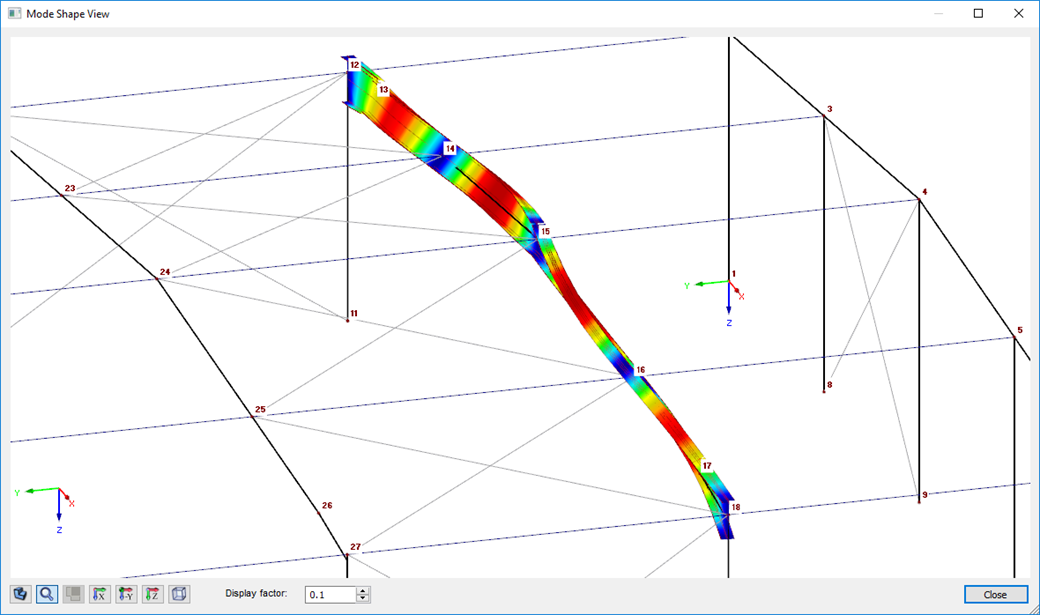
Graphical Display of Mode Shape of Set of Members
  • 3D Viewer
  • 3D Viewer | Babylon
  • Virtual Reality
  • Calculation
  • RF-STEEL EC3 5
  • Steel Structures
    • Eurocode 3

RF-STEEL EC3 | Structural Analysis

When performing the design of tension, compression, bending, and shear loading, the module compares the design values of the maximum load capacity to the design values of the actions.

If the components are subjected to both bending and compression, the program performs an interaction. In RF-/STEEL EC3, you can determine the factors according to Method 1 (Annex A) or Method 2 (Annex B).

The flexural buckling design requires neither the slenderness nor the elastic critical buckling load of the governing buckling case. The module automatically calculates all required factors for the bending stress design value. RF-/STEEL EC3 determines the elastic critical moment for lateral-torsional buckling for each member on every x-location of the cross-section. If required, you only need to specify lateral intermediate supports of the individual members/sets of members, definable in one of the input windows.

If members are selected for the fire resistance design in RF-/STEEL EC3, there is another input window available where you can enter additional parameters, such as: a coating or cladding type. Global settings cover the required time of fire resistance, temperature curve, and other coefficients. The printout report lists all intermediate results and the final result of the fire resistance design. Furthermore, it is possible to print the temperature curve in the report.
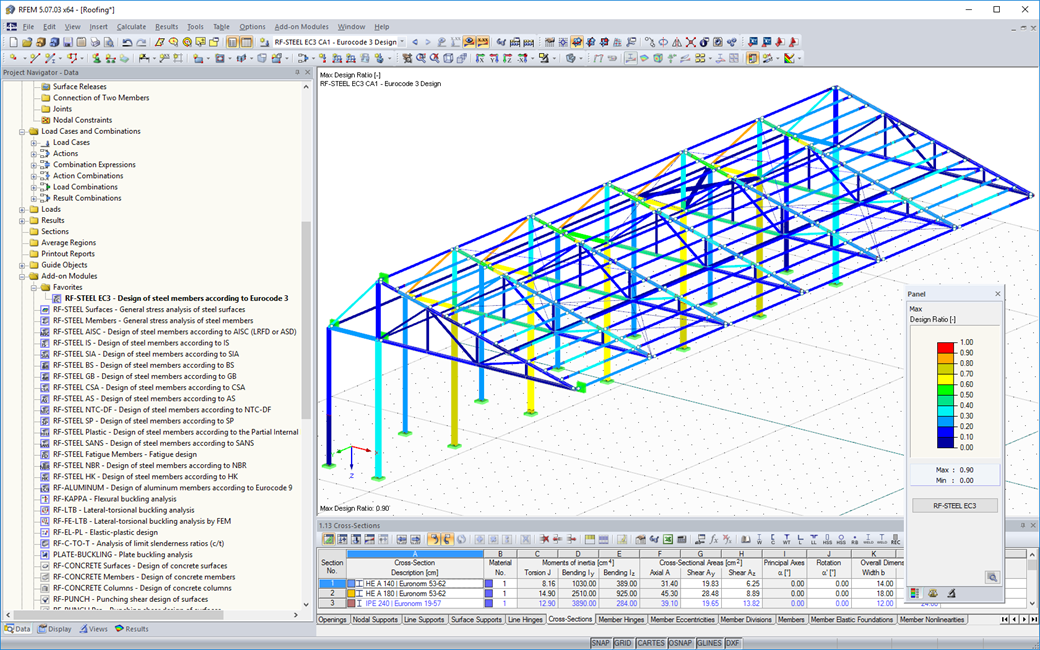
Graphical Results Evaluation
  • 3D Viewer
  • 3D Viewer | Babylon
  • Virtual Reality
  • Results
  • RF-STEEL EC3 5
  • Steel Structures
    • Eurocode 3

RF-STEEL EC3 | Results

The results sorted by load case, cross-section, member, set of members, or x-location are displayed in clearly arranged result windows. By selecting the corresponding table row, detailed information about the performed design is displayed.

The results include a comprehensible list of all material and cross-section properties, design internal forces, and design factors. Furthermore, it is possible to display the distribution of internal forces of each x-location in a separate graphic window.

Parts lists by members/sets of members for the individual cross-section types complete the detailed and structured display of results. To print input data and results, you can use the global printout report in RFEM/RSTAB.

For further processing of various data, it is possible to export all tables to MS Excel.
  • Invitation to an online product demonstration highlighting advanced software functionality
    Schedule Online Product Demo

    Experience Dlubal live: schedule your online product demo today!

  • Promotional banner inviting sign-up for a free 90-day trial of Dlubal software products.
    Free Full Version for 90 Days

    The most effective way to get to know Dlubal software is to try it out for yourself.

  • Contact our sales team for expert support on advanced software solutions.
    Contact Our Sales Team

    The Dlubal team is here for you!

Webshop

Customize your individual program package and find out all the prices online!

  • RFEM 5 Family
  • RSTAB 8 Family
Go to the webshop

Calculate Your Price

2,270.00 USD
+0.00 USD
RF-STEEL EC3
Total Amount 2,270.00 USD

The price is valid for United States.

First Steps with RFEM 5

This page provides some useful hints and tips for users who are not familiar with RFEM to facilitate your introduction to our programs.

More Information
First Steps with RFEM 5 First Steps with RFEM 5

Structural Analysis Models to Download

If you are looking for models to practice on or as inspiration for your projects, you've come to the right place. We provide you with a vast number of structural analysis models to download, such as RFEM, RSTAB, or RWIND files.

All Models
Downloadable technical model templates for precise engineering analysis. Downloadable technical model templates for precise engineering analysis.

Integrated Standards for Steel Design

Standards for Steel Design

European Union | Flag EN 1993-1-1:2005 + AC:2009 (Eurocode 3)
European Union | Flag EN 1993-1-3:2010 (Eurocode 3rd | cold-formed sections)
Switzerland | Flag SIA 263 | 2013-01 (Swiss standard)
Italy Flag NTC | 2018-01 (Italian standard)
EN-GB | Flag BS 5950 | 2001-05 (British standard)
EN-US | Flag AISC 360-22 (US standard)
EN-US | Flag AISC 360-16 (US standard)
EN-US | Flag AISC 360-10 (US standard)
EN-US | Flag AISC 341-22 (US standard | seismic)
EN-US | Flag AISC 341-16 (US standard | seismic)
EN-US | Flag AISI S100-16 (US Standard | cold-formed sections)
India | Flag IS 800 | 2007-12 (Indian standard)
People's Republic of China | Flag GB 50017 | 2017-12 (Chinese standard)
People's Republic of China | Flag GB 50018 | 2002-09 (Chinese standard | cold-formed sections)
People's Republic of China | Flag GB 51022 | 2015 (Chinese standard)
People's Republic of China | Flag GB 51249 | 2017 (Chinese standard | Fire resistance)
Canada | Flag CSA S16-19 (Canadian standard)
Canada | Flag CSA S16-14 (Canadian Standard)
Canada | Flag CSA S16-19 (Canadian standard | Earthquake)
Canada | Flag CSA S136-16 (R2021) (Canadian Standard | cold-formed sections)
Australia | Flag AS 4100 | 2020-08 (Australian standard)
Russia | Flag SP 16.13330 | 2017-02 + Rev. 1 | 2019, Rev. 2 | 2020 (Russian standard)
Brazil Flag NBR 8800 | 2008-08 (Brazilian standard)
South Africa Flag SANS 10162-1 | 2011-05 (South African Standard)

Annex for EN 1993-1-1

DE | Flag DIN EN 1993-1-1/NA:2016-04 (Germany)
Austria | Flag ÖNORM EN 1993-1-1/NA:2015-12 (Austria)
Switzerland | Flag SN EN 1993-1-1/NA:2016-07 (Switzerland)
Bulgaria | Flag BDS EN 1993-1-1/NA:2015-10 (Bulgaria)
EN-GB | Flag BS EN 1993-1-1/NA:2016-07 (United Kingdom)
European Union | Flag CEN EN 1993-1-1/2015-06 (European Union)
Cyprus Flag CYS EN 1993-1-1/NA:2015-07 (Cyprus)
CS | Flag CSN EN 1993-1-1/NA:2016-06 (Czech Republic)
Denmark Flag DS EN 1993-1-1/NA:2015-07 (Denmark)
Greek Flag ELOT EN 1993-1-1/NA:2017-01 (Greece)
Estonia Flag EVS EN 1993-1-1/NA:2015-08 (Estonia)
Croatia Flag HRN EN 1993-1-1/NA:2016-03 (Croatia)
Ireland Flag I.S. I. 1993-1-1/NA:2016-03 (Irland)
Luxemburg Flag ILNAS EN 1993-1-1/NA:2015-06 (Luxembourg)
Iceland Flag IST EN 1993-1-1/NA:2015-11 (Iceland)
Lithuania Flag LST EN 1993-1-1/NA:2017-01 (Lithuania)
Latvia Flag LVS EN 1993-1-1/NA:2015-10 (Latvia)
Malaysia Flag MS EN 1993-1-1/NA:2010-01 (Malaysia)
Hungary Flag MSZ EN 1993-1-1/NA:2015-11 (Hungary)
Belgium Flag NBN EN 1993-1-1/NA:2015-07 (Belgium)
Flag of the Netherlands NEN EN 1993-1-1/NA:2016-12 (Netherlands)
France Flag NF EN 1993-1-1/NA:2016-02 (France)
Portugal Flag NP EN 1993-1-1/NA:2009-03 (Portugal)
Norway Flag NS EN 1993-1-1/NA:2015-09 (Norway)
Poland Flag PN EN 1993-1-1/NA:2015-08 (Poland)
Finland Flag SFS EN 1993-1-1/NA:2015-08 (Finland)
Slovenia Flag SIST EN 1993-1-1/NA:2016-09 (Slovenia)
Romania Flag SR EN 1993-1-1/NA:2016-04 (Romania)
Serbia SRPS EN 1993/NA:2021-02 (Serbia)
Singapore Flag SS EN 1993-1-1/NA:2019-05 (Singapore)
Sweden Flag SS EN 1993-1-1/NA:2015-06 (Sweden)
Slovakia Flag STN EN 1993-1-1/NA:2015-10 (Slovakia)
Belarus Flag TKP EN 1993-1-1/NA:2015-04 (Belarus)
Spain Flag UNE EN 1993-1-1/NA:2016-02 (Spain)
Italy Flag UNI EN 1993-1-1/NA:2015-08 (Italy)
Structural Analysis and Design Software
Dlubal Software, Inc.

30 South 15th Street, 15th Floor
PA 19103 Philadelphia
United States

+1 (267) 702-2815 [email protected]
Dlubal Software GmbH

Am Zellweg 2
93464 Tiefenbach
Germany

+49 9673 9203-0 [email protected]
Solutions
  • Reinforced Concrete Structures
  • Steel Structures
  • Timber and Wood Structures
  • Steel Joints
Products
  • RFEM 6
  • RSTAB 9
  • RSECTION 1
  • RWIND 3
Support
  • Frequently Asked Questions (FAQ)
  • Ask Individual Question
  • Geo-Zone Tool for Load Determination
  • Contact Our Sales Team
News
  • Subscribe to Newsletter
  • Current News
  • Event Overview
  • Online Training
Resources
  • Free Full Trial Version
  • Submit Customer Project
  • Customer Projects
  • Online Manuals
Join Dlubal
Dlubal Community YouTube Facebook LinkedIn Twitter Instagram Pinterest TikTok
© 2001-2025 Dlubal Software GmbH | All rights reserved
Legal Notice
About Us
Sitemap
Language
  • Deutsch
  • English
  • Français
  • Español
  • Português
  • Italiano
  • Česky
  • Polski
  • Pусский
  • 中文(简体)