Community
    Sign in to your account

    Sign up for the Dlubal Extranet to get most of the software and have exclusive access to your personal data.

    Create Account
    By signing-in you agree to Dlubal Conditions of Use & Sale. Please see our Privacy Notice, our Cookies Notice.
    0
    Webshop
    Contact Sales Team
    Language
    • Deutsch
    • English
    • Français
    • Español
    • Português
    • Italiano
    • Česky
    • Polski
    • Pусский
    • 中文(简体)
    • Industries
      • Reinforced Concrete Structures
      • Prestressed Concrete Structures
      • Steel Structures
      • Wood & Mass Timber Structures
      • Masonry Structures
      • Aluminum and Lightweight Structures
      • Buildings
      • Industrial Structures and Plants
      • Pipelines
      • Bridge Structures
      • Cranes and Craneways
      • Towers and Masts
      • Glass Structures
      • Tensile Membrane Structures
      • Cable and Tensile Structures
      • Laminate and Sandwich Structures
      • Temporary Structures
      • Scaffolding and Rack Structures
      • Offshore Structures
      • Silos and Storage Tanks
      • Renewable Energy Plants
      • Solar Structures & Mounting Systems
      • Shipbuilding and Floating Bodies
      • Conveyor Structures
      • Drilling Structures
      • Swimming Pools and Water Parks
      • Container Structures
      • Drilled Pile Foundations
      • Staircase Structures
      • Power Plants
      • Hydraulic Steel Engineering
      • Mechanical Engineering
      • Pneumatic Structures
      Application Areas
      • Structural Engineering
      • Finite Element Analysis (FEA)
      • Wind Simulation and Wind Load Generation
      • Stress Analysis
      • Nonlinear Analysis
      • Stability Analysis
      • Nonlinear Buckling Analysis
      • Warping Torsion Analysis
      • Dynamic and Seismic Analysis
      • Nonlinear Dynamic Analysis
      • Pushover Analysis
      • Form-Finding and Cutting Patterns
      • Steel Joints
      • BIM Planning
      • Cold-Formed Sections
      • Soil-Structure Interaction
      • Facade Analysis
      • Foundations and Foundation Engineering
      • Construction Stages
      • Fire Resistance
      Standards
      • Eurocodes (EC)
      • German Standards (DIN)
      • British Standards (BS EN, BS)
      • Italian Standards (NTC)
      • US Standards
      • Canadian Standards (CSA)
      • Australian Standards (AS)
      • Swiss Standards (SIA)
      • Chinese Standards (GB, HK)
      • Indian Standards (IS)
      • Mexican Standards (RCDF, CFE Sismo 15)
      • Russian Standards (SP)
      • South African Standards (SANS)
      • Brazilian Standards (NBR)
      Online Services
      • Geo-Zone Tool Top Menu Icon Snow Load, Wind Speed, and Seismic Load Maps
      • Cloud Calculation Icon Cloud Calculations
      • Structural Analysis Wiki Icon Structural Analysis Wiki
      • Cross-Section Properties of Steel and Timber Sections Icon Cross-Section Properties of Steel Cross-Sections
      Structural Design for Solar Systems

      Dlubal Software helps you create and verify any solar mounting system. Work efficiently with steel, aluminum, and concrete structures in a single environment.

      Explore Tools
      Solar Structures Solar Structures | Mobile Version
      Dlubal API

      The new Dlubal API service (gRPC) provides you with a flexible interface to the structural analysis software based on Python and C#, with direct access to the entire Dlubal product range.

      Start With API
      Background for the main menu banner API Background for the main menu banner API
    • Icon representing RFEM 6, a finite element analysis software application. RFEM 6 Only Structural Analysis and Design Software You Need for Your Projects

      RFEM 6 serves as the basis of the modular program family and is used to define structures, materials, and actions for plate, wall, shell, and beam structures, as well as for solids and contact elements.

      More Information
      Add-on Switch Icon Add-ons
      • Additional Analyses
      • Dynamic Analysis
      • Special Solutions
      • Design
      • Connections
      RSTAB 9 Icon without borders RSTAB 9 Iconic Frame and Truss Analysis Software

      RSTAB 9 is a powerful analysis and design software for 3D beam, frame, or truss structure calculations, reflecting the current state of the art and helping structural engineers meet requirements in modern civil engineering.

      More Information
      Add-on Switch Icon Add-ons
      • Additional Analysis
      • Dynamic Analysis
      • Special Solutions
      • Design
      RSECTION 1 Icon without borders RSECTION 1 User-Defined Cross-Section Properties

      RSECTION supports structural engineers by determining cross-section properties for a wide variety of cross-sections and allowing for subsequent stress analysis.

      More Information
      RWIND 3 Icon without borders RWIND 3 CFD Software for Digital Wind Tunnels

      RWIND 3 is a digital wind tunnel for simulating wind flows around any building geometry and for the calculation of the wind loads on their surfaces.

      More Information
      API Icon Dlubal API Your Gateway to Parametric Modeling and Automation

      The new Dlubal API service (gRPC) provides you with a flexible interface to the structural analysis software based on Python and C#, with direct access to the entire Dlubal product range. Benefit from seamless and powerful integration into your Dlubal software—ideal for parametric modeling and complex optimization tasks.

      Discover API
      API Documentation API Documentation
      • Index
      • Getting Started
      • Applications
      • Model Objects
      • Subscriptions & Pricing
      • Examples
      FEA for Steel Connections

      Design and analyze steel connections using CBFEM, compliant with EN 1993‑1‑8 and AISC 360, fully integrated in RFEM 6 for faster, more accurate structural workflows.

      Learn More
      Steel Connections Steel Connections
      Geo-Zone Tool

      The Dlubal online service provides zone maps for quick determination of snow loads, wind speeds, and seismic data.

      CHECK LOAD ZONES
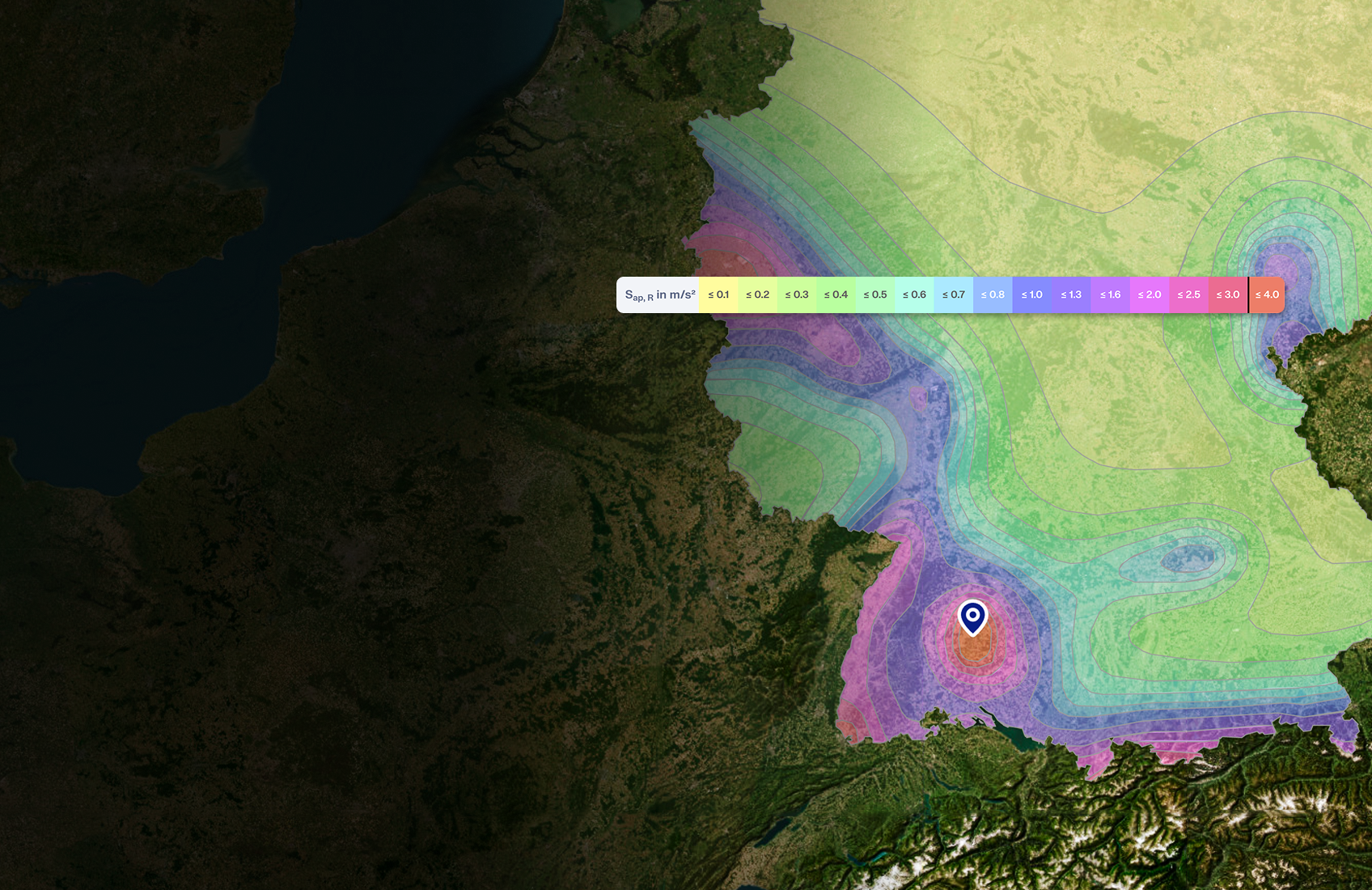
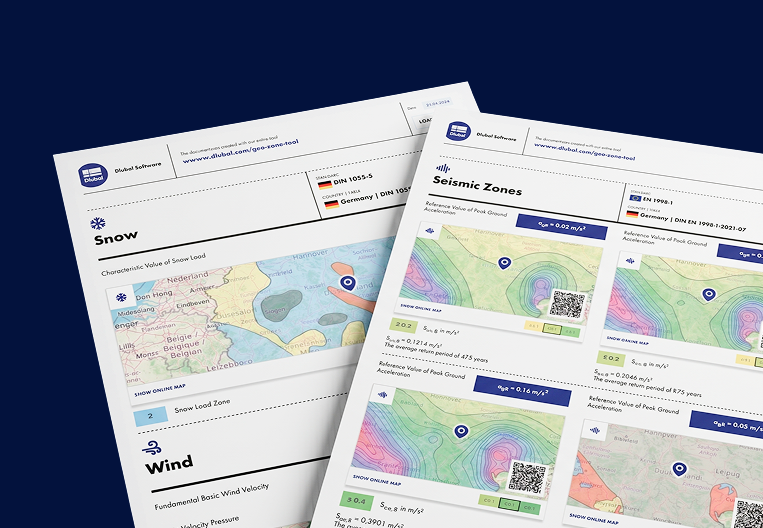
      Geo-zone tool visual displaying snow, wind, and seismic maps with illustrations for environmental load assessments. Illustration of snow, wind, and seismic geo-zone maps on a mobile version showing various regions and data.
      Outdated Products
    • Support
      • Frequently Asked Questions (FAQ)
      • Knowledge Base
      • Product Features
      • Licensing
      • Ask Individual Question
      • Our Support Team
      • Submit Program Feature or Idea
      • FAQ for Licensing & Authorization 
      • Report Problem or Program Issue
      • Program Updates
      • Program Issues
      • Formulas | Math is fun!
      Training
      • First Steps with RFEM
      • First Steps with RSTAB
      • Online Training
      • Training at Dlubal
      • Individual Training
      • Videos
      • E-Learning Videos
      • Webinars – Learn Online
      • Online Courses
      Service
      • Free Support / Service
      • Geo-Zone Tool for Load Determination
      • Extranet | My Account
      • Project Support
      • Service Contract
      • Updates & Upgrades
      • Previous Program Versions
      Sales
      • Webshop
      • Our Sales Team
      • Contact Our Sales Team
      • Schedule an online product demo
      • Why Dlubal Software
      AI Support Assistant
      • Mia – Your 24/7 AI Assistant
      • Discover Your Personal AI Assistant
      Free Support & Service

      Need help? Access free support options including 24/7 AI assistance, email support, and webinars.

      Learn More
      Free Support & Service Free Support & Service
      Find Answers Fast

      Find quick answers to common questions about Dlubal Software. Search or filter hundreds of FAQ to solve issues in no time.

      View FAQ
      Frequently Asked Questions (FAQ) FAQ | Mobile Version
    • News
      • Current News
      • New Product Features
      • Subscribe to Newsletter
      • New Programs
      • Dlubal Blog
      Training
      • Online Training
      • Individual Training
      Events
      • Event Overview
      • Trade Fairs and Conferences
      • Webinars
      Master Engineering with Webinars

      Join industry leaders and explore solutions in structural engineering and software. Enhance your skills with our live sessions!

      See Next Webinars
      3D FEA Software RFEM 6 | First Steps Menu Banner Image | News Webinars | Mobile Version
      Unlock the Power of Innovation

      Discover cutting-edge tools and enhancements designed to boost your engineering workflow.

      Explore New Features
      Explore New Features Menu Banner Image | News_ProductFeatures | Mobile Version
    • Download Full Version

      Would you like to try out the capabilities of the Dlubal Software programs? You have the opportunity to do so! With the free 90-day full version you can thoroughly test all our programs.

      Start Trial Version Now
      Dlubal Free Zone

      In the Dlubal free zone, you can access webinars, articles, and software trial versions—all free of charge and conveniently located in one place.

      More Information
      Examples
      • Structural Analysis Models to Download
      • Submit Structural Analysis Model
      • Introductory Examples and Tutorials
      • Verification Examples
      • Image Overview
      Documents
      • Online Manuals
      • Manuals
      • Leaflets, Brochures, and Certificates
      References
      • Customer Projects
      • Why Submit Your Customer Project?
      • How to Submit Customer Project?
      • Submit Customer Project
      Free Models to Download

      Explore thousands of ready-to-use structural models. Download, adapt, and use them as templates to accelerate your design process.

      Discover Models
      Structural Analysis Models to Download Free Models to Download | Mobile Version
      Dlubal Free Zone

      Get expert help whenever you need it. Enjoy free AI assistance, email support, live webinars, and premium services for Service Contract Pro users.

      Get Support
      Free Support & Service Free Support & Service | Mobile Version
    • E-Learning
      • RFEM 6 for Beginners
      • RFEM 6 for Students
      • Programming with RFEM 6 and Python
      • RFEM 6 with Rhino & Grasshopper
      • RFEM 5 for Beginners
      • Modeling with RFEM 5
      • Structural Analysis Learning Videos for Students
      • Quick Tutorials for Dlubal Programs
      • Best Tips and Tricks in RFEM
      • Dlubal Online Training Recordings
      • Recorded Dlubal Webinars
      Students and Schools
      • Free Structural Analysis Software for Students
      • Request or Renew Free Student License
      • Request for Free Instructor License
      • Submit Thesis
      • Why Submit Your Thesis?
      • Graduation Theses with Dlubal Structural Analysis Software
      • Free Structural Analysis Software for Educational Institutions
      • Request School Package
      • Free Introductory Training at Your University
      • Request Training Date
      Knowledge Platform
      • First Steps with RFEM
      • Videos
      • Online Manuals
      • Structural Analysis Wiki
      • Knowledge Base
      • Frequently Asked Questions (FAQ)
      Infotainment
      • Podcast
      • Dlubal Blog
      • Introduction to Structural Analysis and Design
      First Steps with RFEM 6

      Take your first steps with RFEM 6 and discover how quickly you can model and calculate. Customize with add-ons for even more possibilities.

      Get Started
      3D FEA Software RFEM 6 | First Steps Menu Banner Image | News Webinars | Mobile Version
      Free Structural Analysis Software for Students

      Thousands of students worldwide already benefit from Dlubal Software. Enjoy free access, training, and expert support throughout your studies.

      Get Free License
      Free Structural Analysis Software for Students Free Structural Analysis Software for Students
    • About Us
      • History and Facts
      • Company Philosophy
      • Why Dlubal Software?
      • Product Comparison
      • Quality Policy
      • Our Team
      Contact
      • Dlubal Locations Worldwide
      • Authorized Dlubal Resellers
      References
      • Customer Reviews
      • Customer Projects
      • Case Studies
      • Why submit your customer project?
      • Verification Examples
      • Your Review
      • Participation in Research Projects
      Our Customers

      We present our customers who realize their projects with Dlubal Software. Learn how our customers worldwide implement innovative solutions in construction and engineering using advanced tools for structural analysis and dynamic analysis.

      View Our Customers
      Building Success Together

      Discover how leading engineers around the world trust our solutions to elevate their projects with us.

      See Our Customers
      See Our Customers Menu Banner Image | Company_OurCustomers_Mobile
      Meet the Experts

      Our dedicated engineers are here to assist you with modeling, design, and technical challenges—anytime, anywhere.

      Connect with Support
      Our Team Menu Banner Image | Company_OurTeam | Mobile Version
    • Career
      • Jobs
      • Teams
      • Colleague Blog
      • Insights
      Jobs
      • All Open Positions
      • Product Development
      • Customer Support
      • Sales
      • Marketing
      • Software Development
      • Administration
      • Interns
      • Others
      Teams
      • Product Development
      • Customer Service
      • Sales
      • Marketing
      • Software Development
      • Administration
      Why Dlubal?
      • Company Culture
      • Employee Benefits
      Build Your Future with Us

      Reveal how our team shapes the future of engineering. Experience innovation, growth, and exciting challenges.

      Your Career Opportunities
      Career at Dlubal Menu Banner Image | Career at Dlubal Mobile
      Find Your Dream Job

      Join a global leader in engineering software and take your career to new heights.

      Explore Open Positions
      All Open Positions Menu Banner Image | Open Positions Mobile
    • Webshop
    Main Products
    Icon representing RFEM 6, a finite element analysis software application.
    RFEM 6
    RSTAB 9 Icon without borders
    RSTAB 9
    RWIND 3 Icon without borders
    RWIND 3
    RSECTION 1 Icon without borders
    RSECTION
    Online Services
    Geo-Zone Tool icon
    Geo-Zone Tool
    Cross-section Properties
    Cross-Section Properties
    API Icon
    API
    Cloud Calculation Icon
    Cloud Calculation
    Downloadable Models
    Downloadable Models
    Dlubal Community Icon
    Dlubal Community
    Knowledge Base Articles Icon
    Knowledge Base
    Online Webinars
    Webinars
    Sign in to your account

    Sign up for the Dlubal Extranet to get most of the software and have exclusive access to your personal data.

    Login Create Account
    90-Day Free Trial
    Sign in to your account

    Sign up for the Dlubal Extranet to get most of the software and have exclusive access to your personal data.

    Login Create Account
    • Support & Training
    • Service
    • Geo-Zone Tool for Load Determination
    Online Tool | No Installation Required

    Geo-Zone Tool

    Retrieve snow, wind, seismic, and other load zone data. The Geo-Zone Tool features zone maps for many countries worldwide, and can be accessed via the browser app or our GraphQL API, as well as our client libraries for Python and C#.

    Open Geo-Zone Tool { } API Documentation
    Illustration showcasing the new geo-zone feature for structural analysis, using color-coded maps to indicate regions. Visual depiction of the new geo-zone tool for enhanced site analysis and optimization in engineering projects.
    • Overview
    • Use Cases
    • Product Features
    • Supported Standards
    • API Documentation
    • FAQ
    Subscriptions & Prices
    Geo-Zone Tool icon

    Characteristic Load Values,
    Directly from the Map

    Structural engineers spend significant time locating snow zones, wind maps, and seismic hazard values before any calculation begins. Each country publishes these data in different formats: national annexes, map appendices, and altitude correction tables scattered across multiple documents.

    Geo-Zone Tool eliminates that manual lookup. Enter a postal code or address, or click anywhere on the interactive map. The tool automatically identifies the exact location, detects site altitude, and returns characteristic design values compliant with the selected standard.

    The results are immediately usable in structural analysis. RFEM 6 and RSTAB 9 users can transfer values directly into load cases with no copy-paste or tool switching required.

    Your browser does not support the video tag.

    Your Advantages

    Characteristic load values for any location worldwide, referenced to the applicable standard

    50+ international standards and national annexes, from Eurocodes to ASCE 7, IS 875, and AS 1170

    All characteristic values in one clear PDF report ready for project documentation

    Direct integration with RFEM 6 and RSTAB 9 - values transfer into load cases without manual entry

    Use Cases

    Geo-Zone Tool is used at the very start of a structural project, before the first calculation begins. It replaces manual cross-referencing of national annexes, zone maps, and altitude tables with a single, precise location lookup.
    A PDF printout report from the Geo-Zone Tool showcasing engineering data and figures finalized for reference use. A PDF printout report from the Geo-Zone Tool showcasing engineering data and figures finalized for reference use.
    Roof Load Determination

    Enter the project postcode, select the standard, and get s_k with altitude correction applied. Ready for the roof load combination.

    Wind Load Input Before Facade and Cladding Design

    Get v_b,0, terrain category, and the full wind pressure profile in one session. The Wind Profile module returns V_m(z), I(z), and q_h(z) at every height level.

    Seismic Zone Check Before Committing to Dynamic Analysis

    Confirm the seismic zone and PGA for the relevant return periods before starting a full response spectrum analysis.

    Load Parameters for Projects in Unfamiliar Countries

    Select the applicable standard from 50+ supported codes and get the correct zone values, terrain category, and characteristic loads.

    Key Features

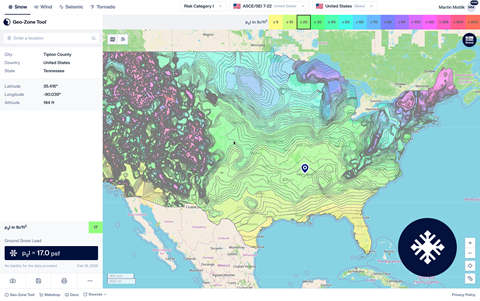
    Map depicting snow load zones across the United States using the Geo-Zone Tool.

    For Snow

    Ground snow load maps per ASCE/SEI 7-22. Returns p_g in psf directly from the contour map for the site location.
    • Ground snow load [psf]
    • Auto detected site altitude [ft]
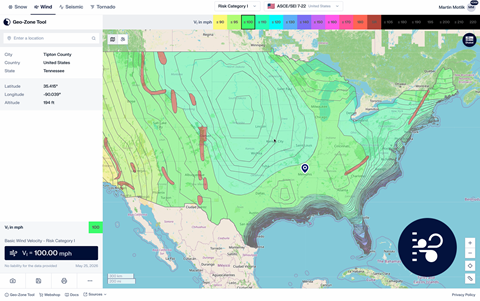
    Map illustrating wind load zones for various regions across the USA, used in the Geo-Zone Tool for accurate wind load calculations.

    For Wind

    Basic wind speed maps per ASCE/SEI 7-22 and 7-16. Returns wind velocity in mph for all Risk Categories, including special wind regions.
    • Basic wind speed [mph]
    • Risk Category I–IV
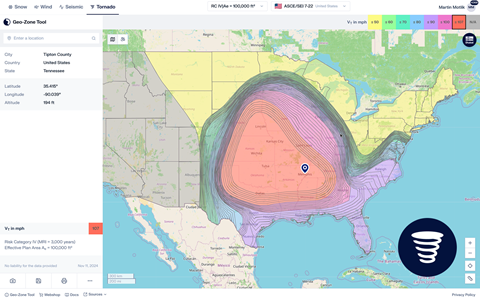
    Geo-Zone Tool displaying US tornado zone map based on regional risk factors.

    For Tornado

    Tornado design wind speed per ASCE/SEI 7-22 and 7-16. Required for Risk Category III–IV structures.
    • Tornado design wind speed [mph]
    • Effective plan area A_e selector
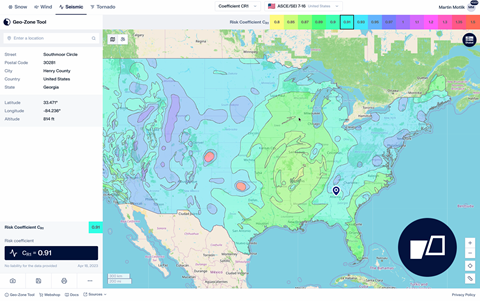
    A screenshot of the Geo-Zone Tool displaying seismic zones across the United States, highlighting varying levels of seismic activity.

    For Seismic Hazard

    Seismic design parameters per ASCE/SEI 7-16. Returns mapped ground motion values, design spectral accelerations, and Seismic Design Category.

    • Ground Motion Parameter
    • Peak Ground Acceleration

    Wind Profiles

    Facade engineers and cladding designers need to understand how wind behaves at every floor level, not just the basic wind speed value. The Wind Profile module computes the full vertical distribution of wind velocity, turbulence intensity, and wind pressure per EN 1991-1-4 and other supported standards.

    • V_m(z) mean wind velocity profile at any height
    • I(z) turbulence intensity distribution over the full building height
    • q_h(z) wind pressure profile for facade and cladding design
    Illustration of wind velocity, turbulence intensity, and wind pressure distribution using the Wind Profile module in the Geo-Zone Tool.

    Accelerograms | Real Ground Motion Records

    Response spectrum analysis requires representative ground motion input. The Accelerogram module gives structural engineers direct access to real recorded earthquake data from 145+ measurement stations, all within the Geo-Zone Tool environment.

    • 145+ seismic stations across Italy, the US, and global networks
    • Peak acceleration values ax, ay, and az for each recorded event
    • Full time-series data export for time-history analysis
    • Filter by station, event date, focal depth, and soil type
    Your browser does not support the video tag.

    Hazard Tool | Seismic Design Parameters

    Seismic design to ASCE 7 requires more than a single PGA value. The Seismic Design Parameters module provides the complete set of ASCE/SEI 7-22 site-specific parameters for any US location.

    This comprehensive dataset includes mapped ground motion values, design spectral accelerations, the Seismic Design Category, and both Multi-Period and Two-Period design spectra.

    Screenshot of Geo-Zone Tool displaying ASCE/SEI 7-22 seismic design parameters for site-specific hazard analysis.
    What Manual Workflows Leave out

    The ASCE Hazard Tool is the standard reference for ASCE 7 load values. Geo-Zone Tool covers the same data and goes further by connecting directly to your structural analysis software.

    ✦ Geo-Zone Tool
    ASCE Hazard Tool
    Manual Lookup
    ASCE 7 load values — snow, wind, seismic, tornado
    Separate sources per load type
    Structural Analysis Software Integration
    International standards (non-US projects)
    US locations only
    One standard per document
    PDF Printout Reports
    Manual documentation required
    Interactive color-coded zone map
    Tool API Option
    Not available
    Transparent API pricing
    "Request a quote"
    Not available
    Try Geo-Zone Tool Now
    API Icon

    Integrate Geo-Zone Data into
    Your Own Workflow

    The Geo-Zone Tool API gives software developers and BIM integrators programmatic access to all load zone data. Use it to build automated workflows, populate structural models, or create custom reporting pipelines.
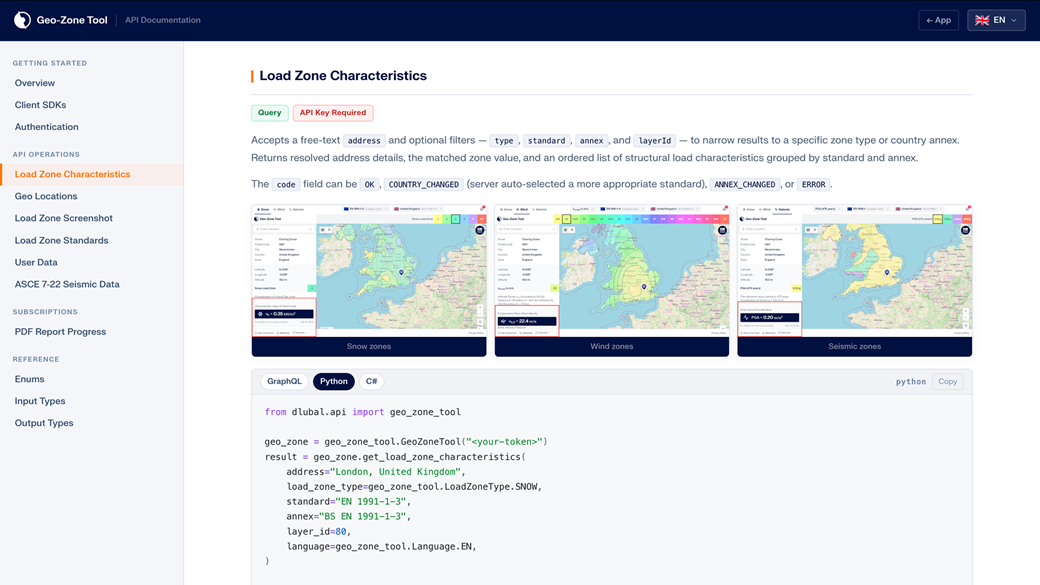
    • GraphQL API with typed requests and responses
    • All three load modules: snow, wind, and seismic
    • Full standard and national annex selection via query parameters
    { } Open API Documentation →
    Screenshot displaying the Geo-Zone Tool's online API documentation at Dlubal, showcasing detailed descriptions and programming instructions.

    Request Packages

    Pay only for what you use. Request packages never expire and require no subscription.
    Buy once and use at your own pace.

    Free
    No registration required. Try Geo-Zone Tool on any location and see the results before you commit.
    No charge 3 Requests Included
    • No account needed
    Try it Now
    500 Requests
    Ideal for individual engineers and occasional project lookups.
    $110.00

    $0.22 / request

    • ~125 complete project setups (snow + wind + seismic)
    Buy Now
    Most Popular
    5,000 Requests
    The right choice for active design teams and regular project work.
    $780.00

    $0.156 / request

    • 30% lower cost per request vs. starter pack
    Buy Now
    15,000 Requests
    Built for high-volume workflows, large engineering companies, and automated pipelines processing multiple projects simultaneously.
    $2,350.00

    $0.156 / request

    • Want to automate? Add API credits to unlock programmatic access
    Buy Now
    Frequently Asked Questions About Geo-Zone Tool
    How does the Geo-Zone Tool pricing work?

    Geo-Zone Tool works on a request-based model. Each location lookup or result generated in the tool consumes one request. Requests are purchased as one-time credit packages of 500, 5,000, or 15,000 requests with no expiration date. No subscription or recurring fee is required. Access to Geo-Zone Tool is through the Dlubal Extranet. Packages are available in the Dlubal Webshop .

    Which standards and national annexes are supported?

    Geo-Zone Tool covers 100+ standards across snow, wind, seismic, and tornado load types, including all EN Eurocode national annexes, ASCE 7, AS 1170, IS 875, SIA 261, NBC, and many more. New standards are added on a regular basis. See the full list on the Supported Standards page .

    How do I transfer the values into RFEM 6 or RSTAB 9?

    Geo-Zone Tool is integrated into the Dlubal software environment. In RFEM 6 and RSTAB 9, you can call Geo-Zone Tool directly from the load case settings. The characteristic values s_k, v_b,0, q_b, and PGA are transferred automatically into the corresponding load case parameters with no copy-paste required.

    What data sources does the tool use?

    Every result is based on the applicable national standard or national annex. Geospatial data is sourced from the following openly available datasets:

    • gadm.org | Administrative boundary data
    • openstreetmap.org | Geographic base data
    • osm-boundaries.com | Boundary data derived from OpenStreetMap
    • Copernicus Corine Land Cover | Land use and terrain classification
    Can I use the results in official project documentation?

    Yes. The PDF export includes all information required for structural documentation: location coordinates and altitude, the applicable standard and national annex, the identified zone, the resulting characteristic value, cited data sources, and the report date.

    Each PDF also includes a QR code that links directly back to the live map view in Geo-Zone Tool, so the report stays permanently connected to its source data and anyone reviewing it can verify the results by scanning the code.

    Can I use Geo-Zone Tool on a mobile device during a site visit?

    Yes. The tool runs entirely in the browser and works on mobile devices and tablets. You can enter the site address or click the map directly from the field to get immediate load zone values.

    Dlubal Community Icon
    Join the Dlubal Community

    Here, you can ask and answer technical questions, engage in meaningful discussions on structural analysis and design, suggest new features, and interact directly with the Dlubal team and fellow users.

    Dark blue icon representing free support service, typically used for websites. It symbolizes assistance and customer service availability.
    Free Support & Service

    Explore our free and professional support options, including 24/7 AI assistance, email support, webinars, and exclusive services for Service Contract Pro customers.

    Get load values
    in under 60 seconds

    No account required. No software installation. Works for any location on Earth, referenced to the standard that applies to your project.

    Illustration of the Geo-Zone Tool icon used for geolocation features in engineering software, showing practical applications for structural analysis and design. Open Geo-Zone Tool API icon representing integration functionality in engineering software. API Documentation
    Structural Analysis and Design Software
    Dlubal Software, Inc.

    30 South 15th Street, 15th Floor
    PA 19103 Philadelphia
    United States

    +1 (267) 702-2815 [email protected]
    Dlubal Software GmbH

    Am Zellweg 2
    93464 Tiefenbach
    Germany

    +49 9673 9203-0 [email protected]
    Solutions
    • Reinforced Concrete Structures
    • Steel Structures
    • Wood & Mass Timber Structures
    • Steel Joints
    Products
    • RFEM 6
    • RSTAB 9
    • RSECTION 1
    • RWIND 3
    Support
    • Frequently Asked Questions (FAQ)
    • Ask Individual Question
    • Snow Load, Wind Speed, and Seismic Load Maps
    • Contact Our Sales Team
    News
    • Subscribe to Newsletter
    • Current News
    • Event Overview
    • Online Training
    Resources
    • Free Full Trial Version
    • Submit Customer Project
    • Customer Projects
    • Online Manuals
    Join Dlubal
    Dlubal Community YouTube Facebook LinkedIn Twitter Instagram Pinterest TikTok
    © 2001-2026 Dlubal Software GmbH | All Rights Reserved
    Legal Notice
    About Us
    Sitemap
    Language
    • Deutsch
    • English
    • Français
    • Español
    • Português
    • Italiano
    • Česky
    • Polski
    • Pусский
    • 中文(简体)