Answer:
If you define a plastic material behavior in your file and enter a yield strength, it is important to understand how the stress is evaluated.
The stress limitation to the yield strength always refers to the entire finite element (whether it is a surface or solid element).
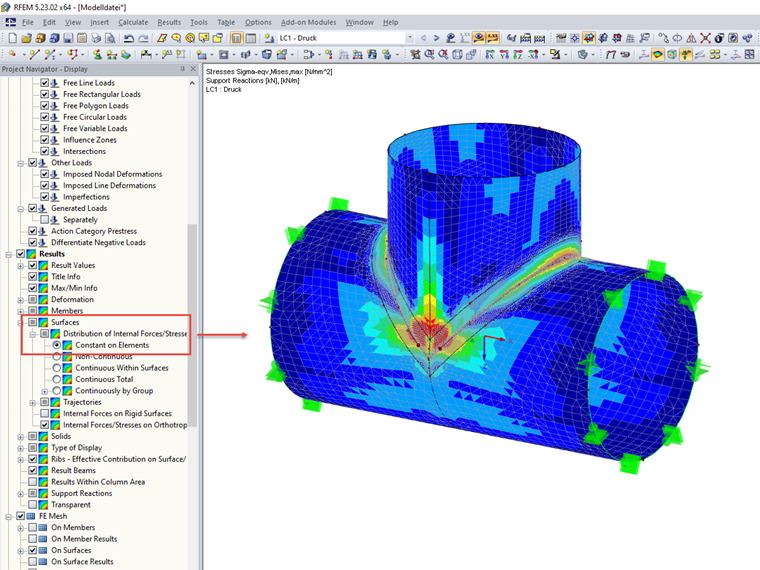
To ensure the correct plastic calculation, it is always necessary to consider the stress with the "Constant in Elements" smoothing type.
Where can I find this setting?
- For surface elements:
- In the Project Navigator, go to Display → Results → Surfaces → Distribution of Internal Forces/Stresses and activate the "Constant in Elements" option.
- For solid elements:
- You can find the corresponding setting under Results → Solids → Distribution of Internal Forces/Stresses → Constant in Elements.
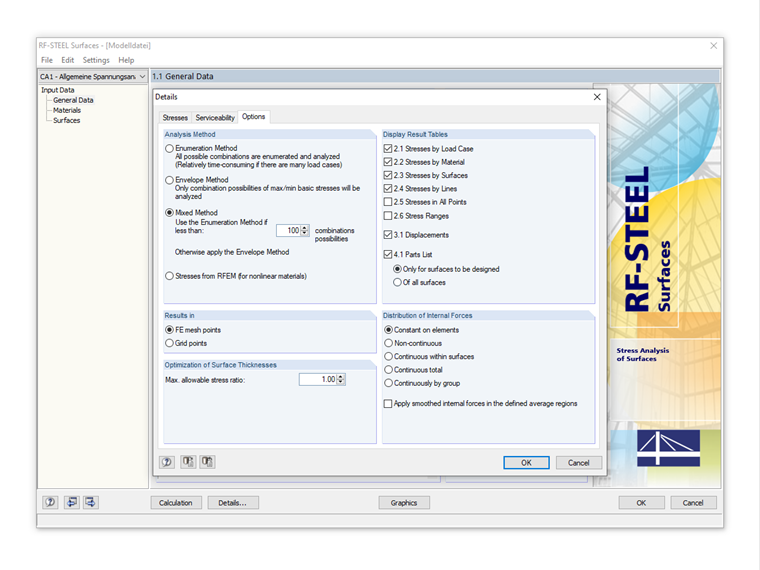
- In RF-STEEL Surfaces:
- Here, you can also switch the stress display to "Constant in Elements". To do this, click the [Details] button and switch to the "Options" tab.
More Information:
A detailed explanation of all smoothing options for surface results can be found in this technical article:
KB 001571 | Internal Forces Diagram/Surface Stresses – Smoothing Options