Installation and Use of Add-on
You can activate or deactivate the “Construction Stages Analysis (CSA)” add-on in the “”Add-ons” tab of the model's Base Data.

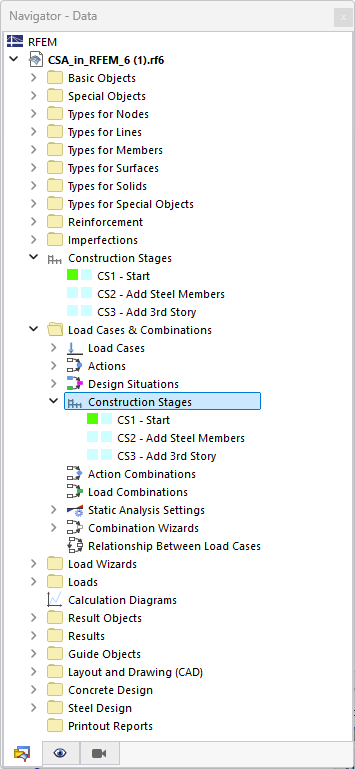
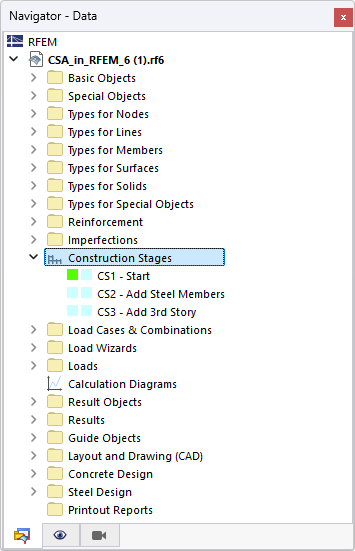
After activating the add-on and selecting a suitable standard, the RFEM user interface is extended with new entries in the navigator (see the following images) as well as with the tables and dialog boxes.
To perform analysis of different construction stages, you should first design the model completely in RFEM. You can then assign the individual construction stages in two areas (Model Side and Load Side).
1. Construction Stages of Model
First, create the individual construction stages in the “Construction Stages” dialog box and assign the respective structural objects. The entries are managed in the Data Navigator in the “Construction Stages” category. As an alternative, you can access the dialog box via the menu bar → Editing → Construction Stages.
2. Construction Stages of Loads
Then, assign the corresponding load cases and combinations to the construction stages listed in the “Load Cases and Combinations” dialog box. The entries are managed in the Data Navigator in the Load Cases and Combinations category under the Construction Stages entry; alternatively, you can access the dialog box via the menu bar → Edit → Load Cases and Combinations → Construction Stages: