You can start the import from RFEM to Tekla Structures by clicking the Import from RFEM button
 in the Tekla Structures menu (see the image
Add-In in Tekla Structures Ribbon
).
in the Tekla Structures menu (see the image
Add-In in Tekla Structures Ribbon
).
A dialog box appears where you can enter the specifications important for the data import to RFEM.
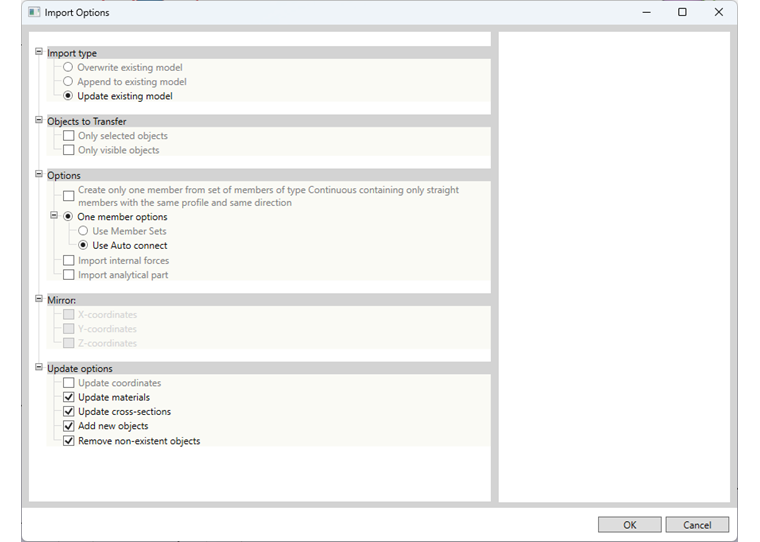
Import Type
Specify whether the data should Overwrite existing model or Append to existing model, and thus extend the model for the import into Tekla.
If a model has been exported from Tekla Structures to RFEM and then edited in RFEM, you can only adopt the changes from RFEM by updating the existing model.
To update the model, you can specify individual settings using the update options.
Objects to Transfer
You can only import the selected objects or the visible objects in the RFEM model.
Options
Create only one member from set of members
This option allows for converting a member set consisting of several members in RFEM into a single continuous physical member in Tekla.
Import analytical part
During the import, a structural analysis is generated for the physical model.
Mirror
If you overwrite or extend the current model, you can mirror the elements on the global coordinate system.
Transfer of Further Information
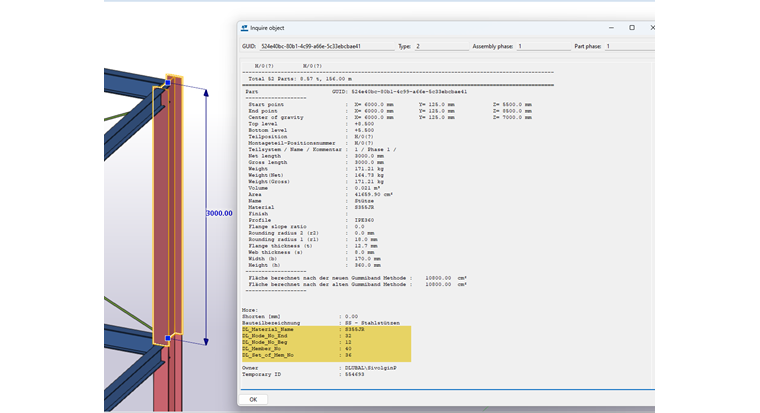
After the import, you can retrieve the information about the material, the node number, and the member number of the individual objects. These attributes are displayed in the object info.