


Dlubal Software and Tekla Structures use different terms for materials and cross-sections. For smooth data exchange, it is necessary to include the respective term in the conversion tables.
Opening Conversion Tables
You can open the conversion tables using the Conversion Tables button
 in the Tekla Structures ribbon (see the image
Add-in in Tekla Structures Ribbon
).
in the Tekla Structures ribbon (see the image
Add-in in Tekla Structures Ribbon
).
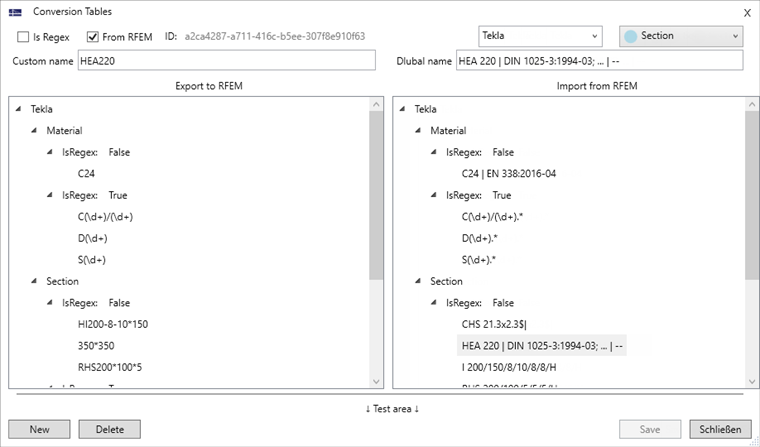
The Custom name area on the left controls the conversion for the export from Tekla to RFEM. Here, you can enter the cross-section and material term used in Tekla. On the right, you can see the Dlubal term assigned to the individual entries. The Dlubal name area on the right controls the conversion for the import from RFEM into Tekla. Here, you can enter the material and cross-section term used in RFEM. On the left, you can see the Tekla term assigned to the individual entries. Both columns are additionally subdivided into materials and cross-sections.
There is also a distinction between regular expressions (Is Regex check box selected) and non-regular expressions (Is Regex not selected). Regular expressions allow you to convert several objects, such as an entire IPE section series, with a single entry.
Further examples of regular expression definitions are described in the following FAQ:

You can use non-regular expressions to add a material or cross-section name in its program-specific designation.

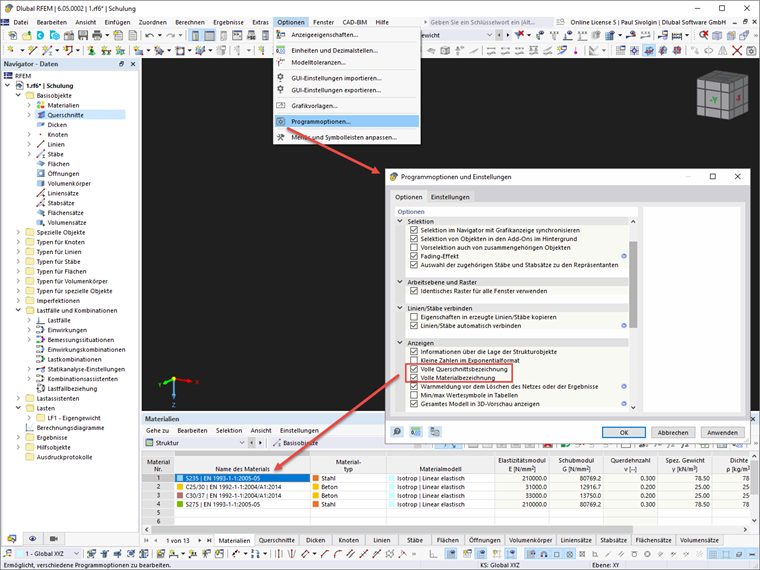
For the data exchange, it is necessary to specify the full Dlubal material or section name. Thus, the term and the corresponding standard can be clearly assigned in the Dlubal material and cross-section library. You can use the program options to display the full name for cross-sections and materials.
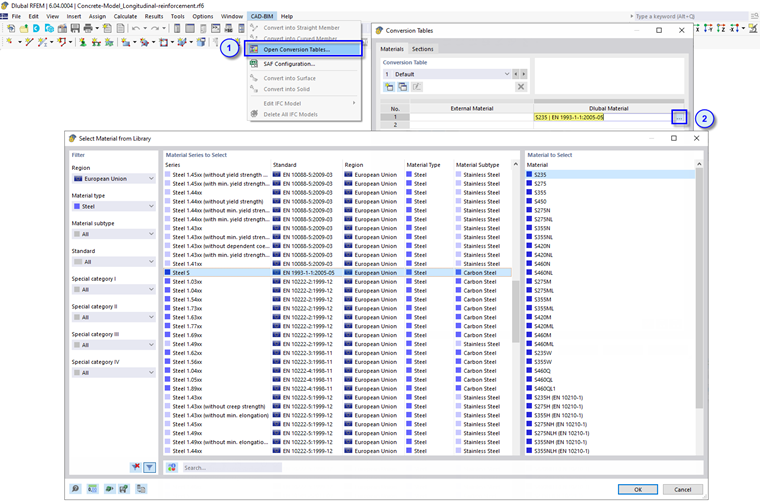
You can also open the complete material or section names using the Open Conversion Tables function in the CAD-BIM menu of RFEM.
Adjusting Conversion Tables
Some cross-sections and materials are predefined in the conversion tables after the installation. You can select an entry and delete it by clicking the
 button. It is also possible to edit the existing definitions. To confirm your changes, click the button
 .
.
To create a new conversion rule, use the
 button. The options given in the following table have the following functions:

|
Create a conversion as a regular or non-regular expression |

|
Create a conversion for the import from RFEM or a conversion for the export to RFEM |

|
Create a conversion for a material or a cross-section |
Then, enter the Tekla name (Custom name) in the table on the left and the Dlubal name of the material or cross-section on the right. Click the
button to save the new conversion and add it to the table.
The content of the conversion table is saved as an XML file (Conversion-Tekla_DE) in the following directory:
- C:\Users\Public\Documents\Dlubal\ImportExportWs
Thus, you can transfer the defined conversion table to other computers.