


Currently, two DXF formats are available. DXF II format is based on more advanced technology and provides advanced features compared to older DXF format. The ongoing development is focused on further improving the DXF II technology, with the aim of eventually phasing out the traditional DXF format. It is possible to import them directly from AutoCAD or to import a DXF file. For the direct import from AutoCAD, it is necessary to have both applications open at the same time.

Insert Point
The insert point follows the model coordinates. You can manually change the insert point along the X, Y, and Z axes.
Axis Rotation
You can also rotate the model about the global axes. A positive angle rotates the model clockwise.
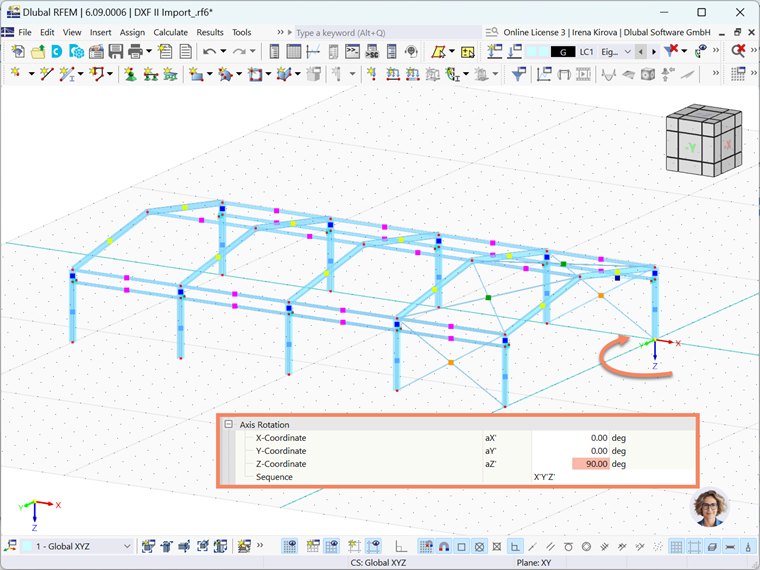
The sequence of the axis rotations can be defined separately.
Coordinate System Transformation
In the corresponding drop-down menu, you can swap the axes or change the direction of an axis.
Settings
If the "Length units of DXF template" are not to be automatically adopted from the DXF file, you can select the appropriate unit from the list.
Options
Minimize tolerance in model
A high tolerance may lead to a poor formation of small lines. To avoid this problem, minimize the tolerance.
Generate members
You can convert the imported lines into members. For this, it is necessary to enter the cross-section and material names accordingly in the layer descriptions. (for example, layer description: IPE 500 $S235)
Import 3DFaces as surfaces
If you activate this option, 3D surfaces of the DXF template are automatically created as surfaces in RFEM.
Import selected layers
You can specifically define which layers should be imported.