


In the world of structural engineering, efficiency and precision are paramount. As structures become increasingly complex, so do the demands for more sophisticated tools to manage and optimize their design and analysis. Dlubal's API (gRPC) provides an indispensable solution for engineers looking to enhance their workflow by automating tasks and gaining deeper control over their design parameters. This powerful tool integrates seamlessly with RFEM and RSTAB, allowing users to create custom configurations, refine mesh settings, automate load case definitions, and tailor both steel and concrete designs to meet specific requirements.
1. Getting Started: Configuring Base Data and Add-ons
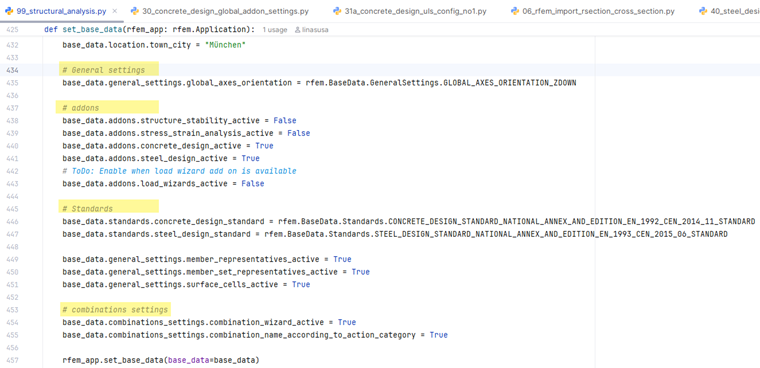
Before diving into the design specifics, the first crucial step when working with Dlubal’s API is configuring your base data. This includes entering essential project-specific details such as location, country, and the relevant design standards. The base data lay the foundation for your structural model, ensuring that your design adheres to local codes and regulations. By configuring these parameters through the API, you can save time and minimize human error, especially when managing multiple projects with varying requirements.
Key Steps:
- Base Data Configuration: The API allows you to set up and modify base data programmatically, streamlining the initial stages of the project setup. This includes entering location-specific information, selecting the appropriate design standards (e.g., Eurocodes), and applying these settings across the entire model.
- Managing Add-ons: Dlubal’s software includes various add-ons that can enhance functionality. Through the API, users can easily enable or disable these add-ons depending on the needs of the project. For instance, the Load Wizard, while still under development, will soon be available to assist in more complex load case management. Customizing these add-ons ensures that the software remains as flexible and tailored to your specific needs as possible.
2. Refined Mesh Settings and Structural Element Definition
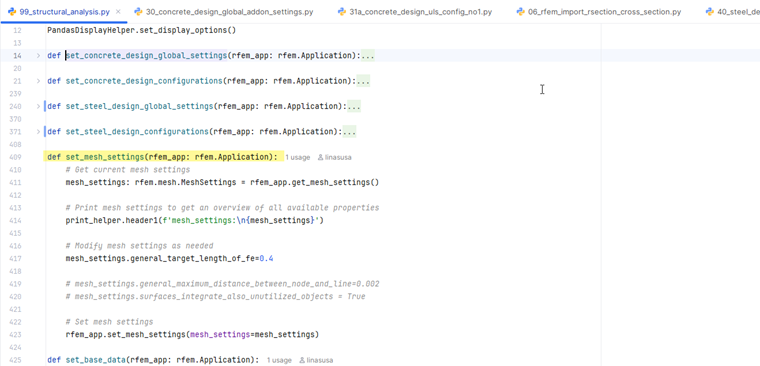
Accurate structural analysis depends on the precision of the mesh used in the model. A finer mesh allows for more detailed analysis, particularly in areas with high stress or complex behavior. The Dlubal API gives you the ability to refine the mesh to meet the needs of your project, automating the process, and reducing the time spent on manual adjustments.
Key Steps:
- Mesh Refinement: Through the API, users can define the number of mesh divisions, adjust element sizes, and modify mesh settings to ensure that areas of the model requiring higher precision are adequately addressed. These settings can be adjusted dynamically, enabling a high degree of control over the model’s accuracy. The changes made are sent back to the software as objects, allowing for seamless integration in the model.
- Defining Structural Elements: Once the mesh is refined, it’s time to define the structural elements such as beams, columns, and walls. The API allows you to create members, supports, eccentricities, member imperfections, imperfection cases, etc., programmatically, ensuring that each component reflects the physical structure’s properties. This level of automation not only enhances efficiency but also ensures consistency throughout the model.
3. Streamlining Load Cases and Design Configurations
Load cases are essential for simulating real-world conditions in structural analysis. The Dlubal API simplifies the creation and management of load cases by automating many of the steps involved. This is especially useful when dealing with multiple load combinations or when you need to apply different types of loads to various parts of the structure.
Key Steps:
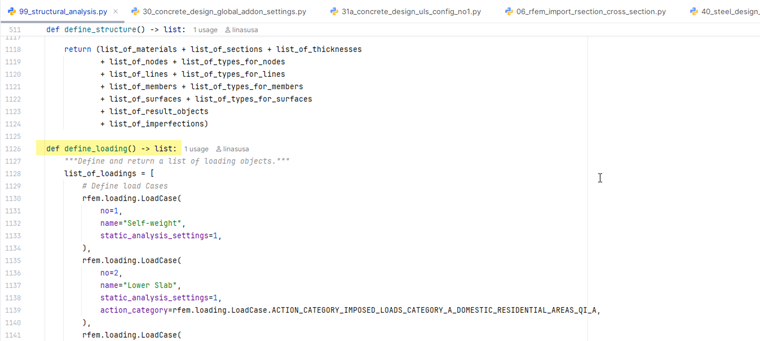
- Load Case Creation: The API integrates with the combination wizard to generate load cases efficiently. It also allows for the definition of surface and member loads, which are automatically assigned to the relevant parts of the model. This process eliminates the need for manual entry and reduces the risk of errors.
- Design Configurations: Once load cases are defined, it's time to set up design configurations, including Ultimate Limit State (ULS) and Serviceability Limit State (SLS). These configurations define the failure criteria for the structure under various load conditions. The API enables users to set and modify these parameters programmatically, ensuring that all design considerations are accounted for without navigating manually through the interface.
4. Tailoring Steel and Concrete Design Settings
At the heart of Dlubal’s software are its powerful tools for steel and concrete design. These tools ensure that your designs meet both safety standards and performance criteria. With the API, engineers can further refine these settings, allowing for precise adjustments to meet specific project requirements. Whether it's steel's ultimate limit state (ULS) configurations or concrete reinforcement definitions, the API offers the flexibility to customize every aspect of the design.
Steel Design Configuration
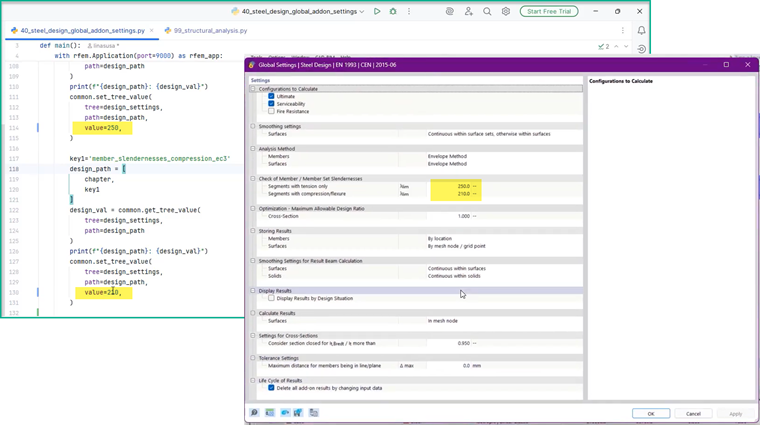
The API allows users to configure steel design settings, such as selecting ULS or SLS criteria, fire resistance, and other critical parameters. By using the design settings as objects, engineers can manipulate these parameters programmatically, ensuring that they align with the project’s needs.
- Creating Lists of Strings: One important procedure in steel design configuration is the creation of a list of strings that defines the design settings. This list includes parameters such as ULS, SLS, and fire resistance, which are then passed to the API for processing.
- Using Get and Set Tree Values: The API provides methods like getTreeValue and setTreeValue to retrieve and set values for specific design parameters. This allows users to navigate the design tree and modify settings without interacting manually with the software interface.
.png?mw=760&hash=4f09aa8b1bbd546c24d64fbe912fb02144d0fa5b)
Concrete Design Configuration
Similarly, the API allows users to define concrete design settings, including reinforcement types, material properties, and design limits. While the concrete design process shares similarities with steel design, the specifics of reinforcement and material properties are addressed separately, allowing for more detailed customization.
5. Advanced Design Features
The Dlubal API includes a variety of advanced features that enable engineers to perform more detailed analysis and ensure their designs meet real-world conditions. These include managing imperfections, stiffness definitions, effective length factors, etc.
- Member Imperfections: To model structural behavior more accurately, the API enables users to define member imperfections. This is particularly important in ensuring that the structure’s response under load is realistic and accounts for potential deviations in member geometry.
- Stiffness and Effective Length Adjustments: The effective length factor, which influences buckling behavior, can be modified through the API to ensure that the structural model reflects real-world conditions. Adjusting stiffness and effective length parameters programmatically helps maintain accuracy throughout the analysis.
Conclusion and Next Steps
Dlubal’s API offers structural engineers a robust toolset for automating and customizing their design processes. By integrating the API into your workflow, you can reduce the time spent on repetitive tasks, ensure more consistent design outputs, and enhance the accuracy of your models. From configuring base data to adjusting advanced design parameters, the API empowers users to take control of their structural analysis and design. This level of customization not only improves accuracy but also enhances efficiency, particularly in large-scale or complex projects.
To fully capitalize on the benefits of Dlubal's API, engineers should explore the detailed steps outlined in this article, experiment with the provided code snippets, and familiarize themselves with the API’s extensive documentation. As the API continues to evolve, it will provide even greater flexibility, helping engineers stay at the forefront of modern structural design techniques.