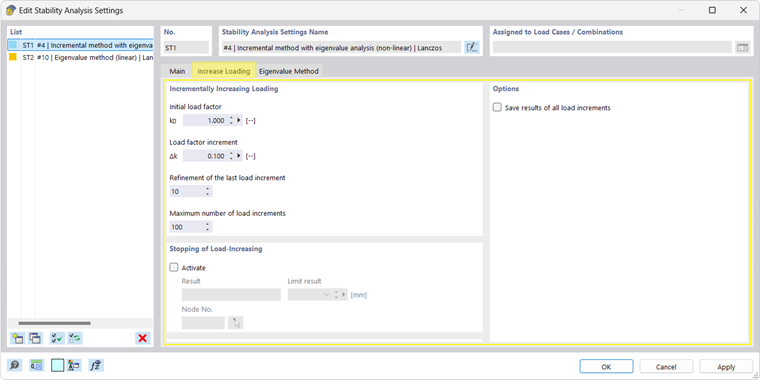
The settings in the "Increase Loading" tab are organized into several sections:
Tab Section: Incrementally Increasing Loading
Initial load factor k0
Load factor at which the incremental stability analysis starts
Load factor increment Δk
Increment of the step-by-step load increase
Refinement of the last load increment
Factor for controlling the granularity of the last load increment that leads to the system failure
Allows for greater accuracy of the result: by default, 10 load increments of size Δk / 10 are applied.
Maximum number of load increments
Limit value for terminating the stability analysis
Tab Section: Stopping of Load-Increasing
Result
Criterion for (premature) termination of the incremental stability analysis: maximum displacement or rotation of any or a specific node (reference node)
Limit result
Maximum value of a displacement u (mm, in) or a rotation φ (mrad) at which no further load increases are applied.
Node No.
Reference node; in the default setting, the node with the maximum displacement/rotation is calculated; alternatively, you can select a node.
Tab Section: Options
Save results of all load increments
Allows for displaying the results of each individual load increment using a dropdown list in the Results navigator.