464x
005963
2025-02-03

Tab: Main

Image of the settings in the "Main" tab:
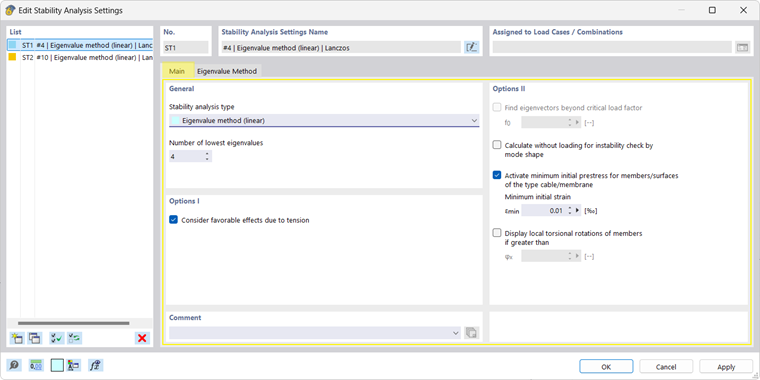
The settings in the "Main" tab are organized into several sections:

Tab Section: General

Stability analysis type Eigenvalue method (linear)
 
  • Default setting for efficient determination of critical buckling loads and deformation by eigenvalue analysis of the stiffness matrix under a given stress; the stress state is determined by an initial structural analysis.
 
  • Nonlinear model properties (material, geometry, failing elements) are linearized (“frozen”) based on the structural analysis.
Incremental method with eigenvalue analysis (nonlinear)
  • Analysis of the equilibrium conditions on the deformed structural system with an incremental increase of the loads up to instability
  • Better suitability for more complex structures and systems with large deformations due to the complete consideration of nonlinearities
 
  • You can set the calculation parameters in the "Increase load" tab as soon as you select an incremental method for the stability analysis.
 
  • After the incremental, nonlinear calculation, a linear eigenvalue analysis is performed in the last stable system state.
  Incremental method without eigenvalue analysis (nonlinear)
 
  • Calculation method for determining the critical load factor as described above, but without additional eigenvalue analysis
Number of lowest eigenvalues
  • Maximum value of the calculated eigenvalues
 
  • The usual setting in the range of 4 to 10 provides reliable results with reasonable computing time and RAM usage.
 
  • Please note: Eigenvalues with negative load factors do not allow for conclusions to be drawn about the buckling behavior of the model; if you obtain such results, you should increase the number of lowest eigenvalues.

Important

A nonlinear, incremental calculation only makes sense if at least one nonlinearity (material, geometry, failing elements) is taken into account in the model. If not, an error message is displayed.

Tab Section: Options I and II

Consider favorable effects due to tension of members
  • Positive axial forces usually stabilize the model; by activating the check box, these tension forces are taken into account when determining the eigenvalues.
Find eigenvectors beyond critical load factor f0
  • Eigenvalues and corresponding load factors are calculated in ascending order; “shifting” allows smaller eigenvalues to be ignored and the calculation to start with a higher eigenvector.
 
  • Please note: this option is only available for linear stability analyses using the eigenvalue methods "Roots of Characteristic Polynomial" or "Shifted inverse iteration".
Calculate without loading for instability check by mode shape
  • In unstable structural systems, the structural analysis usually fails; possible causes include modeling errors, numerical problems, insufficient bracing, or actual overloading of the structure; see FAQ.
 
  • This option allows for the calculation and display of the deformation of the unstable system and facilitates the search for problematic locations in the model.
Activate minimum initial prestress for members/surfaces of the type cable/membrane
  • Unloaded cables and membranes can fail right at the start of the calculation and prevent the determination of further mode shapes. By applying a pre-strain εmin, these elements are prestressed and the model is stabilized.
Display local torsional rotations of members if greater than
  • The display of member rotations may reduce the clarity of the result graphic; specifying a minimum rotation angle φx allows you to control the display.
 
  • By default, φx = 0.01 is set.

Parent Chapter