What’s New
The following improvements have been implemented to increase the accuracy and flexibility of punching shear checks:
- Support for ACI 318: Two-way (punching) shear strength checks per ACI 318-19 Section 22.6 are now available for slab-column connections and similar cases.
- Support for CSA A23.3: One-way and two-way shear strength checks per CSA A23.3 Clause 13.3.2 are now included.
- Consideration of Shear Reinforcement: Punching shear design now accounts for shear reinforcement, resulting in more accurate and less conservative outcomes in reinforced regions. Previously, reinforcement was not considered in the two-way shear design.
- Enhanced Input Options for Reinforcement: Users can now define two-way shear reinforcement directly at nodes, including both vertical shear bars and headed shear studs.
- Extended Node Types: Punching shear checks can now be performed at both Columns and Walls that frame into a slab. Dimensions for the column or wall can be entered manually and are only used in the punching shear design checks.
- Expanded Strength Checks: The software now calculates punching shear strength with and without shear reinforcement, and both sets of results are displayed in the Design Details.
- Code Compliance Checks: Additional detailing and limit checks are performed in accordance with ACI 318-19 and CSA A23.3-19.
New Input for Two-Way Shear Reinforcement
RFEM 6 now enables direct input of two-way shear reinforcement at nodes, offering detailed control over reinforcement geometry and improving the precision of punching shear calculations.
To define this reinforcement, edit the relevant node and enable Punching Design.
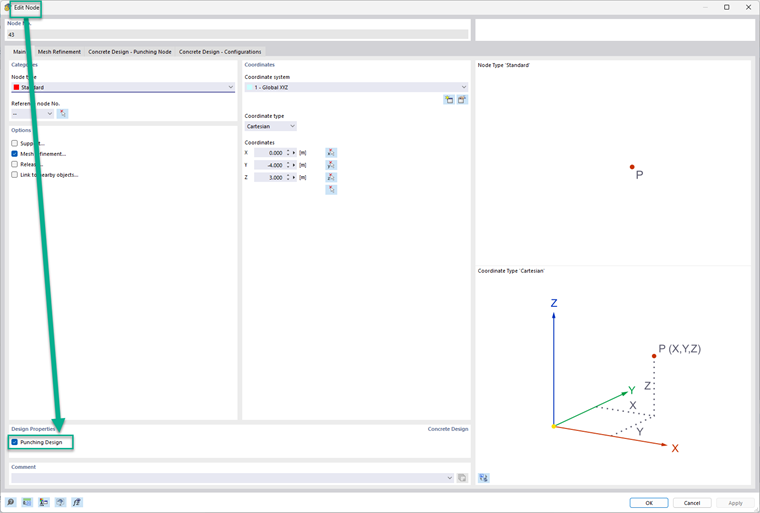
Then, go to the Concrete Design – Punching Node tab to create or edit the punching reinforcement.
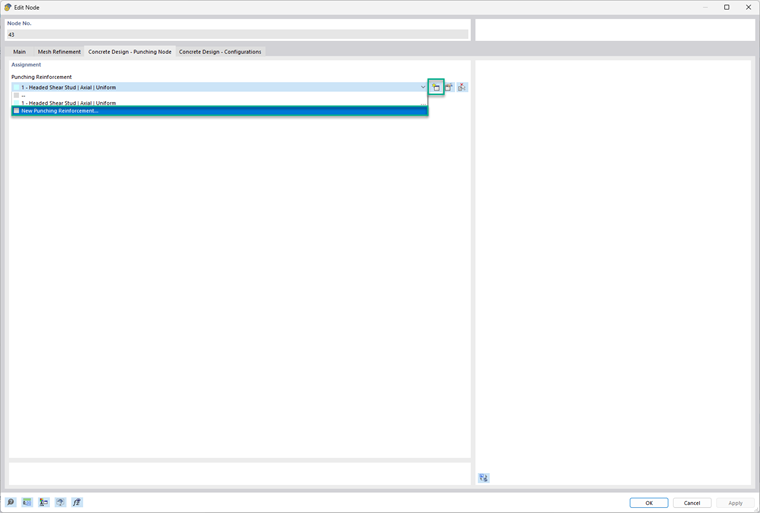
In this tab:
- You can specify the material and bar size (left side).
- You can select the reinforcement type (right side), choosing between “Headed Shear Stud” or “Vertical”.
Additional options are planned for future RFEM 6 releases.
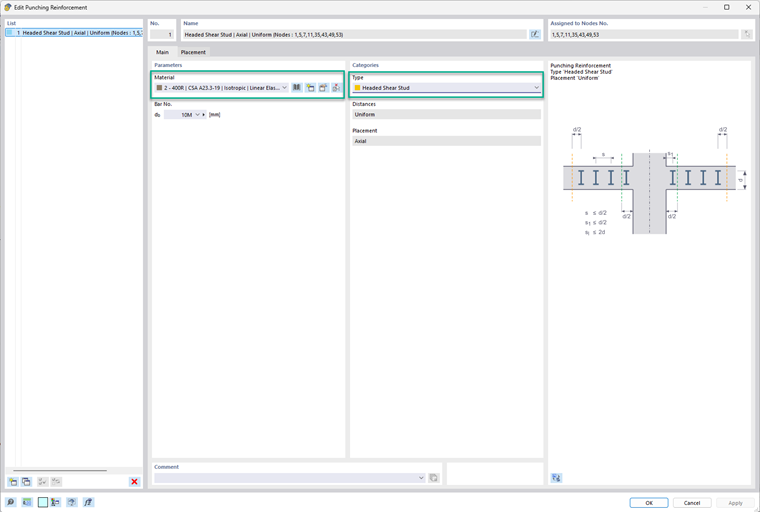
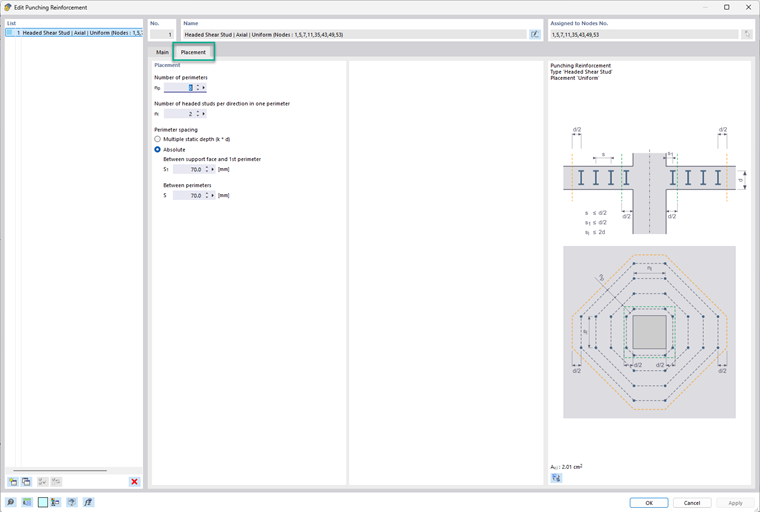
In the Placement tab:
- Enter the number of perimeters (np).
- Define the number of headed studs per direction, per perimeter.
- Perimeter spacing can be specified as a factor of the surface thickness or by entering absolute values (S1 and S).
- A graphical bitmap on the right shows each input visually for better understanding.
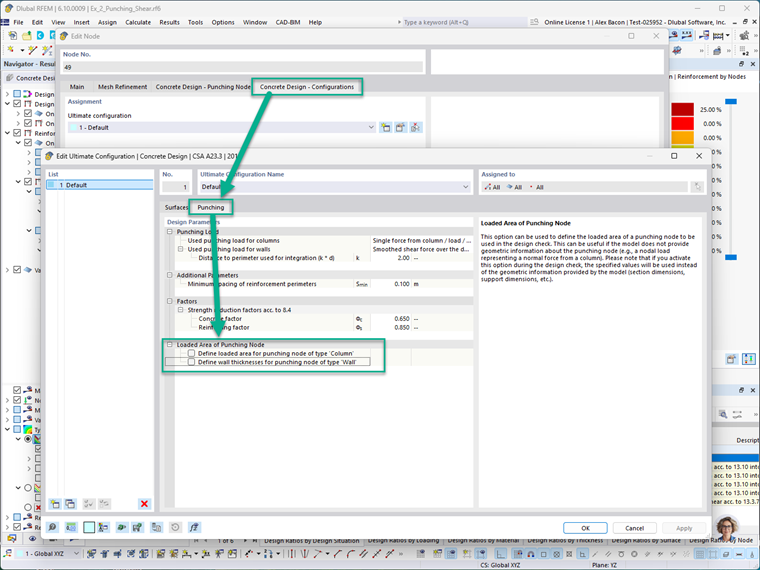
In the Concrete Design – Configurations tab, the loaded area of the punching node can be defined manually for both columns and walls. This includes setting the cross-sectional dimensions of the column or wall framing into the node.
Note: When these manual inputs are activated, they override the actual model geometry during punching shear design checks. This allows designers to simulate custom or conservative assumptions where needed.
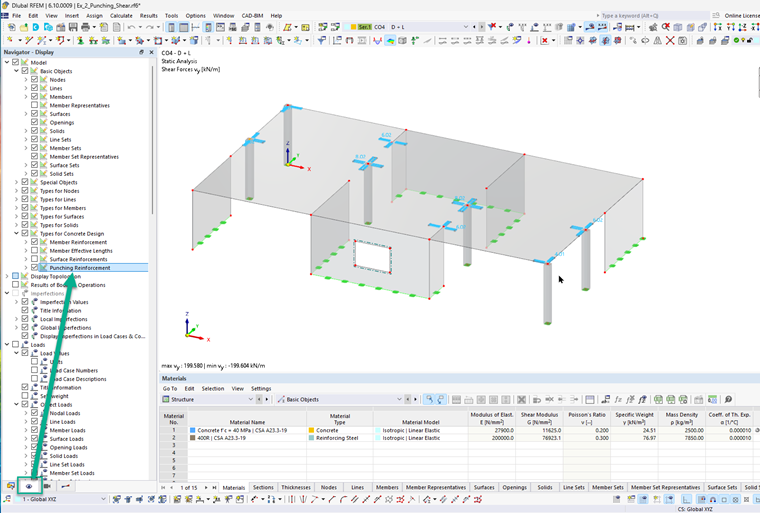
To visually display punching shear reinforcement in the model, navigate to:
Display Navigator → Model → Types for Concrete
This will graphically show the reinforcement at nodes where punching shear design has been activated. In the image below, the blue symbols represent the punching shear reinforcement that has been defined.
Extended Punching Strength Design Checks
Earlier versions of RFEM 6 performed punching shear checks without explicitly considering shear reinforcement. The latest improvements now offer the following enhancements:
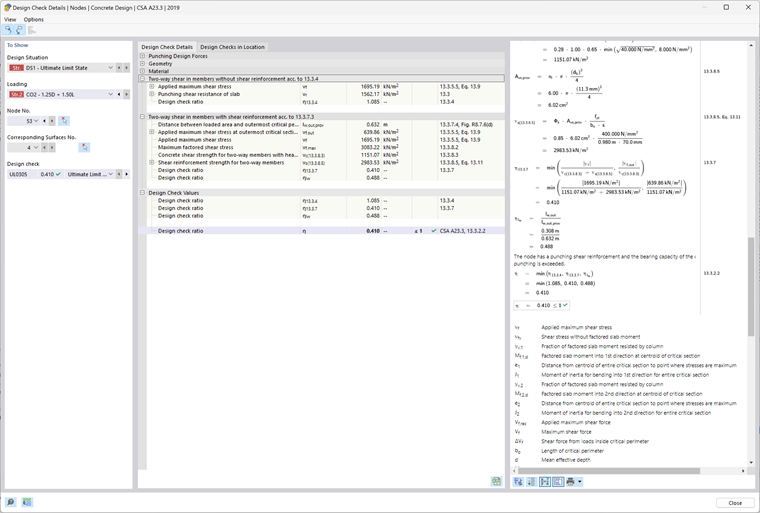
- Inclusion of Shear Reinforcement in Calculations: The program now incorporates shear reinforcement in punching strength design calculations, providing more efficient and accurate results. For comparison purposes, RFEM 6 still performs the calculation without reinforcement, and both results are available under the Design Details.
- Reinforcement Detailing Checks: The software now checks code-compliant detailing requirements, including bar spacing, anchorage, and reinforcement limits according to ACI 318-19 and CSA A23.3:19.
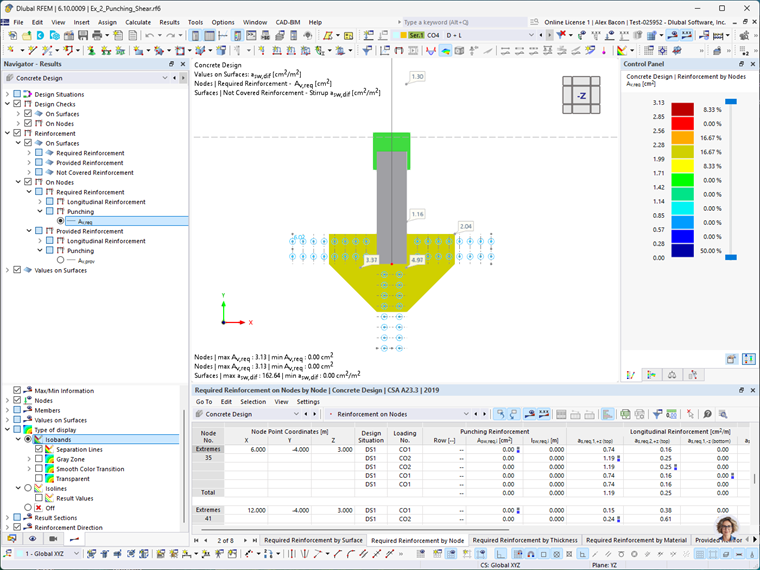
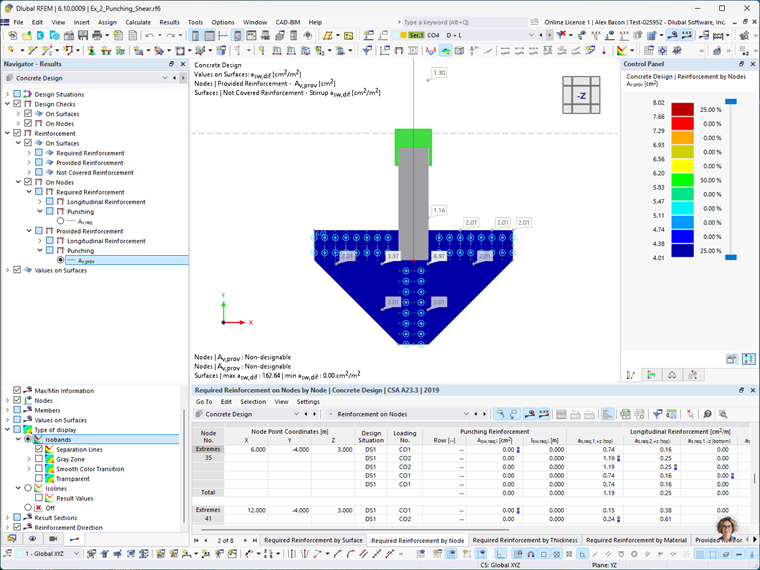
- Graphical Display of Reinforcement Areas: The required (Av,req) and provided (Ap,prov) reinforcement areas are now displayed graphically at the relevant nodes, helping users visually confirm compliance with design requirements.
Example
This section demonstrates a simplified punching shear design example modeled in RFEM 6 and compares its results to hand calculations based on ACI 318-19.
Scenario:
A cast-in-place reinforced concrete spread footing for an interior column subjected to a concentric axial load. The design assumes that punching shear governs the required footing thickness, and the shear strength contribution of the reinforcement is neglected.
Given:
- Factored load, Pu = 1 kip (compression)
- Design standard: ACI 318-19
.jpg?mw=760&hash=1bebce33a29bb9027700c0a7ff5a0a95855bb5dc)
Step 1: Determine Effective Depth (d)
The effective depth, d, is calculated by subtracting the concrete cover and one-half the bar diameter from the total slab thickness:
Step 2: Determine Critical Perimeter (bo)
The critical perimeter is located at a distance d/2 from the face of the column:
Step 3: Determine Punching Shear Stress Capacity (vc)
Using ACI 318-19 Table 22.6.5.2, the nominal shear stress vc (without reinforcement) is the minimum of three expressions:
These can be simplified for clarity:
Where:
β is the ratio of the long side to the short side of the column (or loaded area):
αs, for an interior column per ACI Section 22.6.5.3, equals 40:
Step 4: Calculate Nominal Punching Shear Strength
The nominal punching shear strength is calculated as:
Where:
λ = 1.0 for normal-weight concrete (ACI 19.2.4.3)
λs, the size effect modification factor, is determined from Section 22.5.5.1.3:
Using these values:
Result:
The design punching shear strength (φVc) without shear reinforcement is 563.273 kips.
RFEM 6 – Concrete Design Add-on – Results
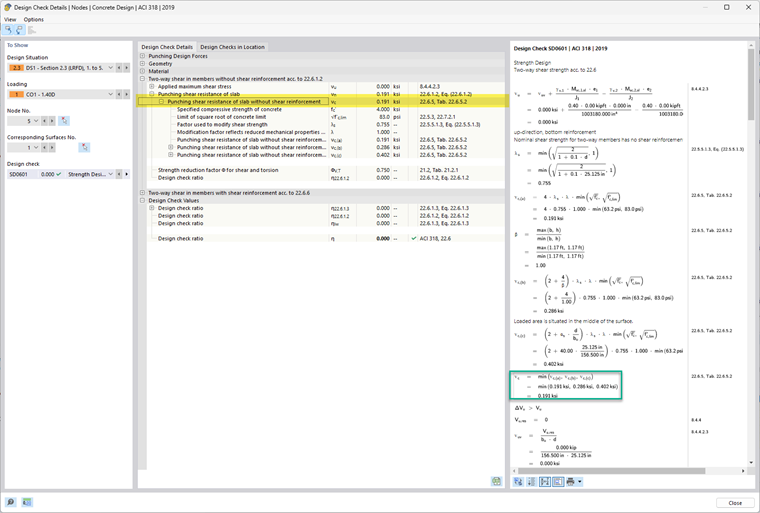
Below is the Design Check output from the Concrete Design add-on in RFEM 6. These results correspond to the example model attached at the end of this article.
RFEM 6 displays the punching shear strength vc as a pressure value (ksi). To compare with the analytical result, multiply this value by the critical perimeter (bo), effective depth (d), and the strength reduction factor (φ).
Example comparison:
vc = 0.75 × 0.191 ksi × 156.5 in × 25.125 in.
vc = 563.27 kips
This matches with the hand calculation of 563.27 kips.
Conclusion
With these latest updates, RFEM 6 offers a comprehensive and code-compliant workflow for punching shear design according to ACI 318-19 and CSA A23.3-19 standards. Key enhancements include:
- The ability to define node-specific shear reinforcement
- Improved accuracy in capacity checks by including reinforcement
- Support for multiple reinforcement types, including vertical bars and headed studs
These features significantly improve modeling flexibility and design reliability.
For a summary of the initial punching shear tools available in RFEM 6, please refer to part I of this series.
Link to Design of Punching Shear Part 1