


It is also possible to check the results of specific objects using the control panel. There you can define exclusively those members, surfaces, or lines whose results are to be displayed. In contrast to "visibilities", the model is shown in full view.
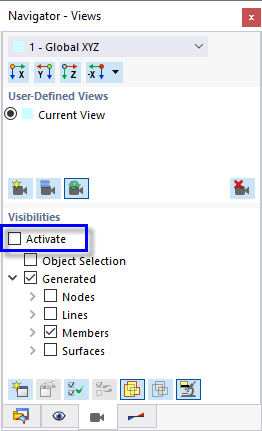
Disable all visibilities by clearing the Activate check box in 'Navigator - Views'.
Frame Girder
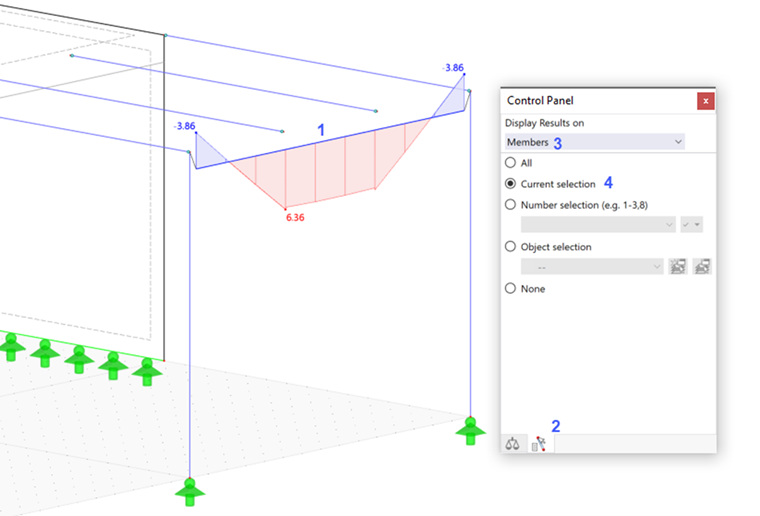
Select the frame girder (member no. 4) by clicking it (1). Then click the
 tab of the control panel (2). Make sure that the Members option is set in the 'Display Results on' area (3). Select the Current selection option (4) so only the moments of the selected girder are shown.
To display the bending moments of all members again, select All.
Upper Slab
To apply the selection to surfaces, select Surfaces from the list in the 'Display results on' area (1). Then enter surface no. 5 – the upper slab – in the 'Number selection' box (2). Click the
 button to the right of it (or press ENTER) to apply that selection (3).
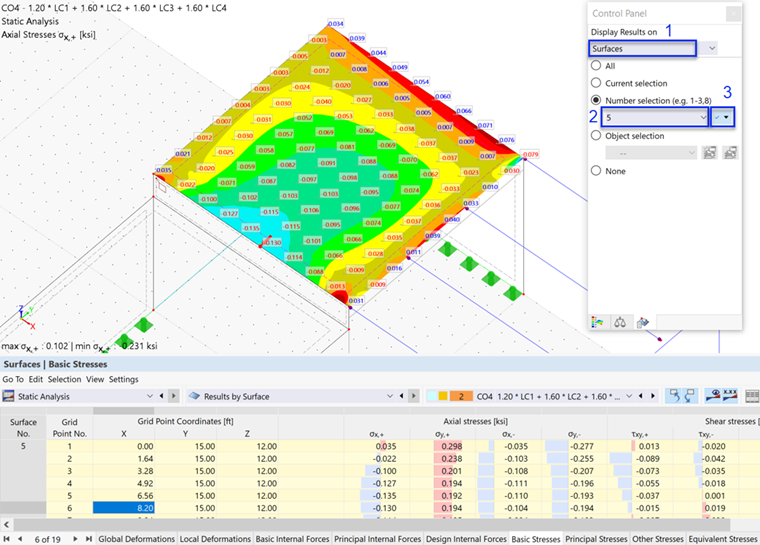
When you check the 'Surfaces | Basic Stresses' table, you will notice that only the results of this surface are contained.
Reset the view of the results by selecting the All option again.