


After inserting a component into the model, its properties and parameters can be reviewed and adjusted in the Component dialog box. This dialog box serves as the central input window for configuring a single component and allows for it to be assigned to the corresponding model objects.
In addition to a preview of the component, various settings are available, which may vary depending on the specific component series and its assignment type. The associated properties are automatically inherited from the selected component series.
The component dialog box is divided into the tabs Main and Parameters.
Sections in “Main” Tab
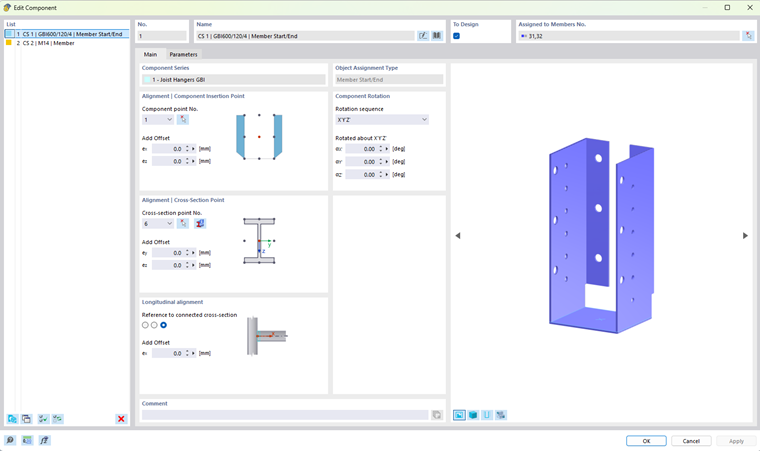
| Component Series | Associated component series |
| Object Assignment Type | Object type to which the component is assigned |
| Component Rotation | Adjustable rotation of the component |
| Alignment | Additional settings for the component alignment |
Sections in “Parameters” Tab
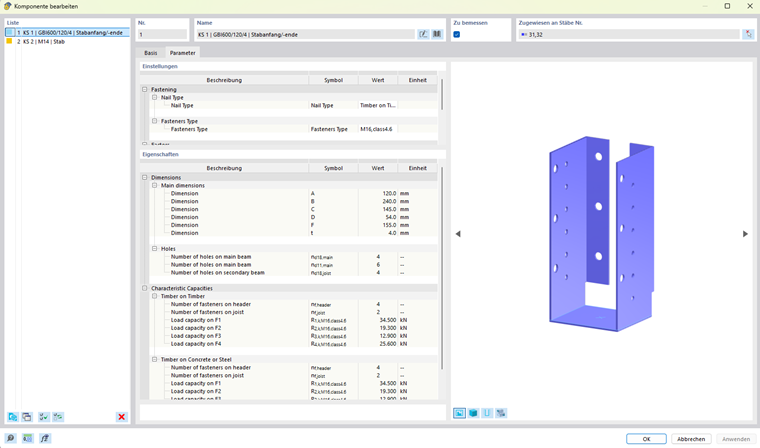
| Settings | Configurable settings |
| Properties | Component parameters |
Both tabs are described in detail in the following chapters. These sections explain both the settings for positioning and aligning the component and the various parameter groups and their meanings.