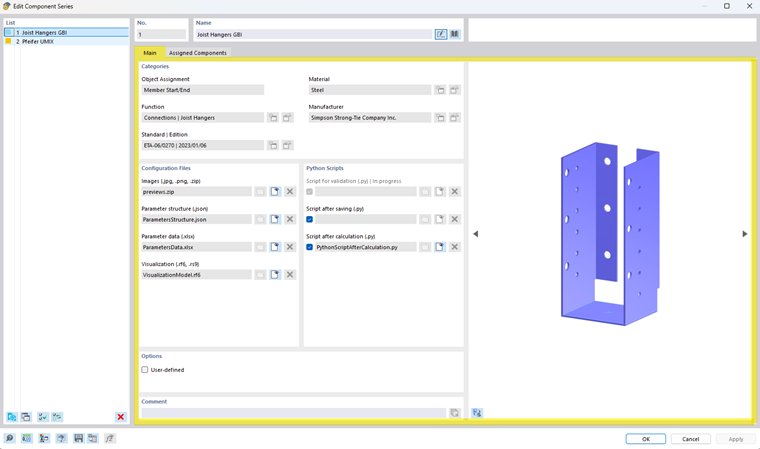
This section is used for grouping and filtering in Dlubal Center.
Object Assignment
Object type to which the component series is assigned
Function
Function type of the selected component series
Standard Edition
Standard edition of the selected component series
Material
Material of the selected component series
Manufacturer
Manufacturer of the selected component series
Configuration Files
Images
The image files contain preview images of the component series
Parameter structure
JSON file containing the structure of the parameters in the component dialog box
The JSON file links the Excel file to the design so that the individual parameters can be assigned to a variable.
Parameter data
Excel file containing the most important parameters of the component series
Visualization
Optional RFEM 6 file for detailed visualization in the RFEM work window
A component can be generated without a visualization file.
Python Scripts
Script after calculation
Performs the design checks defined in the component series using the relevant parameters and internal forces, and transfers the results to RFEM
Script after saving
Adjusts the model according to the selected components (for example, by creating hinges or modifying cross-sections, materials, and hinge stiffnesses) and is executed when the component dialog is confirmed
Script for validation
Before a component is used, it checks whether the necessary requirements for its application are met (for example, regarding the material or allowable geometric dimensions)
Info
The Python scripts Script after saving and Validation script are optional and can be deactivated so that only the design process is performed. However, changes already made to the model by the Script after saving are not automatically undone if the script is subsequently deactivated.
Options
The “User-defined” check box provides the option to create your own component series with user-defined components. This option is described in the chapter User-Defined Components.