


Material Behavior
An overview of the properties of the Hoek-Brown model is provided in the corresponding chapter of Theoretical Principles.
Input Dialog Box
When the material model is set to Hoek-Brown, two additional tabs are added to the dialog box for defining the material properties, as highlighted in the following image.
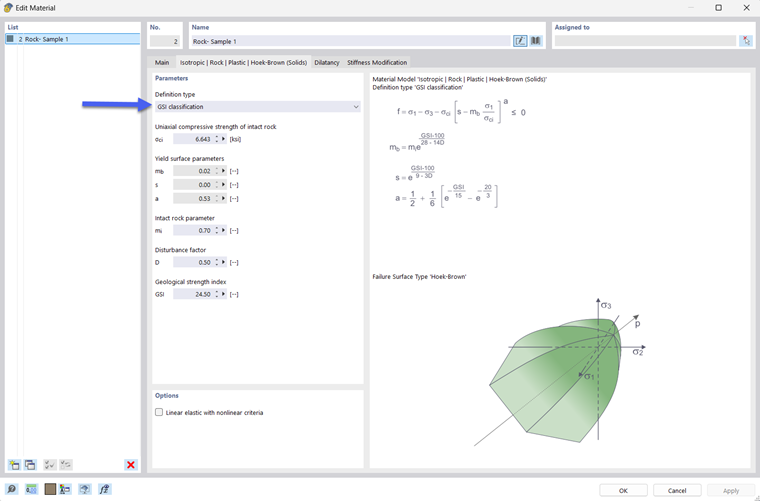
Tab Isotropic | Rock | Plastic | Hoek‑Brown
In this tab, you can define the input parameters required for modeling the material behavior.
- σi – Uniaxial compressive strength of intact rock (UCS)
- mb – Material parameter for the massif
- s – Constant
- a – Constant
- E – Modulus of elasticity
- ν – Poisson's ratio
The modulus of elasticity and the Poisson's ratio have to be defined in the “Main” tab, which is shown in the parent chapter Input – Materials of Soil Type.
The material constants mb, s, and a can be defined in two ways, either directly or indirectly via the relevant GSI values. The corresponding selection is available under Failure surface parameters.
Empirical Values
To select empirical values, use the input dialog box as shown in the following image.
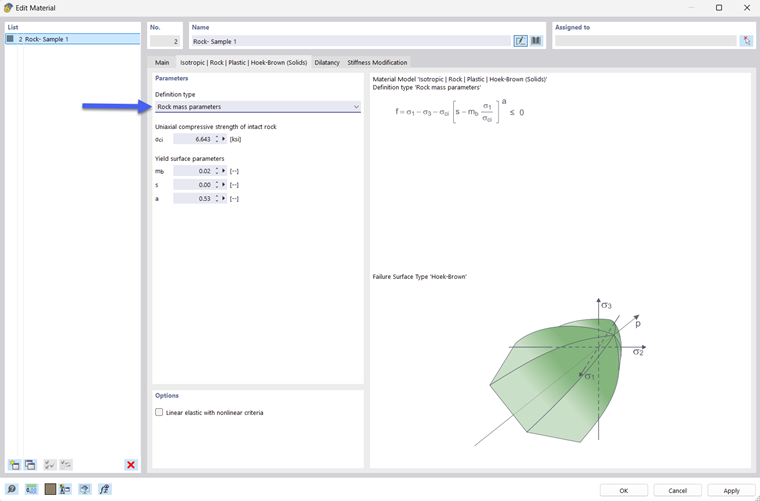
All material parameters can be entered directly in the dialog box. Since they are related to the Geological Strength Index and the loosening factor, they can alternatively be described using the GSI values.
GSI Values
The input dialog box for the GSI values is displayed as shown in the image below.
You need to enter the following values.
- mi – Material parameter for the massif
- D – Loosening or disturbance factor
- GSI – Geological Strength Index
These are internally converted in the program into the above-mentioned material parameters of the Hoek-Brown failure criterion.