


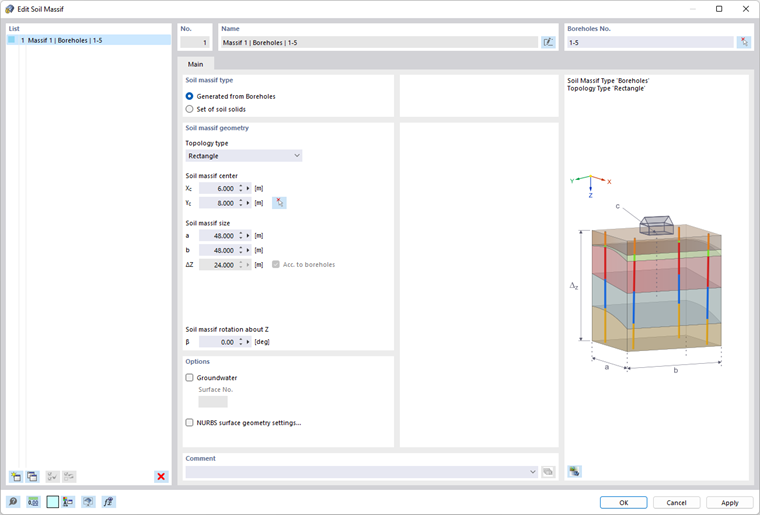
The Soil Massif object contains soil solids that are to be calculated using Geotechnical Analysis. You can find the soil massifs in the “Special Objects” folder in the Navigator and open the corresponding input dialog box from there. The following image shows the input dialog box.
List
The List of the dialog box contains all soil massifs that are present in the current model. All other text boxes of the entire input dialog box include the entries for the soil massif currently selected in the list.
Type of Soil Representation
You can currently select from two types of soil representation. In this case, either a 3D soil model or equivalent spring stiffnesses for the foundation are generated. For more information, refer to the subchapter Modeling Soil-Structure Interaction in the chapter Theoretical Principles of this manual. The image below shows the corresponding options in the “Type of Soil Representation” text box.

A detailed description of further input for soil modeling is provided in the subchapters Finite Element Method and Constrained Modulus Method (Elastic Half-Space).
Soil Massif Type
Soil massifs can be defined in two ways. They can be generated from boreholes or, alternatively, from compound solids. It is necessary to make the relevant selection in the Soil Massif Type text box of the dialog box, as shown in the image below. This selection affects the appearance of the input dialog box, depending on the entries required for the selected type.
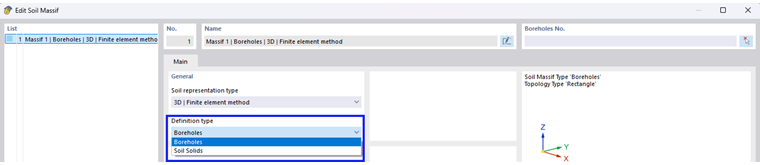
A detailed description of the additional input for soil masses is provided in the subchapters Boreholes and Soil Solids.
In the following, you will find a summary of the main differences between both massif types.
Option (1) – Generated from Soil Samples
- The soil massif is generated from soil samples and the geometry entries.
- All soil solids that are part of the massif keep the status “generated” and are therefore dependent on the massif.
- The corresponding soil solids cannot be edited individually in terms of their material and geometry.
- If a change is required in the input data—for example, in the soil samples—the solids can be updated by regenerating the massif.
Option (2) – Soil Solid Set
- The soil massif can be composed of a soil solid or a soil solid set consisting of continuous soil solids.
- The corresponding soil solids can be edited individually in terms of their material and geometry.
- No soil samples are assigned to the massif. Therefore, any changes to the layers have to be made in the soil solids.