


In the design according to EN 1999-1-1 as well as ADM 2020, it is possible to consider the localized strength reduction in the HAZ due to transverse welds. For other design standards, the reduction due to transverse welds is not taken into account.
You can arrange and create transverse welds by assigning a member transverse weld.
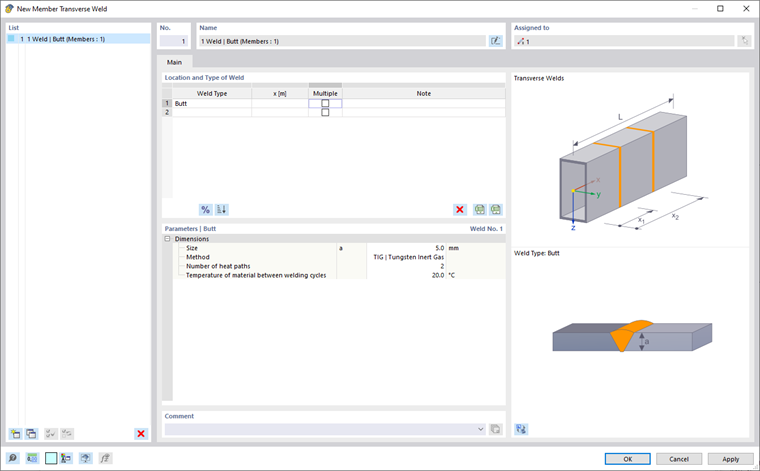
Weld Location and Type
There are fillet and butt welds available as weld types for selection. You can define the transverse welds for different locations along a member or a member set. For this, a specific location is defined by using an absolute or relative entry. You can also use the
 button to switch between the relative and absolute length entries. A multiple definition for the faster entry of recurring transverse welds in a certain distance is also possible.
For a better overview, click the
 button to sort all defined transverse welds in the table in ascending order.
Parameters
In this section, the weld parameters for the selected location are defined. If you select the multiple definition, enter a number and an offset of the transverse welds. Again, the distance can be entered absolutely or relatively.
For the design according to EN 1999-1-1, the weld requires the definition of a weld thickness and a welding method. The MIG and TIG methods are available for selection. Furthermore, you should specify the number of heat paths and the temperature.
Graphical Display
In the Navigator – Display, you can activate the graphical display of the transverse welds. For members and member sets to which a transverse weld is assigned, a cross-section border is displayed at the locations of the transverse weld.