


For stability analyses using the equivalent member method, for example, according to EN 1995-1-1 [1] 6.3, it is necessary to define effective lengths (or warping lengths) so that the program can determine the critical load for stability failure.
If an effective length is assigned to a member or member set, the corresponding settings and effective lengths are taken into account during the stability analysis of the object. If no effective length is defined, but the stability analysis is activated, a warning is displayed in the Errors & Warnings table.
Main
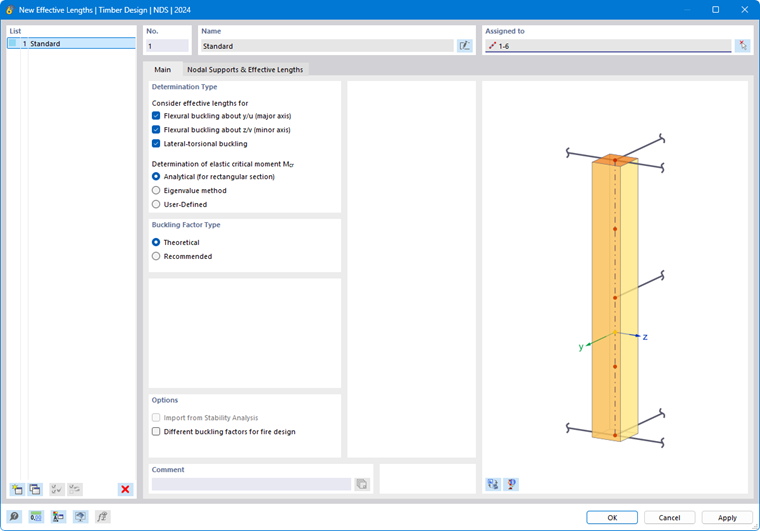
In the Main tab, you have to specify the basic parameters. The effective length factors and nodal supports can then be defined in the Nodal Supports and Effective Lengths tab. The input options are aligned with the standard specified in the model's base data.
Determination Type
Considering Effective Lengths
Use the check boxes to specify which forms of stability failure are to be checked for the member or member set. Under compression, flexural buckling about the major or minor axis can become governing. The "Lateral-torsional buckling" option activates the design for lateral-torsional buckling under bending.
Method for Determining Ideal Elastic Critical Moment
Depending on the standard, various options are available to select the ideal elastic critical moment Mcr or the critical bending stress. The analytical method for rectangular cross-sections is preset. If you wish to specify the value manually, select the “User-defined” option. You can then define Mcr in the Nodal Supports and Effective Lengths tab under the effective length factors.
Buckling Factor Type
American design standards differentiate between the theoretical and the recommended values of the effective length factors. The effective length factors that can be defined as a template for the members restrained on one side, for example, are adjusted according to the selection.
Member Type
When performing stability analysis according to standards like CSA O86 [2], the structural type is important. In this section, you can classify the member as a beam supported at both ends or as a cantilever.
Options
The Import from Stability Analysis check box allows you to apply effective length factors based on buckling modes. You can then enter the relevant data in the Import from Stability Analysis tab.
If different equivalent member lengths are relevant for the fire resistance design than for the cold-state design, select the Different effective lengths for fire resistance design check box. You can define the boundary conditions in the additional tab Nodal Supports and Effective Lengths – Fire Resistance Design.
Factors
In standards, such as CSA O86 [2] or NBR 7190 [3], adjustment factors may be specified in a separate section to take into account, for example, the moment distribution when determining effective lengths.
Nodal Supports & Effective Lengths
Nodal Supports
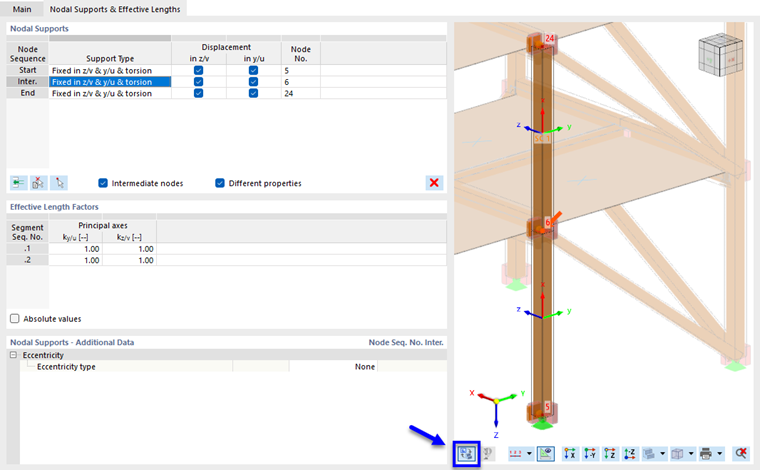
Nodal supports on a member or member set define the boundary conditions for the lateral-torsional buckling analysis (only for the “Eigenvalue Method” determination type). Furthermore, the nodal supports are used to subdivide the member or member set into segments.
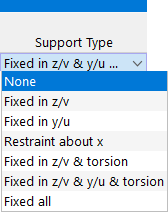
To define the supports, you can select typical variants from a list in the “Support Type” column. As an alternative, you can set the check boxes in the cells of the individual columns to active (fixed support) or inactive (no support).
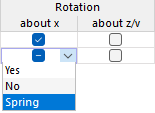
If the ideal elastic critical moment is determined using the eigenvalue method, spring parameters for the relevant directions can be specified in addition to fixed or hinged supports. Use the cell shortcut menu for this. You can enter the spring stiffness in the Nodal Support – Additional Data section.
Intermediate Nodes
You can define support conditions not only at the start and end of the object, but also at intermediate nodes. Standard nodes between the members of a member set as well as nodes on members are considered as intermediate nodes (see the chapter Nodes of the RFEM manual). After entering them, the numbers are displayed in the “Node” column.
Intermediate nodes are defined not by node numbers, but by their order on the member: 1 denotes the first intermediate node from the start of the member, 2 the second intermediate node, and so on. If a member with the effective length assigned has more or fewer intermediate nodes in the model than specified here, the calculation is performed starting from the start of the member. Redundant entries or nodes are ignored.
To insert an intermediate node manually, select the “Intermediate node” check box. You can then use the
 button to add new intermediate nodes. To delete an intermediate node, select the row and then click the
 button. The table shortcut menu also provides options for editing rows.
As an alternative, use the
 button to import the intermediate nodes of an object from the model. Select the member or member set in the work window. The number of intermediate nodes is then imported into the table.
If the effective length is assigned to a member or member set, you can use the
 button to check the node assignment. After you select a node in the work window, the row of the corresponding intermediate support is selected in the table (if defined).
Once the effective length has been assigned to a member or member set, you can check the supports using the
 button in the dialog graphic (see the image Defining Nodal Supports and Effective Lengths).
Effective Length Factors
The “Effective Length Factors” table is tailored to the number of nodal supports. If no intermediate nodes are defined, only a single “segment” exists. You can adjust the effective length of this segment to the boundary conditions by reducing or increasing the effective length factors for the various failure modes.
Supports at intermediate nodes divide the member or member set into segments for the various failure cases:
- Support in z/v divides the length for buckling about the major axis by the factor ky/u.
- Support at y/u divides the length for buckling about the minor axis by the factor kz/v and the warping length by the factor kLT.
- Restraint about x divides the lateral-torsional buckling length by the factor kLT.
The designations of the factors may vary, depending on the selected standard.
The arrow in a column symbolizes a effective length factor that spans multiple segments. This is the case when there is no intermediate nodal support in the “Nodal Supports” table.
You can adjust the effective length factor—and thus the effective length of a segment—by entering the factor directly or selecting one of the predefined cases from the shortcut menu.
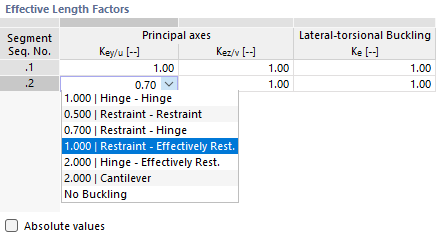
The effective length used to design a failure mode at a specific point in the segment is calculated by multiplying the segment length by the corresponding effective length factor.
|
Lcr |
Effective length |
|
k |
Effective length factor |
|
L |
Member or segment length |
You can also specify the effective lengths directly. To do this, select the “Absolute values” check box. The column headers will then be changed to units of length.
When designing for lateral-torsional buckling using the eigenvalue solver, each segment of the object is considered together with its corresponding supports. The program determines the elastic critical moment for lateral-torsional buckling Mcr using an internal equivalent member model with four degrees of freedom (φx, φz, uy, ω) and the defined nodal supports. If you have selected the user-defined entry for Mcr in the Basis tab, you can manually specify the critical lateral-torsional buckling moment for each segment. This value is then used for all design locations within the segment.
Nodal Supports – Additional Data
This section appears if a spring has been defined as a nodal support or if there is lateral support in the y/u direction without rigid restraint in the x direction. Here you can specify the parameters in detail.

Specify the properties of the “springs” that are present for the lateral support or torsion about the supported axes.
The “Eccentricity” refers to the lateral support in the y/u direction. Depending on the location of the compression flange, it can have a stabilizing or destabilizing effect on lateral-torsional buckling. The list provides support at the top or bottom flange as well as the option for manual definition.
The spring stiffnesses and eccentricities are taken into account accordingly when determining the elastic critical moment for lateral-torsional buckling using the eigenvalue method.
Import from Stability Analysis
The Import from Stability Analysis tab is displayed if activating the corresponding check box in the Main tab. Here, you can select the buckling modes and members whose effective length factors ky/u or kz/v should be applied.
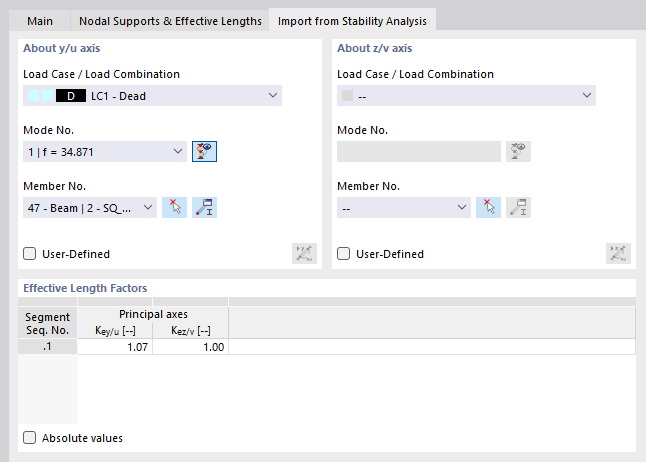
About Axis y/u / About Axis z/v
Specify the load cases of the stability analysis from which the effective lengths are to be imported. You can define a mode shape of a specific load case for each principal axis.
The mode shapes are properties of a load case or a load combination. First, select in the "Load Case / Load Combination" list the load situation that is governing for the buckling mode. The list only contains those load cases and load combinations with a specified stability analysis.
In the next step, define the governing "Mode No." The list of mode shapes is available for all calculated load cases and load combinations.
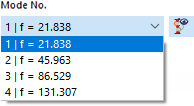
Click the
 button to display the mode shapes in the graphic window of the main program.
Finally, select the "Member No." in the list. You can also use the
 button to define the member graphically in the work window.
Effective Length Factors
The table shows the effective length factors that were imported from the stability analysis for both principal axes. If you want to adjust the value manually, activate the "User-Defined" check box in the "About Axis" section. Thus, the text box becomes accessible.
The effective length factors displayed here are transferred to the Nodal Supports & Effective Lengths tab. They can no longer be edited there.
The "Absolute Values" option allows you to transfer the effective lengths Lcr,y/v and Lcr,z/v of the members from the stability analysis results. You can use this option, for example, if you want to apply the effective length for a member set based on a member within it.
Nodal Supports and Effective Lengths – Fire Resistance Design
This tab is displayed if you have selected the Different Effective Lengths for Fire Resistance Design option in the “Main” tab.
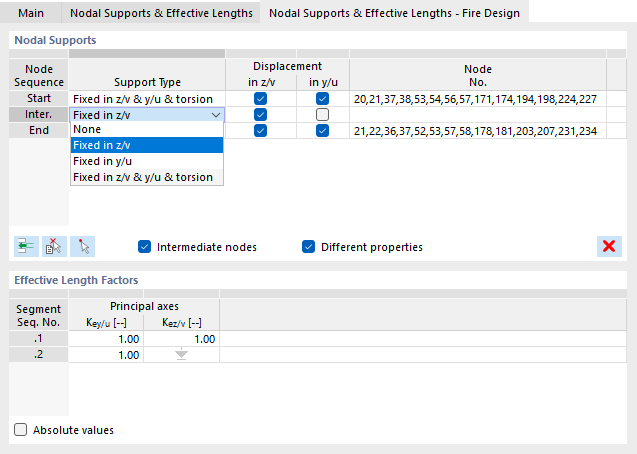
Here you can define specific equivalent member lengths for the fire resistance design. The input is identical to that for the cold-state design (see the section Nodal Supports and Effective Lengths).