


A CFD wind simulation has slightly different demands on the model of a structure than does FEM structural analysis. The wind simulation tools in RFEM 6 allow you to create an appropriate model for wind simulation with low effort and a high level of control. They enable you to strike an efficient compromise between accuracy and calculation costs.
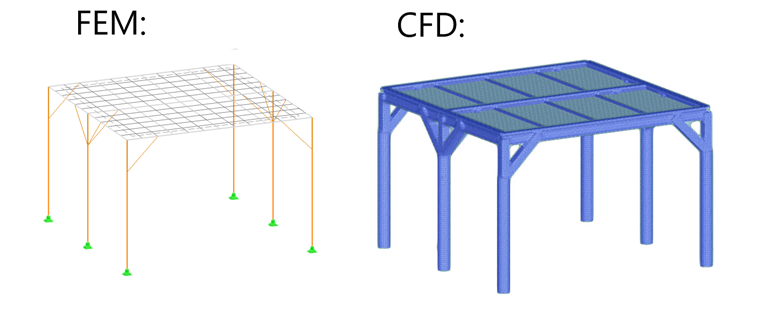
A model for structural FEM analysis is created in order to satisfy the demands of the FEM. Members are represented by 1D elements, surfaces by 2D FE mesh at mid-surface. Member sections or surface thicknesses are expressed only through stiffness properties, not in their topology.
On the other hand, the model for CFD wind simulation works by creating a partial border for the flow domain; therefore, the outer shape of the model is important. It should not be too detailed, because the flow calculation is performed in the 3D domain and any details increase the computational time considerably.
Default global settings in the "Mesh settings - Wind simulation" tab enable you to perform the CFD analysis directly, with no need for editing. However, any parameter of the settings can be modified using "Types for wind simulation". Settings for individual objects can be created using the "Specific wind simulation settings" option.