


You can export the results from RWIND calculation in the following ways.
Export All Data
The export of all result data is available from the Main Menu - Results.
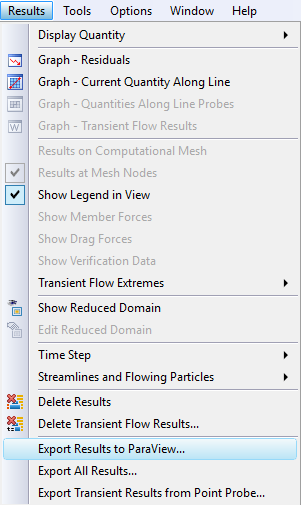
The first option, "Export Results to ParaView...", creates three PVD files (with results in the flow field, on the computational surface mesh, and on the original surface mesh), which can be opened in the ParaView postprocessing program.
For transient calculation, all saved time step results are exported to three folders, but only when "Export all time steps" in "Simulation parameters - Transient flow - Other options" is checked.
The second option, "Export All Results...", exports all the above-mentioned results to VTP and VTU files (which can be opened in ParaView) and the model and zone results to an XML file.
The third option, "Export Transient Results from Point Probe", exports the coordinates and results of a selected point probe to an XML file.
Export Data from Graphs
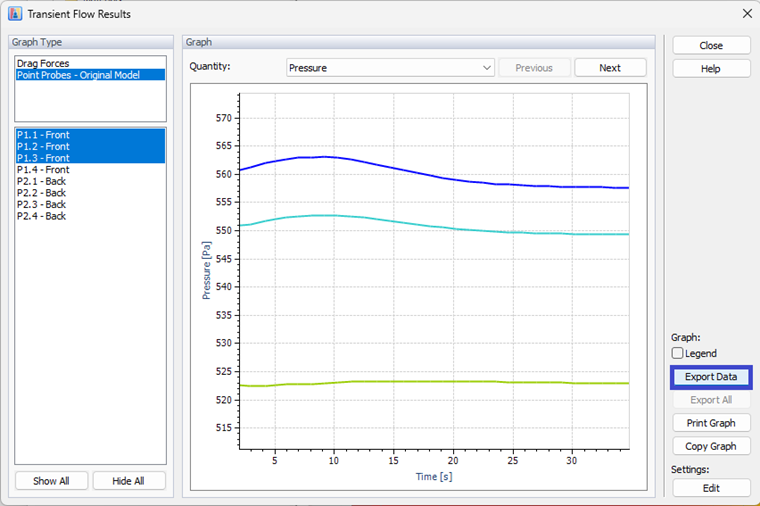
The results displayed in graphs (convergence graph with residuals, graph along a line probe, transient flow results in a point probe) can be exported directly from the graph to a TXT file.
Export Geometry
The geometry of a model can be exported either inside the ParaView data, or by right-clicking on the required model. Select "Export selected models" from the pop-up menu, and an STL file with the model geometry is created.