


The result tables in the Design Ratios on Surfaces category contain the results data for the design checks performed with the respective design ratios.
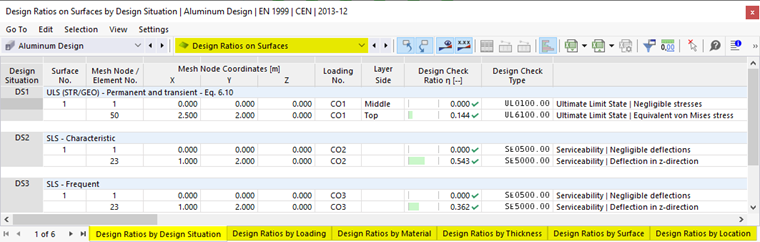
The surface results are sorted in the tabs according to the following criteria:
- Loads (design situations, load combinations)
- Surface properties (materials, thicknesses)
- Objects (surfaces, FE mesh points)
Surface No.
For each design criterion, the number of the surface with the greatest design ratio is shown.
Mesh Node / Element No.
The column shows the number of the FE mesh node for which the program has determined the maximum design ratio.
Mesh Node Coordinates
The global coordinates X, Y, and Z of the FE mesh nodes are shown in three columns.
Design Situation
This column shows the numbers of the design situations with the individual ratios available.
Load
This column shows the numbers of the load or result combinations that are governing for the respective design checks.
Layer Side
The equivalent stresses are examined for the following locations of the surface cross-section:
- Top
- Middle
- Bottom
You can show or hide the surface axes by selecting ‘’‘Local Axis Systems of Surfaces on/off’‘’ in the surface shortcut menu. Another way is to use the ‘'Navigator – Display’' (Model → Basic Objects → Surfaces → Surface Axis Systems x, y, z).
Design Criterion
This column shows the design conditions according to a standard. The design ratio is expressed by the length of the colored bar.
Design Check Type
Each design check is identified by a number. For example, ultimate limit state design checks according to Eurocode are identified by “UL”, while serviceability limit state design checks are identified by “SE”. The type of design check is explained in the Description column.
Design Check Formula
You can activate this column in the Result Table Manager. It specifies the equations of the standard according to which the design checks are performed.
Description
Each design is explained by a short description with reference to the section in the standard.
You can display the design check details for a specific design ratio by clicking the
 button or double-clicking the line.
Filter Results
The chapter Design Ratios on Members describes how you can filter the results by limit state and design ratio.