


The ultimate configuration is divided into several tabs, which clearly structure the specifications for the individual design checks.
Members | Main
In the Members | Main tab of the ‘‘Ultimate Configuration’’ dialog box, you can define the basic settings for the design of members and member sets.
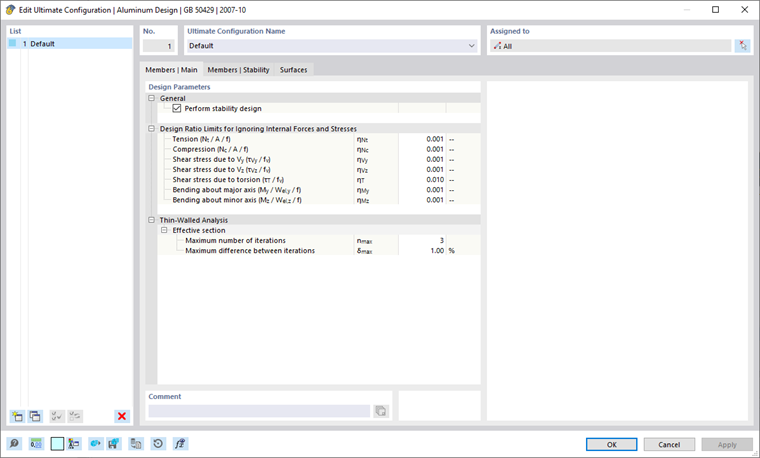
General
The “Perform stability design” check box controls whether stability analyses, such as against flexural buckling or lateral-torsional buckling, are performed in addition to cross-section checks. You should deactivate the check box if you do not want to perform stability design.
If the stability analysis is activated, it is necessary to define and assign effective lengths to the respective members or member sets. If this is not the case, no stability analysis is possible. After the calculation, a corresponding message is displayed in the Errors & Warnings result table. Cable members and tension members are excluded from this, as they can only absorb tensile forces and do not require stability analysis.
Design Ratio Limits for Ignoring Internal Forces and Stresses
The design standards, which are mostly based on manual calculations, contain design check formulas or interaction conditions that are often only designed for certain combinations of internal forces. However, when calculating the structural design on a 3D model, the values for internal forces are usually very small. Although they are insignificant from an engineering point of view in terms of load-bearing capacity, strict adherence to the design standard may prevent certain design checks or force the use of less favorable interaction formulas. The “Design ratio limits for ignoring internal forces and stresses” therefore provide a simple and transparent way of neglecting certain internal forces during the design and avoiding the above-mentioned problems.
The limit value η describes the ratio of the effective shear force to the cross-section resistance, which is determined in a simplified manner using the cross-section properties. These are not standard-compliant design capacities: Standard-specific regulations are therefore not taken into account; this is not the purpose of setting limit values. You should therefore only use high limit values for testing purposes.
If a shear force is below the limit value condition, the design is performed without a warning that the shear force is neglected. However, in the design check details, you can use the “Negligible” note for the design internal forces to check which internal forces were neglected as a result of the limit values and were not taken into account in the design. If all internal forces are negligible at a point, only the check of the negligible internal forces is specified as design.
Analysis of Thin-Walled Structures
Determining the effective cross-section requires an iterative approach. In the “Maximum number of iterations” text box, you can specify the maximum number of calculation runs. As soon as the “Maximum difference between iterations” between the results of two iterations is exceeded, the calculation ends.
Members | Stability
The Members | Stability tab is available if the you have selected the ‘'Perform stability design’' check box in the ‘'Members | Main’' tab. You can specify additional settings for the stability analyses here.
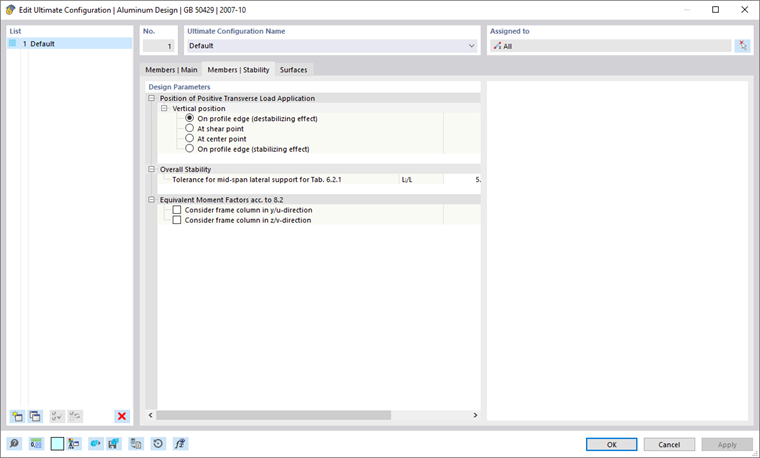
Position of Positive Transverse Load Application
If there are transverse loads (in the direction of the minor axis), it is important to define where these forces act on the cross-section. They can significantly influence the ideal elastic critical moment: A load acting on the upper flange of a bending beam in the direction of the shear center has a destabilizing effect.
If the load acts on the bottom chord, it has a stabilizing effect. Use the selection boxes to define the “Vertical position”.
Overall Stability
According to GB 50429, Section 6.2.1 (2), the overall stability of a single-span beam with a constant I-section can be neglected if the maximum ratio of length to width does not exceed the values specified in Table 6.2.1. A distinction is made between beams without lateral support and those with lateral support in the mid-span position. With the tolerance setting, you can specify the value up to which a lateral support is considered to be in the mid-span position.
Equivalent Moment Factors According to 8.2
Use the check box to specify whether the member or member set should be considered as a movable or immovable frame for the calculation of the equivalent moment factor according to GB 50429, Section 8.2.
Surfaces
In the “Surfaces” tab of the “Ultimate Configuration” dialog box, you can configure basic settings for the design of surfaces.
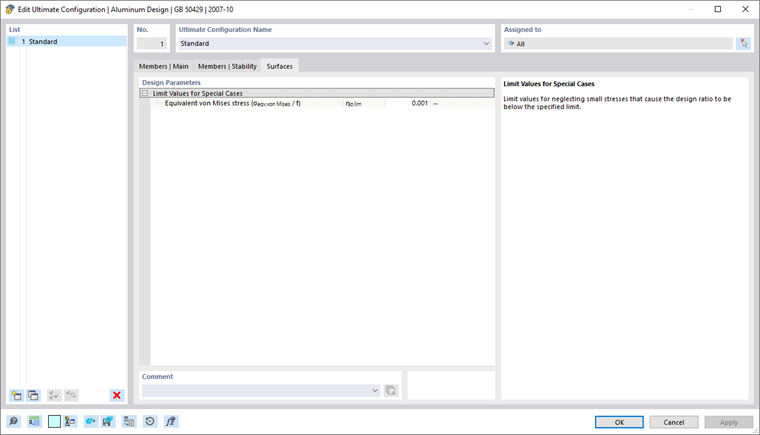
Design Ratio Limits for Ignoring Internal Forces and Stresses
This category manages a limit value that applies to very small stresses. If the stress is below the defined ratio η, it is not taken into account in the design. The background for this option is described in closer detail in the chapter Members | Main.