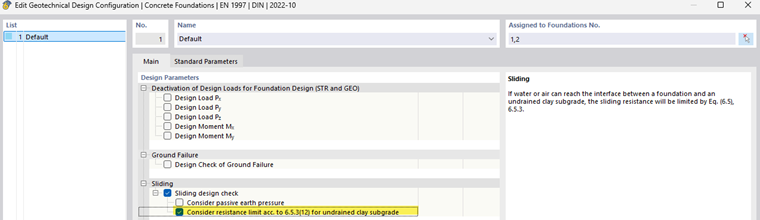
The sliding design check is activated by default in the geotechnical design configuration. Theoretical background on the sliding design check can be found in the chapter Theoretical Background.
Sliding resistance
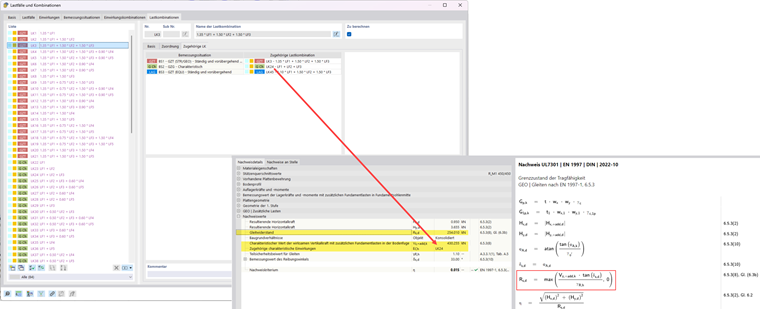
If you want to perform the sliding design check, it is necessary to assign a corresponding characteristic load combination to each ULS load combination. You can do this in the Load Cases and Combinations tab. This assignment is necessary to calculate the shear resistance correctly. With a partial safety factor of 1, the characteristic loads of the SLS combinations are considered equivalent to the design loads (V'k = V'd). Without this assignment, the shear resistance cannot be determined correctly.

Passive earth pressure
For the design of concrete foundations, it is preset that the passive earth pressure is not considered in the sliding design. If you want to consider the passive earth pressure, activate the Consider passive earth pressure option in the configuration of the geotechnical analysis.
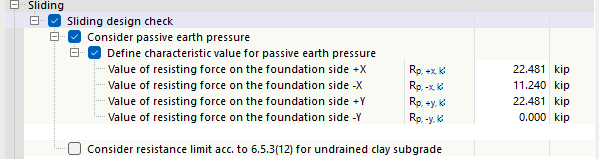
After activating the passive earth pressure, you can define the parameters of the resisting forces on the individual foundation sides.
Resistance limit for undrained clay soil
If the sliding resistance needs to be reduced according to 6.5.3(12), you can activate the Consider resistance limit acc. to 6.5.3(12) for undrained clay soil option in the geotechnical design configuration.