


The settings for the design checks are managed in Design Configurations. They are based on the Standard that you have specified for the concrete foundations. As it currently stands (October 2024), the following standards are available for the design:
- Geotechnical design according to EN 1997-1 [1]
- Reinforced concrete design according to EN 1992-1-1 [2]
The settings relevant for a specific standard are described in the subchapters.
If you have specified objects to design for the "Concrete Design" add-on, there are two configurations displayed in the "Concrete Design" category in Navigator.
- Geotechnical Analysis Configurations
- Concrete Design Configurations
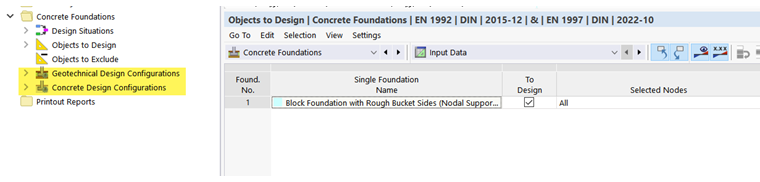
Editing Configuration
In a new model with concrete foundations activated, one configuration is preset for the geotechnical design and one for the reinforced concrete design. Both are denoted as "Default".
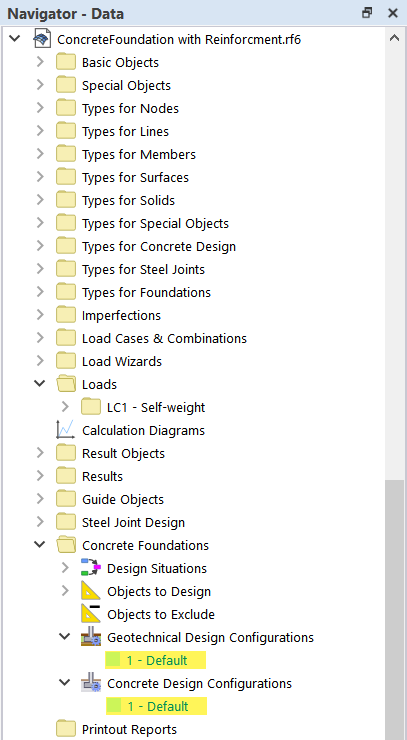
All objects of the model are assigned to these default configurations.
You can open the configurations by double-clicking the navigator entry. As an alternative, open the shortcut menu of the entry and select the Edit function. You can also select the configuration in the navigator and then press the Enter key.
Creating New Configuration
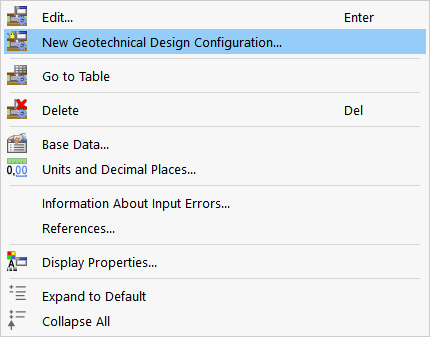
You can create additional configurations with user-defined settings. To do this, use the shortcut menu of the configuration entry in the Navigator and select the New Geotechnical Analysis Configuration or New Concrete Design Configuration option.
Renaming Configuration
If you use several configurations in the model, you should give them specific names. This makes it easier to assign the design tasks in the case of complex models. To change a name, open the Edit Configuration dialog box.. In the "Configuration Name" text box, you can adjust the description.

Assigning Objects
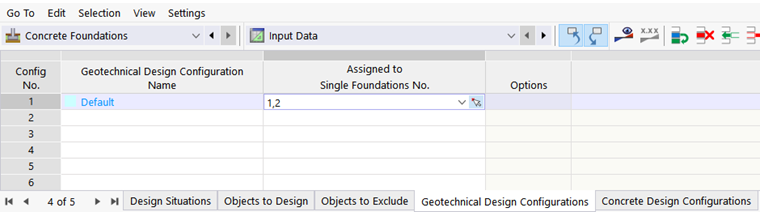
By default, all objects are assigned to the "default" configuration. This is displayed in the Edit Configuration dialog box, the "Assigned to Foundations No." section.

If you only assign certain objects to a design configuration, you can enter the object numbers in the table of configurations.
The settings relevant for a specific standard are described in the subchapters.