


This manual describes the Concrete Foundation add-on for the programs RFEM 6 and RSTAB 9. Since the input and functions for the foundation design are identical in both programs, the add-on description is given only for RFEM. The explanations also apply to the Foundation Design in RSTAB.
You can activate or deactivate the use of the design add-on in the Add-ons tab of the 'Model Base Data'.
.png?mw=760&hash=3f0357405decedd3ad7b27ec7fc84d1e4911d59e)
A green dot in front of the add-on description indicates that you have a license. An orange or blue dot indicates that you can only use the add-on as a demo or trial version, respectively, with limited functionality.
In the Standards I tab of the base data, you can select the standards for the 'Concrete Design' and 'Geotechnical Analysis' categories that you want to use for the concrete foundations (see also the Standards I chapter in the RFEM manual). The input dialog boxes for the concrete foundations are automatically adjusted to these standards.
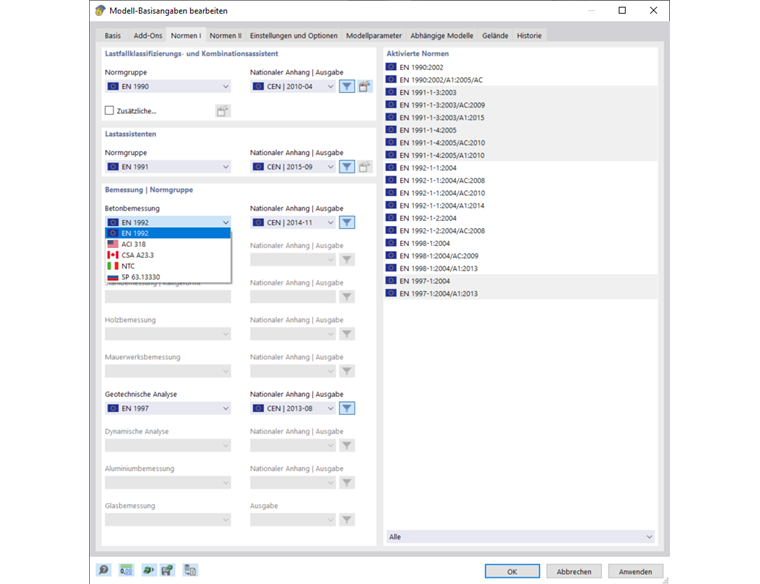
You can find the currently available design standards and a summary of the scope of functions in the product description for the Foundation Design.
Once you have activated the add-on and specified the standards, the user interface is enhanced by new entries in the navigator, tables, and dialog boxes. Thus, the parameters for the concrete foundations are fully integrated into the user interface of the RFEM or RSTAB programs.