


The results tables in the Stresses in Line Welds category contain the stresses determined for the line welds with the respective design ratios.
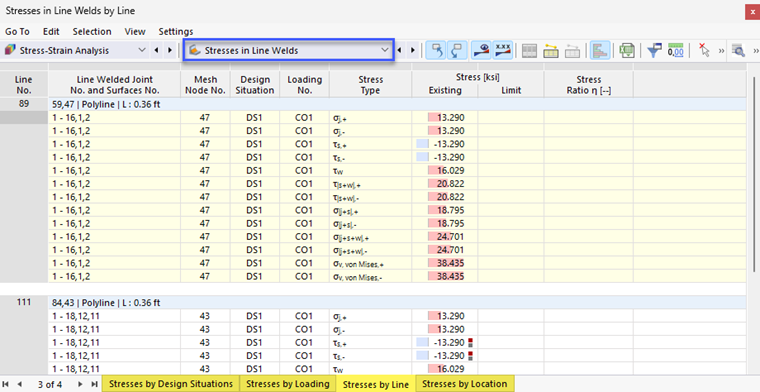
The weld stresses are sorted in the tabs according to the following criteria:
- Loads (design situations, load combinations)
- Objects (line welds)
- Design location (line location)
Line Welded Joint No. and Surface No.
For each stress type, the number of the line welded joint with the highest value is specified.
Mesh Node No.
The column shows the number of the FE mesh node for which the program has determined the maximum design ratio.
Mesh Node Coordinates
The global coordinates X, Y, and Z of the FE mesh nodes are shown in three columns.
Design Situation
This column specifies the number of the design situation for which the individual stresses are available.
Load
The numbers of the load or result combinations that are governing for the respective stress are specified.
Stress Type
This column lists the stress types that you have defined and assigned in the Line Welded Joint Configurations.
Stress Existing / Limit
The existing stress is specified for each stress type.
The “Limit”’ column is usually empty, because the ‘“None”’ limit stress type is preset in the Line Welded Joint Configuration dialog box. This allows you to the weld stresses independent of standards. However, if you have defined user-defined limit stresses, these are specified here.
Stress Ratio η
If you have specified user-defined limit stresses in the Line Welded Joint Configuration dialog box, the stress ratios (utilizations) related to the limit value are specified. The utilization degree is expressed by the length of the colored bar.