


The Sections table and the “Stress-Strain Analysis” navigator category list all cross-sections available in the model with the associated materials. The information on the cross-section types is for information purposes only.

Removing Cross-Sections from Analysis
For all valid cross-sections, you can exclude all members with this cross-section assigned from the stress-strain analysis by deactivating the “To Analyze” check box. Thus, the members are sorted in the tables Objects to Analyze – Stresses and Objects to Analyze – Stress Ranges in the "Not Valid / Deactivated" column and removed from the analysis.
Use Other Cross-Section for Analysis
If you want to use a different cross-section for the stress analysis than for the RFEM calculation, you can specify an alternative in the "Use Other Cross-Section for Analysis" column. To do this, use the
 , button to select another cross-section from the library.

To change the cross-section in general, that is, also for the model, double-click in the table row or click the
 button in the table toolbar to open the editing dialog box for the cross-section. You can assign a different cross-section from the library there.
Optimizing Cross-Section
All standardized and parameterized cross-sections can be optimized within the current series. You can access the optimization using the list in the “Use Other Section for Analysis” column.
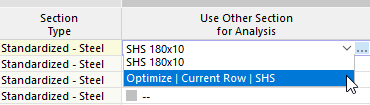
During the optimization, the smallest possible cross-section in the series is determined, the design ratio of which is lower than specified in the Global Settings . The same conditions apply for this “simplified cross-section optimization” as for the use of an alternative cross-section described above: During optimization, the design checks are carried out using the internal forces of the model. The optimum variant is then entered in the table.
Once another cross-section has been defined, further options are available in the cell shortcut menu (accessible by right-clicking):
- Use Optimized Section in Model
- Use All Optimized Cross-Sections in Model
- Use Section from Model in Addon
- Use All Sections from Model in Addon
For a comprehensive model optimization, we recommend the Optimization Cost / CO2 Emission Estimation add-on.