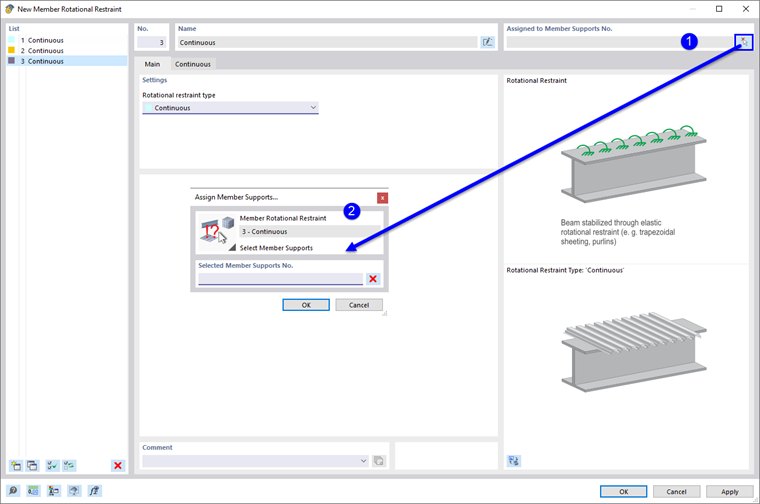
Member rotational restraints provide the option of determining the torsional restraint of a member or member set about its longitudinal axis by structural components, such as bracing or trapezoidal sheeting. A member rotational restraint is taken into account when determining the critical lateral-torsional buckling moment or the critical load factor for lateral-torsional buckling if this is determined using the internal eigenvalue solver. A constant rotational spring is applied over the entire member or member set.
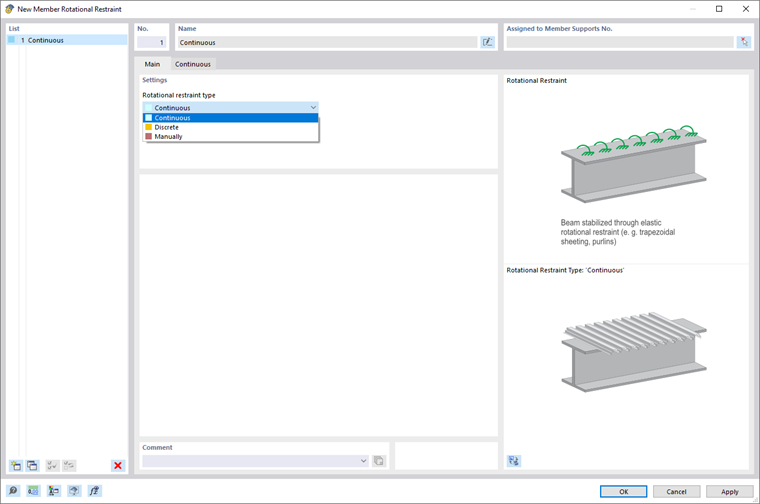
Rotational Restraint Type
Several member rotational restraint types are available for selection in the list (see the image Dialog Box “New Member Rotational Restraint”).
Continuous
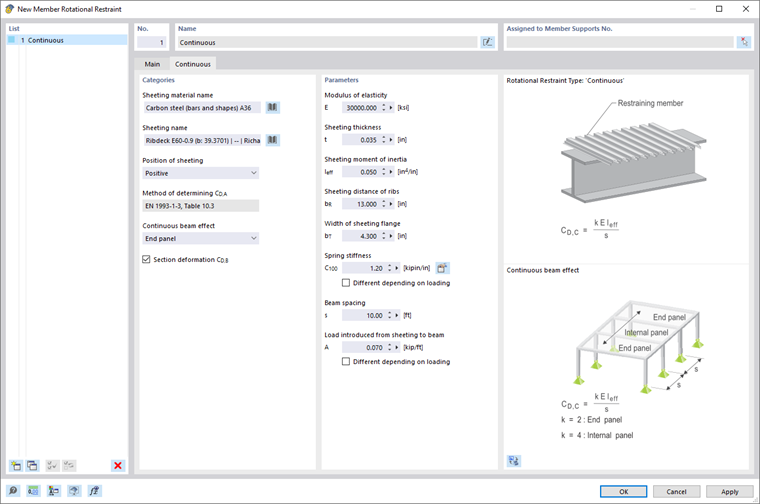
The following information is required to determine the shear panel stiffness from trapezoidal sheeting and the connection deformation:
- Sheeting material name
- Sheeting name
- Spring stiffness C100
- Load introduced from sheeting to beam
- Continuity effect
- Beam spacing
- Section deformation CD,B
You can select the material of the trapezoidal sheeting from the library by clicking the
 button (see the image Material Library). After selecting the material, the modulus of elasticity is transferred automatically. However, you can also define it manually.
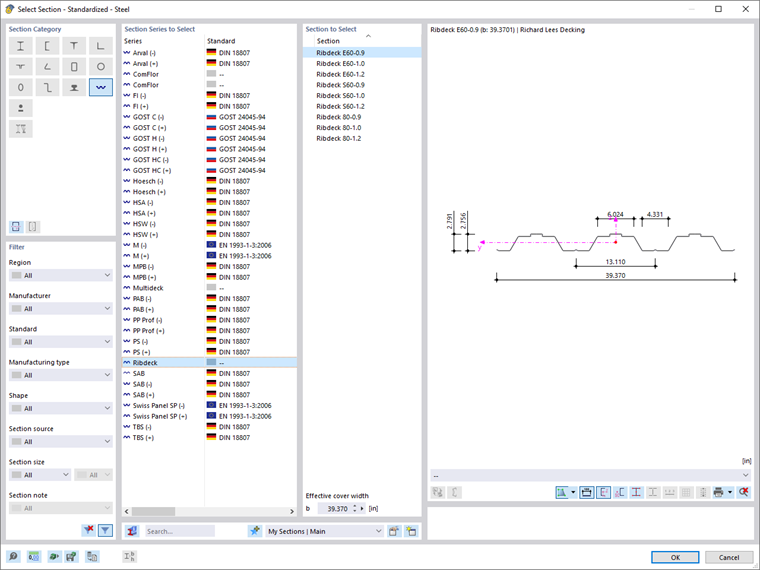
You can also select the trapezoidal sheeting from the library using the
button (see the image Cross-Section Library – Trapezoidal Sheeting). The parameters of the trapezoidal sheeting—the position, thickness, moment of inertia, rib spacing, and flange width of the sheeting— are transferred automatically, but you can change them, if necessary.
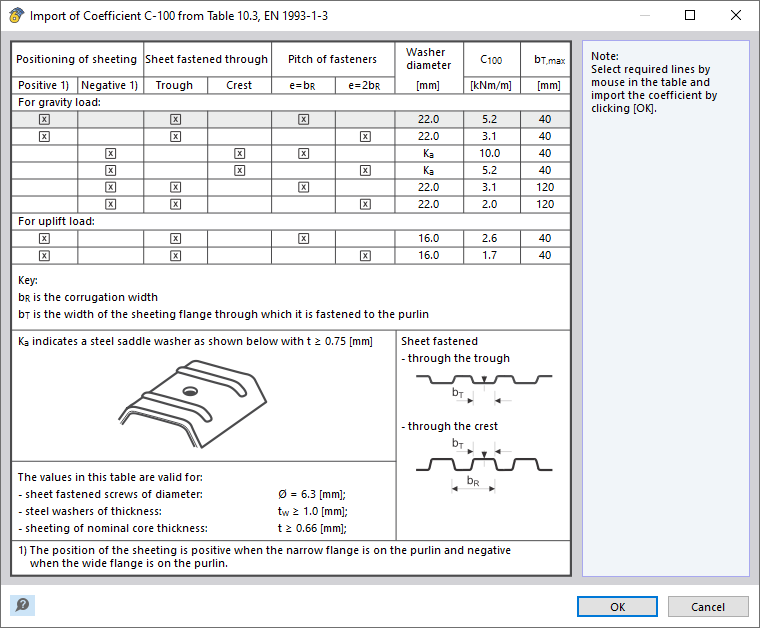
The rotational stiffness of the connection between the sheeting and the purlin CD,A is determined according to EN 1993‑1‑3. You can transfer the rotational spring stiffness C100 from Table 10.3 of EN 1993‑1‑3 by using the
 button (see the image Dialog Box "Import of Coefficient C-100 from Table 10.3, EN 1993-1-3"), or enter the value manually.
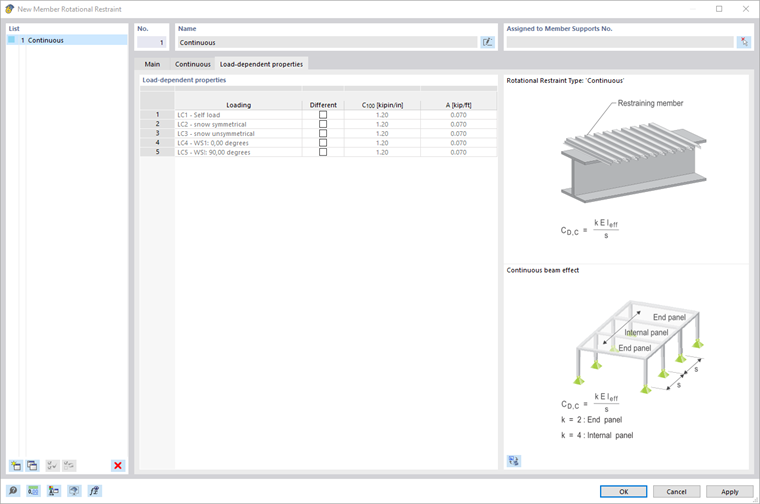
Furthermore, you have to define Load A, which acts between the sheeting and the purlin. The spring stiffness CD,A and the Load A is assigned to all load cases and combinations. If you want to consider them depending on the load case, , activate the "Differently depending on loading" check box. You can then make the assignment in the Load-Dependent Properties tab.
The continuity effect has an impact on the coefficient k of the rotational restraint from the cross-section deformation of the trapezoidal sheeting CD,C. In the list, you can select whether there is an exterior span ( button. Then click on two snap points with the corresponding distance in the work window.
Activate the "Cross-section deformation CD,B" check box to consider the rotational stiffness due to the cross-section deformation of the beam. The cross-section deformation component can only be calculated for constant I-section members, but not for tapered members or non-I-sections.
=== Discrete ===
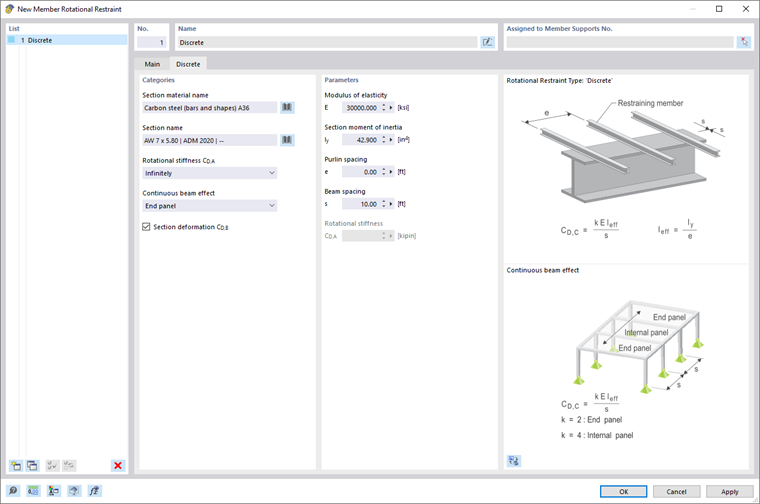
To determine the stiffness component from single supports, such as purlins, the following specifications
are required:
* Section material name
* Section name
* Rotational stiffness CD,A
* Continuity effect
* Section deformation CD,B
* Purlin spacing
* Beam spacing
You can select the material using the
button in the material library (see the image [[#/en/downloads-and-information/documents/online-manuals/rfem-6/000077#image020519 Selecting Material in Library]]). The modulus of elasticity is automatically taken from the material, but you can also adjust it manually.
You can also select the cross-section from the library by clicking the
button. The moment of inertia is transferred automatically, but can be adjusted.
You can define the rotational stiffness CD,A as an infinite value using the options in the list, or define it manually. For the manual definition, enter the value CD,A in the "Parameters" section.
The continuity effect has an impact on the coefficient k of the rotational restraint from the cross-section deformation of the trapezoidal sheeting CD,C. In the list, you can select whether there is an exterior span (k = 2) or an inner span (k = 4).
Activate the "Cross-section deformation CD,B" check box to consider the rotational stiffness due to the cross-section deformation of the beam. The cross-section deformation component can only be calculated for constant I-sections, but not for tapered members or non-I-sections.
Specify the purlin spacing and the beam spacing. You can also define the dimensions graphically by selecting the "Measure" function using the
button. Then click on two snap points with the corresponding spacing in the work window.
=== Manually ===
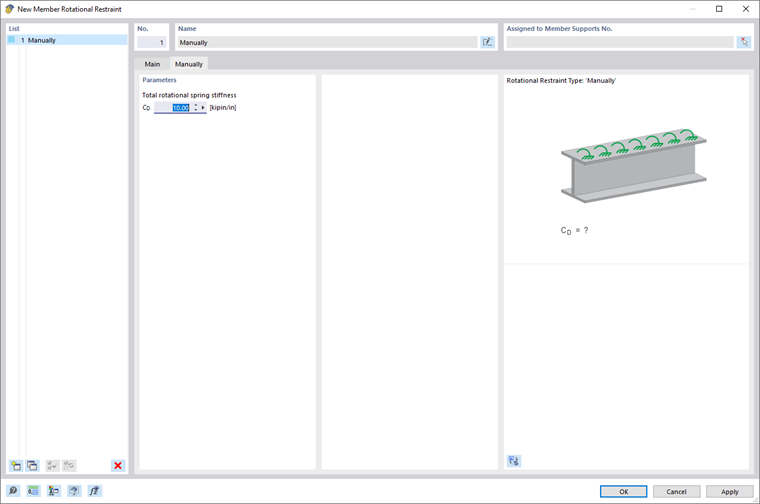
You can also manually specify the rotational spring stiffness.
Enter the value of the total rotational spring stiffness CD, which results from the components of the supporting structural component, connection deformation, and cross-section deformation.
=== Assignment via Member Set ===
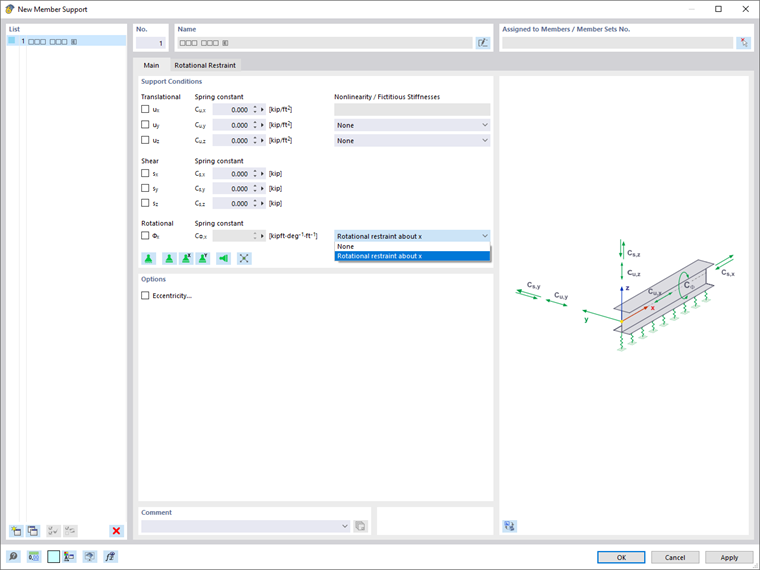
It is necessary to assign the member rotational restraints to a member or a member set using a [[#/en/downloads-and-information/documents/online-manuals/rfem-6/000053 member support]]. To do this, use the graphical selection option by clicking the
button. Then click on two snap points with the corresponding distance in the work window.
Activate the "Cross-section deformation CD,B" check box to consider the rotational stiffness due to the cross-section deformation of the beam. The cross-section deformation component can only be calculated for constant I-section members, but not for tapered members or non-I-sections.
=== Discrete ===
To determine the stiffness component from single supports, such as purlins, the following specifications
are required:
* Section material name
* Section name
* Rotational stiffness CD,A
* Continuity effect
* Section deformation CD,B
* Purlin spacing
* Beam spacing
You can select the material using the
button in the material library (see the image [[#/en/downloads-and-information/documents/online-manuals/rfem-6/000077#image020519 Selecting Material in Library]]). The modulus of elasticity is automatically taken from the material, but you can also adjust it manually.
You can also select the cross-section from the library by clicking the
button. The moment of inertia is transferred automatically, but can be adjusted.
You can define the rotational stiffness CD,A as an infinite value using the options in the list, or define it manually. For the manual definition, enter the value CD,A in the "Parameters" section.
The continuity effect has an impact on the coefficient k of the rotational restraint from the cross-section deformation of the trapezoidal sheeting CD,C. In the list, you can select whether there is an exterior span (k = 2) or an inner span (k = 4).
Activate the "Cross-section deformation CD,B" check box to consider the rotational stiffness due to the cross-section deformation of the beam. The cross-section deformation component can only be calculated for constant I-sections, but not for tapered members or non-I-sections.
Specify the purlin spacing and the beam spacing. You can also define the dimensions graphically by selecting the "Measure" function using the
button. Then click on two snap points with the corresponding spacing in the work window.
=== Manually ===
You can also manually specify the rotational spring stiffness.
Enter the value of the total rotational spring stiffness CD, which results from the components of the supporting structural component, connection deformation, and cross-section deformation.
=== Assignment via Member Set ===
It is necessary to assign the member rotational restraints to a member or a member set using a [[#/en/downloads-and-information/documents/online-manuals/rfem-6/000053 member support]]. To do this, use the graphical selection option by clicking the
 button (see the image [[#image047313 Assigning Member Support]]) or use the member support dialog box. In the "Nonlinearity / Fictitious Stiffnesses" list, select the "Rotational restraint about x" option.
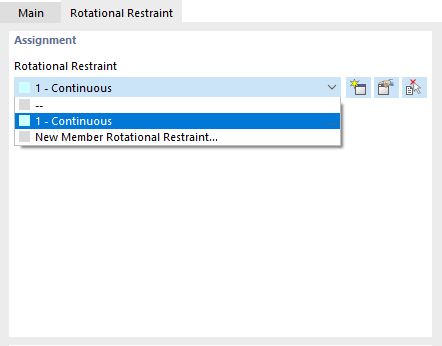
You can assign the desired member rotational restraint in the "Rotational Restraint" tab.
It is also possible to assign the member rotational restraint to a [[#/en/downloads-and-information/documents/online-manuals/rfem-6/000053 member support]] graphically in the editing dialog box of the member rotational restraint by clicking the
button (see the image [[#image047313 Assigning Member Support]]) or use the member support dialog box. In the "Nonlinearity / Fictitious Stiffnesses" list, select the "Rotational restraint about x" option.
You can assign the desired member rotational restraint in the "Rotational Restraint" tab.
It is also possible to assign the member rotational restraint to a [[#/en/downloads-and-information/documents/online-manuals/rfem-6/000053 member support]] graphically in the editing dialog box of the member rotational restraint by clicking the
 button. However, there should already be a fictitious stiffness of the “Rotational restraint about x” type for the member support.