


The Thicknesses table of the “Timber Design” category lists all the thicknesses you have created in the model.
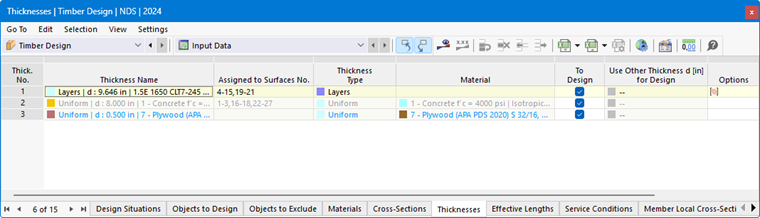
The font color of the thicknesses indicates how the thickness is used. The colors mean:
- Black: The thickness is suitable for the design and is used for the objects to design.
- Blue: The thickness is not used in the model.
- Gray: The thickness is not used for the objects to design.
Removing Thicknesses from Design
For each valid thickness, you can exclude from timber design all surfaces with this thickness assigned by deactivating the “To Design” check box. The surfaces are then sorted into the “Not Valid / Deactivated” column in the Objects to Design table and are not analyzed during the design.
Adjusting Thickness
If necessary, you can adjust the properties of a thickness in the editing dialog box. To do so, double-click the row containing the thickness or click the
 button in the table toolbar.
Use Other Thickness for Design
The functions in this table column are still under development. They are intended to allow for a different thickness for the design than for the RFEM calculation.