


The Thicknesses table in the “Steel Design” category lists all the thicknesses you have created in the model.
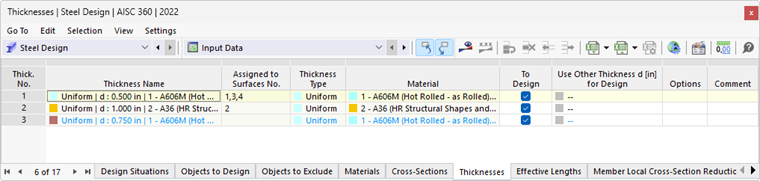
The font color of the thicknesses provides information about the use of the thickness. The colors mean:
- Black: Thickness is suitable for design and is used for the objects to be designed.
- Blue: Thickness is not used in the model.
- Gray: Thickness is not used for the objects to be designed.
Removing Thickness from Design
For each valid thickness, you can exclude all surfaces assigned to this thickness from steel design by deactivating the “To Design” check box. The surfaces are then sorted into the “Not Valid / Deactivated” column in the Objects to Design table and are not analyzed in the design.
Adjusting Thickness
If necessary, you can adjust the properties of a thickness in the editing dialog box. To do this, double-click the thickness line or click the
 button in the table toolbar.
Using Different Thickness for Design
You can use a different thickness for design than for the RFEM calculation: To do this, click in the corresponding row of the table column “Use different thickness d for design.” Then enter the value or select an option from the list.
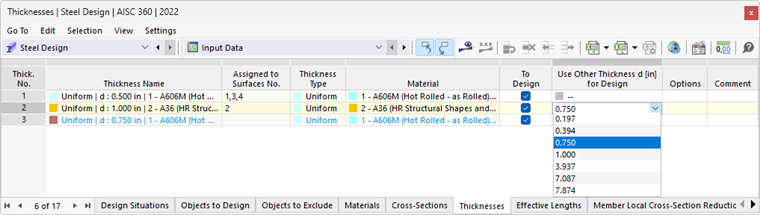
If a different thickness is specified in the column, additional options are available in the shortcut menu. You can use these to transfer the new thickness to RFEM so that it is also used in the structural analysis. It is also possible to import the original thickness back into the table.