


For component design of 1D objects, you can use both Members and Member sets. While using members is usually sufficient for cross-section checks, member sets are often required for stability checks. This explains the significance of member sets for timber design.
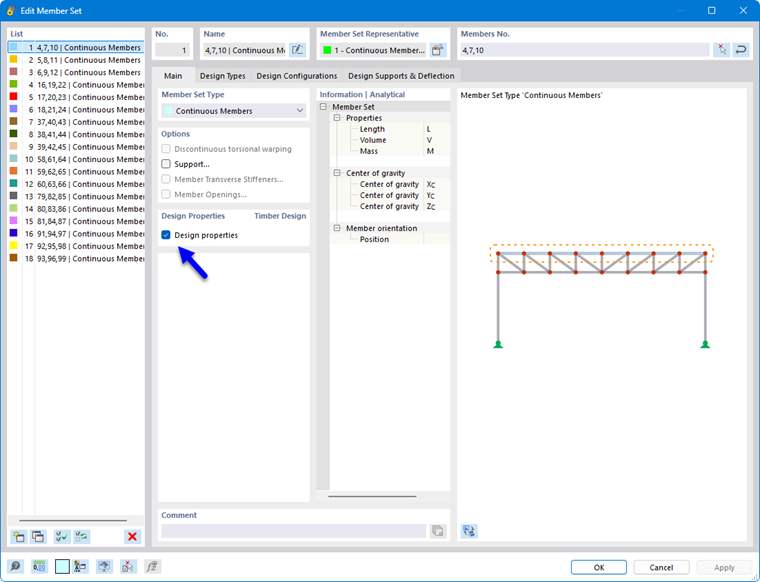
Using member sets
In particular for stability checks, it is necessary to use a member set so that the critical load for the lateral-torsional buckling check is determined correctly or the entire member length is taken into account as the buckling length: for members, only the respective member length is considered. Therefore, in general, a component can only be designed across members with member sets. The nodes between the members of a member set can be considered as intermediate nodes in the dialog of the Buckling lengths.
Straight, uniform components can alternatively be modeled as continuous members with Nodes on members. The stability check can then also be performed without member sets.
Design members or member set
Members that are part of a member set can be designed either as a member or via the member set. To avoid conflicting inputs and results, when designing as a member set, the associated members are automatically deactivated for timber design. If you define the members for design, the superordinate member set is deactivated accordingly. You can check this rule in the input table Objects to Be Designed by listing the objects in the 'Not valid / deactivated' column.
After the design, a note is displayed in the results table Not valid / deactivated (see chapter Overview) for all members that were checked via a member set and thus deactivated. Likewise, member sets are marked there with a note if they were not designed.
Assign design properties
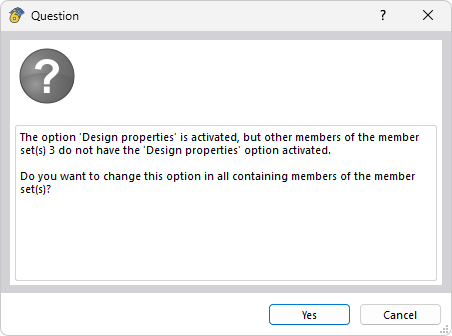
You can assign the same Design specifications to a member set as to a member. Due to the restriction that a member set and a member can never be designed at the same time, after activating the design properties of a member in the member set, a prompt appears asking whether the remaining members should also be designed.
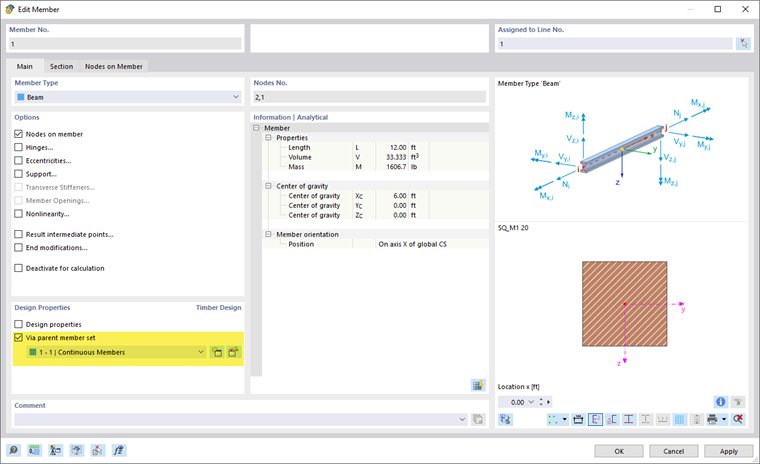
If you assign design properties to a member set, all members contained therein receive the design property Via superordinate member set and the design-relevant tabs of these members are hidden. This excludes conflicting entries.
If no member set exists yet, you can create a new member set using the button
 in the 'Design Properties' section. With the button
 you can edit the selected member set.