


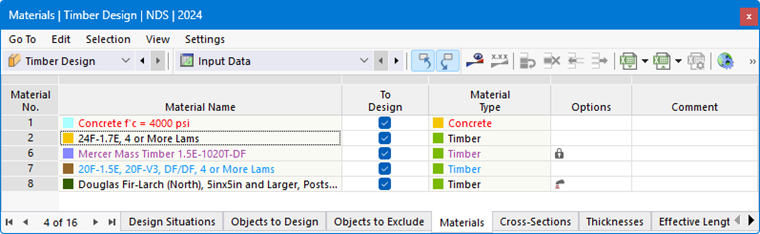
The Materials table in the "Timber Design" category lists all the materials you have created in the model.
Allowable Materials
Timber design is tied to materials of the Timber type. The text color of the materials indicates the material’s usage and allowability. The colors mean:
- Black: The material is allowable for the design and is used in the Objects to Design.
- Red: The material is not allowable for the timber design.
- Blue: The material is not used in the model.
- Gray: The material is not used in the objects to design.
- Purple: The material was generated using the Multilayer Surfaces add-on and is used for the design.
Objects assigned an invalid material are not considered in the design—even if the “To Design” option is activated for that material. They are automatically listed as “Not Valid / Deactivated” in the table Objects to Design.
Removing Material from Design
For a valid material, you can exclude from the design all objects to which the material is assigned by deactivating the “To Design” check box. These objects are then classified as “Not Valid / Deactivated” in the table Objects to Design and are not analyzed during the design process.
Adjusting Material Properties for Timber Design
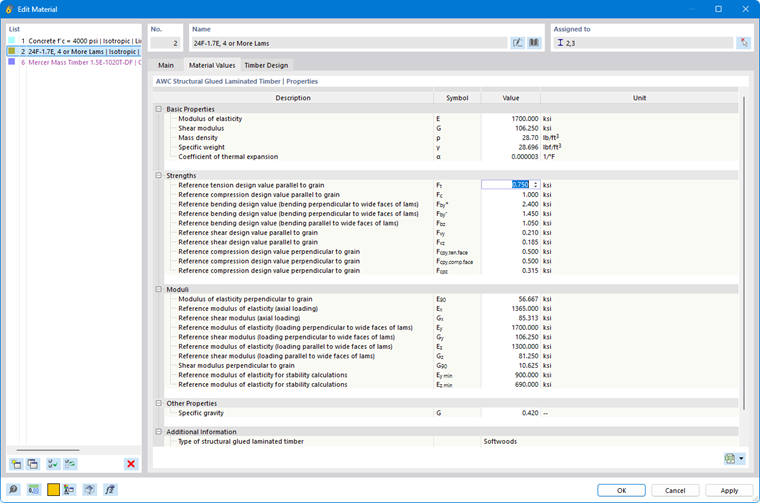
If you want to use user-defined strengths or partial safety factors for the timber design, you can adjust the material properties: Double-click the corresponding table row or use the
 button in the table toolbar to open the material editing dialog box.
On the “Main” tab, select the User-defined material option (see the chapter Materials in the RFEM manual). This allows you to edit the material properties. For example, you can thus change the material’s stiffnesses and strengths in the “Material Properties” tab.
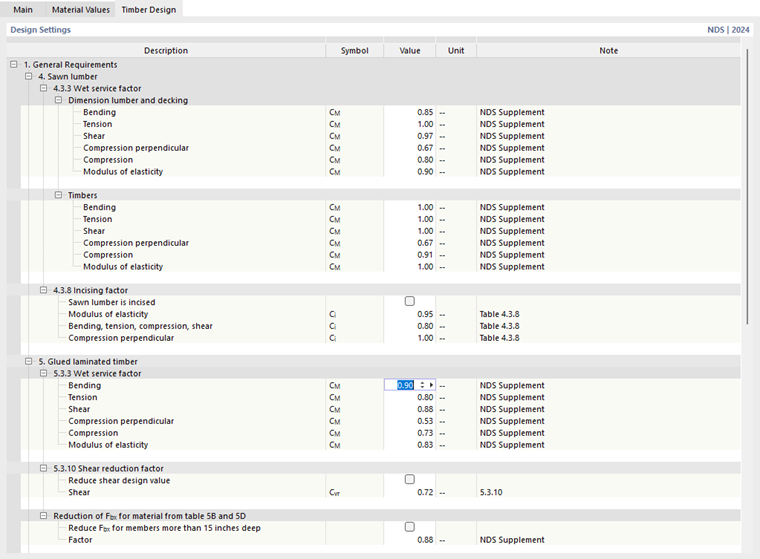
In the “Timber Design” tab, you can adjust the partial safety factors and other design-relevant material factors for design according to the selected standard, such as γM or kmod for EN 1995.
Options
The icons in the “Options” column represent different settings or modified values. They allow for a quick overview, for example, to identify materials with customized properties.