


In the Plate Reinforcement tab, you define the upper and bottom reinforcement layers for the foundation plate of a reinforced stepped foundation. The entries are divided into the categories "Top" and "Bottom".
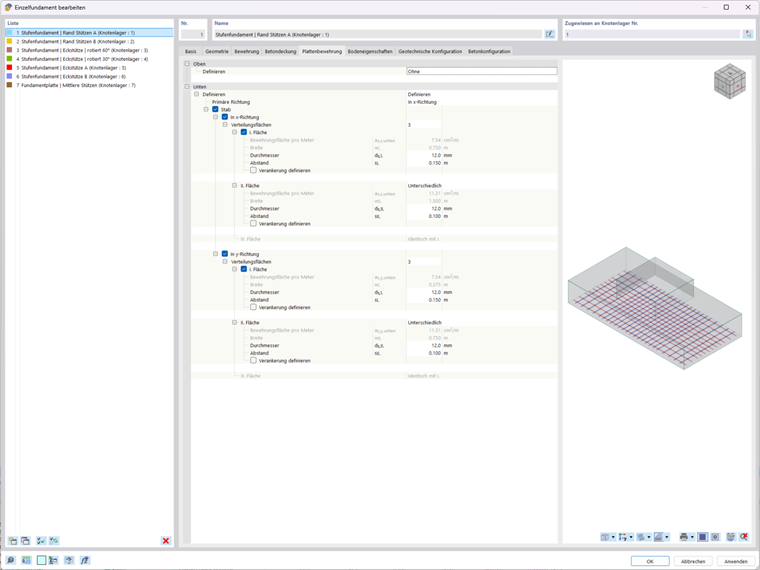
Top
For the top reinforcement, you can select from two options in the list.

Using the Define option, you can specify the reinforcement in the upper section of the foundation plate. You can then enter the data as described in the Bottom section for the bottom reinforcement.
The None option disables the top reinforcement.
Bottom
The ‘‘Bottom’’ category allows for the full definition of the bottom reinforcement layer. Using the selection box for the Primary direction, you can specify which direction represents the governing reinforcement direction (for example, main reinforcement ‘‘In x-direction’‘).
Mesh
If you check the “Mesh” check box, you can create the bottom reinforcement using a mesh reinforcement. The
 button in the “Mesh Name” input box gives you access to the library of welded wire meshes, where you can select the suitable mesh (see the chapter Meshes).
Member
Select the “Member” check box if you want to define the bottom reinforcement using a rebar diameter and a rebar spacing. This activates the settings for both directions (x and y).
In x-Direction / In y-Direction
You can define the reinforcement separately for the x-direction and the y-direction. The concept is identical for both directions.
In the “Distribution Areas” list, select the number of zones into which the foundation will be divided in the respective direction:
- 1: The rebar is distributed evenly across the foundation plate.
- 3: The members are arranged in two equal edge zones and one inner zone (each comprising one-third strips)
With three distribution areas, you can configure the zones as follows:
- Area I: Distribution zone for the foundation’s edge area
- Area II: Distribution area in the middle third of the foundation plate with the “Different” option for a specific configuration
- III. Area: Distribution zone for the other edge area with identical parameters as for Area I (not editable)
The following text boxes are available for defining reinforcement for distribution areas I and II, if applicable.
| Field | Symbol | Description |
|---|---|---|
| Reinforcement area per meter | ρs,x,bottom / ρs,y,bottom | Reinforcement area per meter calculated from diameter and spacing in [cm²/m] (output value) |
| Width | wl. | Calculated width of the distribution area in m (output value) |
| Diameter | ds,I. / ds,II. | Reinforcement bar diameter in [mm] |
| Spacing | sI. / sII. | Axis distance of the rebar members in [m] |
The “Define anchorage” check box allows you to manually enter the anchorage length for the members in the respective zone.