


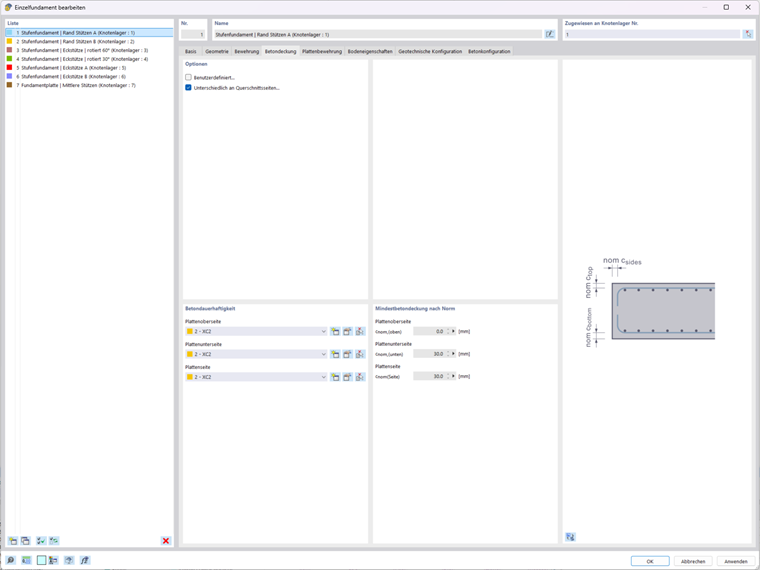
In the Concrete Cover tab, you specify the concrete cover for a reinforced stepped foundation.
Options
Use the check boxes in the Options section to control how the concrete cover is determined:
- User-defined: Check this check box to manually enter the nominal concrete cover cnom for all sides, regardless of the standard. If this check box is not checked, the program calculates the concrete cover.
- Different on cross-section sides: Select this check box if you want to define different exposure classes and minimum concrete cover thicknesses for the top or bottom side of plate and for the plate sides. This applies to both user-defined entries and automatic calculations. If this check box is not activated, the same concrete cover is applied to all sides.
Concrete Durability
In this section, you can assign an exposure class to each side of the foundation. The exposure classes are the basis for the standard-compliant determination of the minimum concrete cover.
Top side of plate: Exposure class of the top side of the foundation block
Bottom side of plate: Exposure class of the bottom side of the foundation block (contact surface with the subsoil)
Side of plate: Exposure class of the lateral surfaces of the foundation block
You can select the exposure classes from the lists or manage them using the
 buttons to the right of each entry.
Minimum Concrete Cover According to Standard
The values in this section show the standard-compliant nominally determined concrete cover cnom for each side of the foundation. The results depend on the selected exposure class and the design standard.
Top side of plate: Standard-compliant nominally determined concrete cover on the top side cnom,(top)
Bottom side of plate: Nominal concrete cover on the bottom side cnom,(bottom side)
Side of plate: Nominal concrete cover on the side surfaces cnom,(side)
The graphic on the right illustrates the positions of the three concrete cover dimensions on the foundation cross-section.