


The model is the representation of the drawn static system. It consists of various model data such as nodes, supports, and members.
Input in RFEM and RSTAB
After opening the program, a new model can be created using the button
 or the menu "File" → "New."
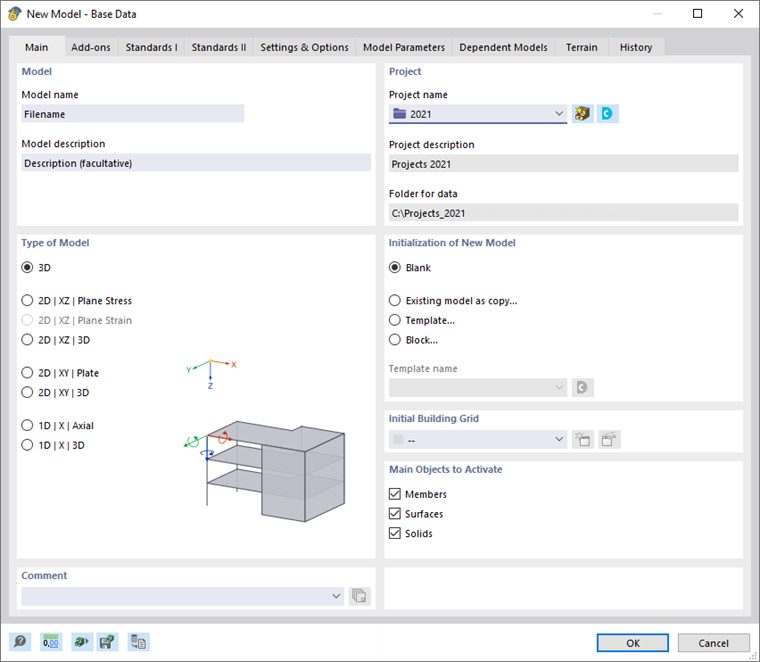
In the "New Model - Base Data" dialog, fundamental parameters besides the model name need to be specified, such as the model type. A 2D model can only be drawn in one plane and has three degrees of freedom, whereas a 3D model has six degrees of freedom, allowing the use of all three work planes XY, XZ, and YZ.
Display Types
There are various display types for the model, also known as Rendering. In the wireframe model, only the axes of members (and surfaces) are represented as lines. In the full model, however, the objects are depicted in their original form, including their cross-sections.
Model Generators
In program generations RFEM 5 and RSTAB 8, typical models or sub-models can be automatically created through parameters. These Model Generators can be accessed via the menu "Tools" → "Generate Model - Members" (in RFEM also "Surfaces").